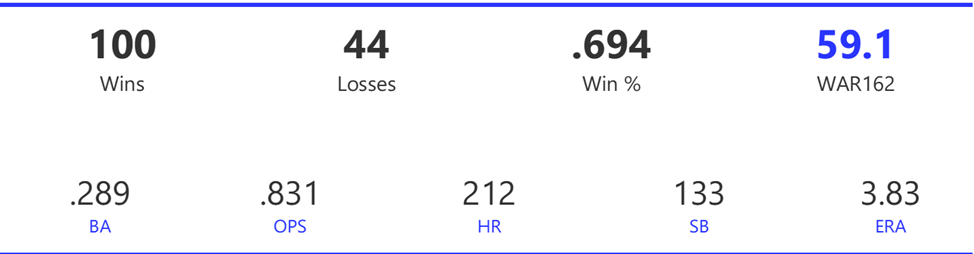
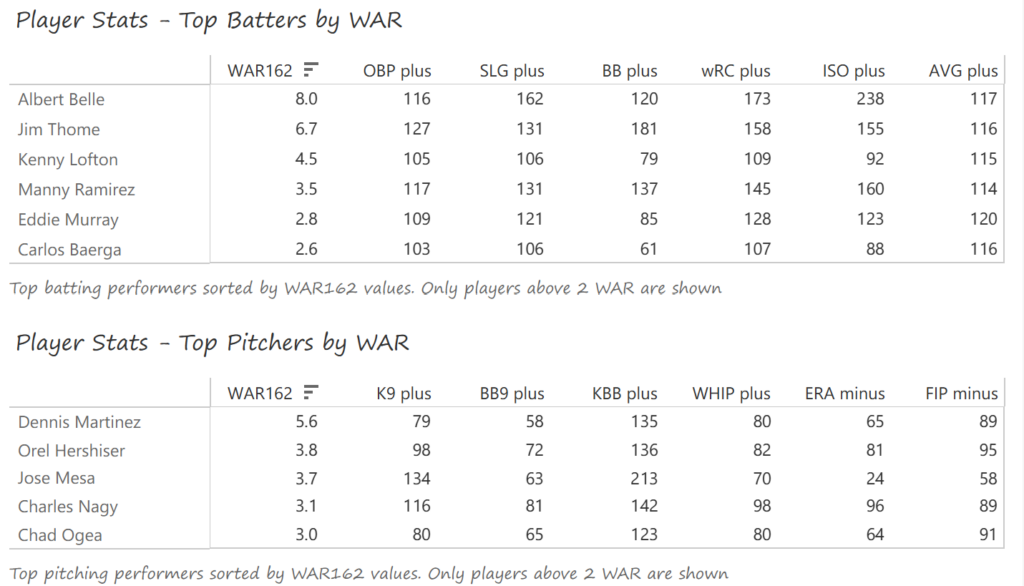
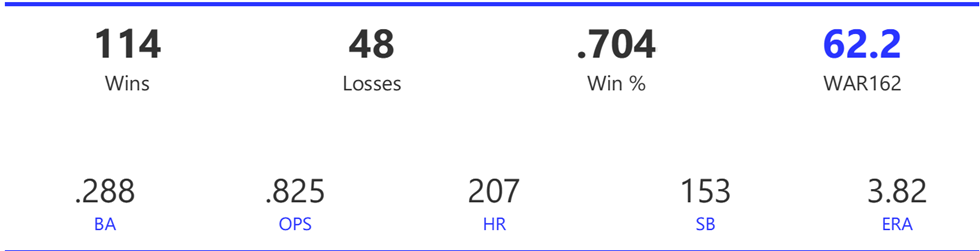
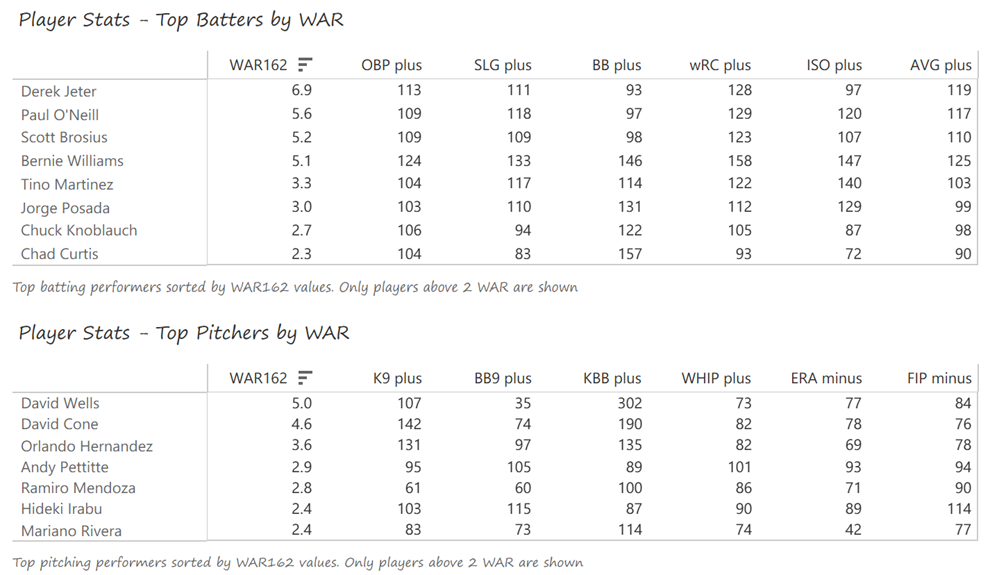
Tableau MLB Team Dashboard (1901-1909) Is Live

The first MLB Team Dashboard is available on Tableau Public – Top 20 Teams, 1901-1909. The dashboard provides the data for my Top 20 MLB Teams countdown, which starts today with teams #20 through #16 from the same decade. Here’s a look at the dashboard:

Users can interact with the MLB Team Dashboard 1901-1909 in multiple ways:

  • By inputting a number between 1 and 20, to see the corresponding ranked team
  • By using the dropdown list to update the data in the distribution chart; runs, hits, doubles, and more can be shown at game levels
  • By hovering over any display item to reveal more information about that data point

The dashboard provides a fun, easy way to discover new insights about the top teams of the decade (based on the WAR162 metric).

Future dashboards will be rolled out roughly every two weeks; by early August we’ll have every decade through the 2010s covered. Enjoy using the dashboard, and watch for regular countdown updates.

MLB Team Rankings Countdown: 1900s 20 through 16

MLB Team Rankings Countdown: 1900s 20 through 16

Welcome to the first countdown post in our series of MLB team rankings by decade. As a reminder, the teams are ranked from #20 through #1 based on aggregate WAR162. For the 1900s (1901-1909), a total of 144 teams were eligible (16 teams x 9 seasons), so the top 20 teams are a fairly exclusive group. We’ll summarize each team, including portions of their team dashboard, and explain how they attained their ranking. So, without further ado, here are the teams ranked #20 through #16.

Here’s the interactive dashboard at Tableau Public: 1900s Top 20 MLB Teams Dashboard

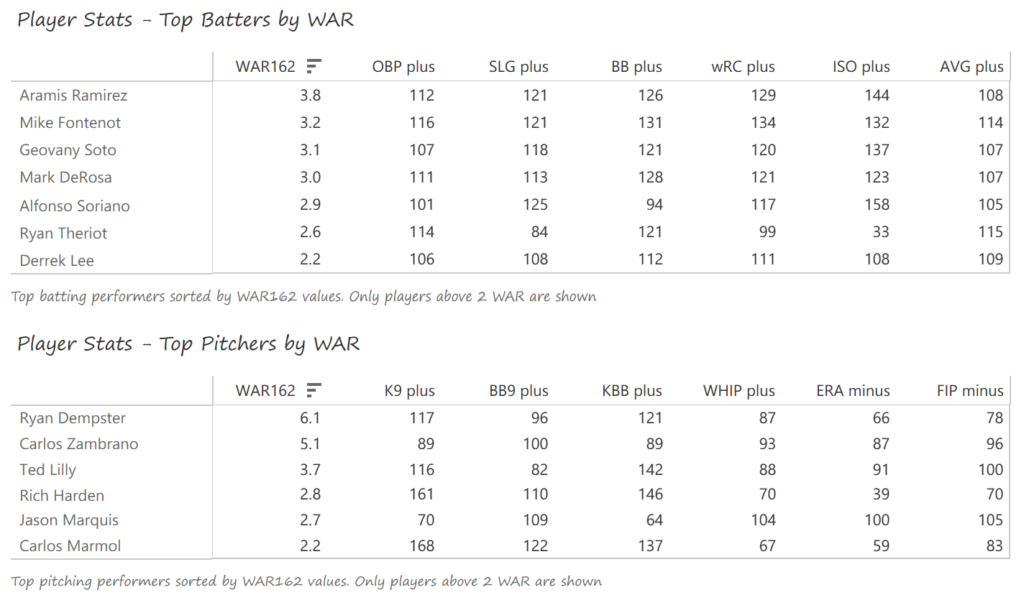
The Napoleons would eventually become the Naps, then the Indians, and most recently, the Guardians. In 1904, they were named after their star player, Napoleon Lajoie, a Hall of Fame second baseman. Here’s a glance at some of their team numbers:

With a record of 86-65, the Naps managed just a 4th place finish in the American League. The team had an unusually unlucky season – their Pythagorean expected record (based on runs scored vs. allowed) was 95-56, a whopping nine-game difference. Cleveland led the AL in batting average and OPS, and finished 2nd in ERA.

Nap Lajoie led the AL in multiple categories, with a .376 BA, .959 OPS, 102 RBI, and 49 doubles. He received strong support from Elmer Flick (.306 BA, 38 SB) and Bill Bradley (.300 BA). Bill Bernhard won 23 games, and Addie Joss led the AL with a 1.59 ERA within a balanced pitching rotation.

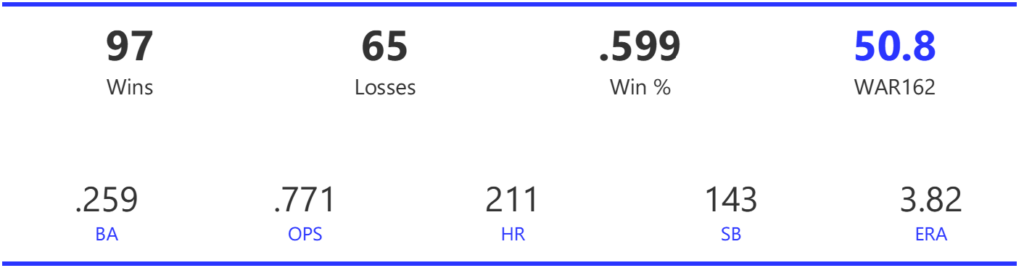
The 1903 edition of the Pirates is one of multiple seasons in the top 20 MLB Team Rankings for the 1900s decade. This version of the team finished first in the NL, but was not quite as good as their record based on runs scored and allowed.

The Pirates’ .286 average was good for 2nd in the NL, as was their .734 OPS, both just behind the Reds. They also placed 2nd in ERA while leading the NL with 16 shutouts.

Honus Wagner was the clear leader in WAR162 on the basis of his league-best .355 BA and 19 triples. His .931 OPS was also near the top of the NL. Wagner received ample support from Fred Clarke (NL-best .946 OPS, .351 BA), Claude Ritchey, Ginger Beaumont (.341 BA), and Tommy Leach. Sam Leever (25-7, NL-best 2.06 ERA) and Deacon Phillippe (25-9, 2.43 ERA, NL-best 1.03 WHIP) dominated on the mound for the NL champs.

The Americans were the predecessor to the Red Sox, finishing 2nd in the AL with a 79-57 record, 3 games worse than their predicted Pythagorean mark of 82-54. This earns them the #18 slot in our 1900s MLB Team Rankings.

The team was just slightly better than league average in most offensive categories, although they did have higher rankings in triples (2nd) and home runs (1st). Pitching carried the team, as they placed 2nd in ERA and 1st in strikeouts, largely thanks to the legendary Cy Young.

Four offensive players carried the load for the Americans, with WAR162 values > 5; no other batters topped 2 WAR for the season. Third baseman Jimmy Collins led the way in WAR (7.9) with a .332 BA, Freddy Parent batted .306 from his shortstop position, Buck Freeman batted .339 with a .920 OPS, and Chick Stahl hit for a .303 average. On the mound, it was Cy Young with some help from Ted Lewis (16 wins) and George Winter (16 wins, 2.80 ERA). Young posted a 33-10 mark with a league-best 1.62 ERA and 0.97 WHIP across 371 innings.

The White Sox claimed first place in the 1901 AL pennant race, 4 games ahead of the Americans, although their WAR totals were nearly identical.

The Chicago squad led the AL in runs scored, stolen bases, and ERA, while ranking in the middle of the pack in BA, HR, and OPS. They also drew a high number of walks; between the walks and stolen bases, the team was able to generate 6 runs per game.

The White Sox had no single offensive standout, but enjoyed productive seasons from several batters, including Billy Hoy, who drew a league-best 86 walks at age 39. Hoy also led the team with an .807 OPS figure. Fielder Jones batted .311 with 38 steals and 84 walks, Fred Hartman hit .309 with 31 steals and 13 triples, and Sam Mertes had 17 triples and 46 stolen bases. Herm McFarland contributed with 75 walks and 33 steals and a .767 OPS. Three pitchers stood out for the Chicagoans, led by Clark Griffith, who compiled a 24-7 record and 2.67 ERA. Jimmy Callahan posted a 15-8 mark, with a 2.42 ERA, and Roy Patterson won 20 games and led the team with 30 complete games and 312 innings on the mound.

The Athletics placed multiple squads in the top 20 for the 1900s decade, with the 1905 edition placing 16th. The A’s bested the White Sox by 2 games for the AL pennant, although the Chicago team had the better Pythagorean win expectation of the two teams.

In a season where pitching dominated, the Athletics’ .255 BA (2nd) and .648 OPS (1st) were at the top, as was their 256 doubles, 45 more than any other competitor. The team’s 2.19 ERA was second-best for the season, and their 895 strikeouts were far ahead of the 652 posted by the Boston Americans.

The Athletics boasted a balanced lineup, with 7 batters earning WAR162 values of 2 or better, including 3 batters who topped 5 WAR apiece. Harry Davis topped the AL with 8 homers, 47 doubles, and 83 RBI to lead the way. Danny Murphy batted .277 from his second base position, and Topsy Hartsel earned a league-best 121 walks and .409 OBP. The pitchers were led by a pair of left-handers; Rube Waddell posted a 27-10 record with an AL-best 1.48 ERA and 287 strikeouts. Eddie Plank earned 24 wins with a 2.26 ERA and 210 strikeouts of his own. Beyond the big two, Andy Coakley picked up 18 wins with a fine 1.84 ERA.

Summary

That’s it for the first entry in our MLB Team Rankings for the 1900s decade! Stay tuned for the countdown from #15 to #11, arriving in a few days. As always, thanks for reading!
The Top 20 MLB Team Dashboard – An Overview

My 2025 book, The Visual Book of WAR, focused on both players and teams with outstanding WAR162 numbers. I’m expanding on that content with MLB team dashboards focused on the top 20 teams by decade. Let’s walk through the completed dashboard format; we’ll take a section-by-section tour and provide a little background for each element in the dashboard. In the following weeks, I’ll be counting down the top 20 teams by decade, starting with the 1900s. In this post, the 1905 Chicago Cubs (ranked #13 for the 1901-1909 period) will be my example.

The MLB Team Dashboard – Team Info and Stats

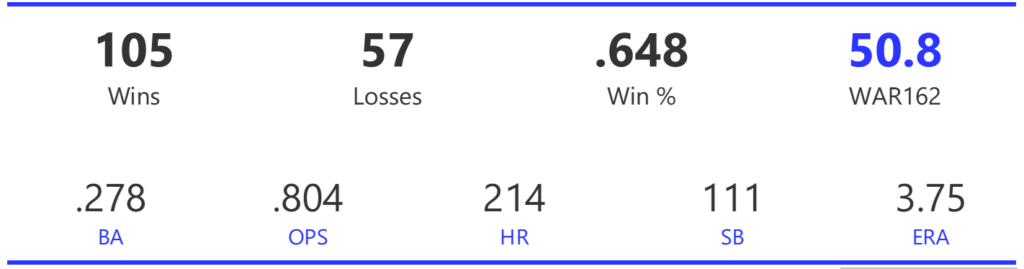
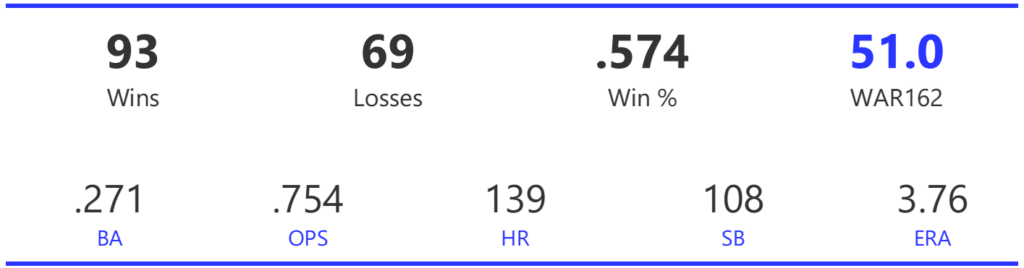
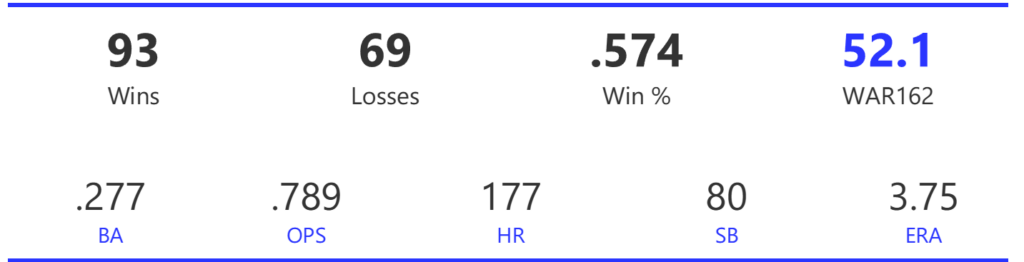
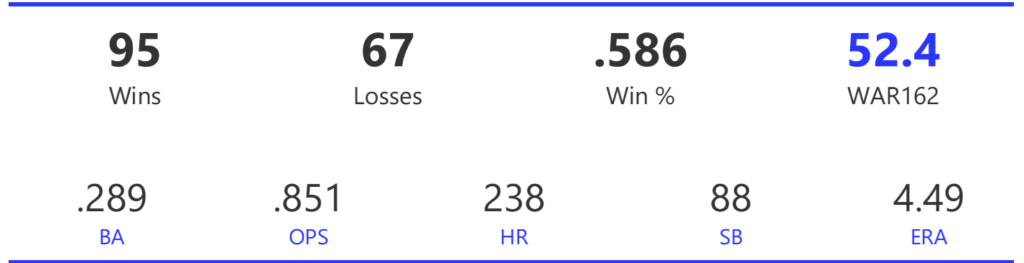
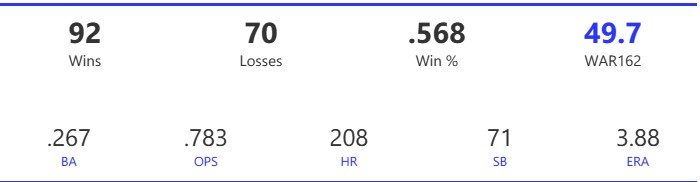
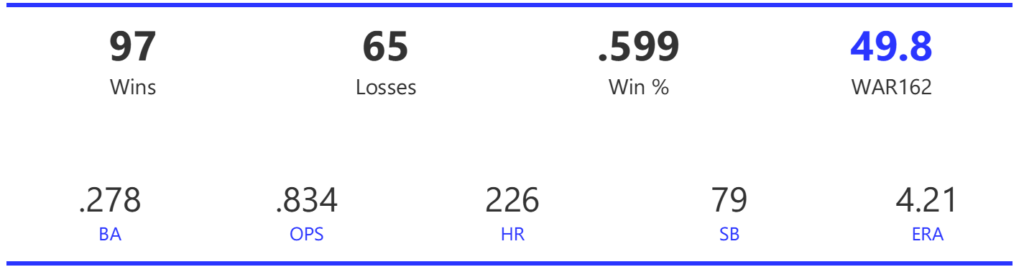
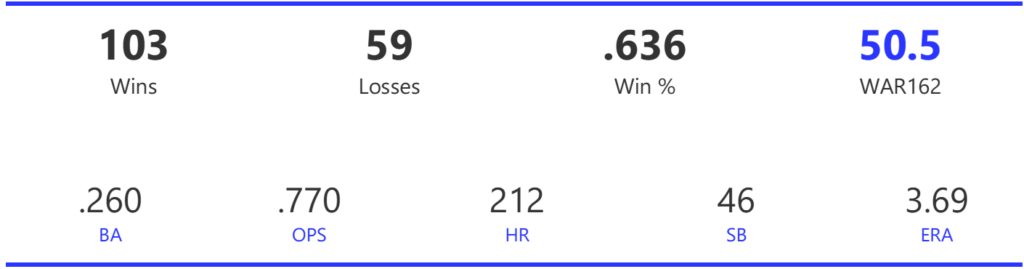
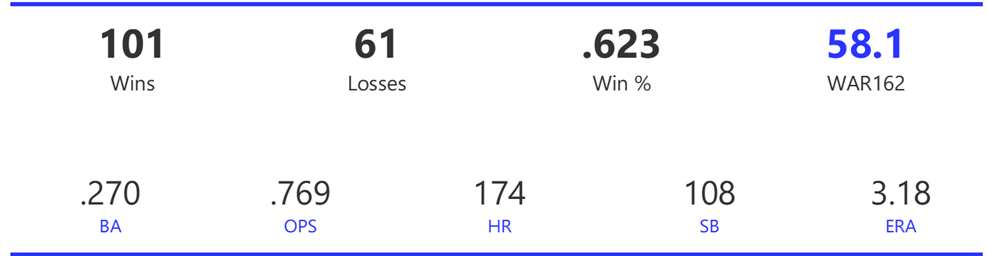
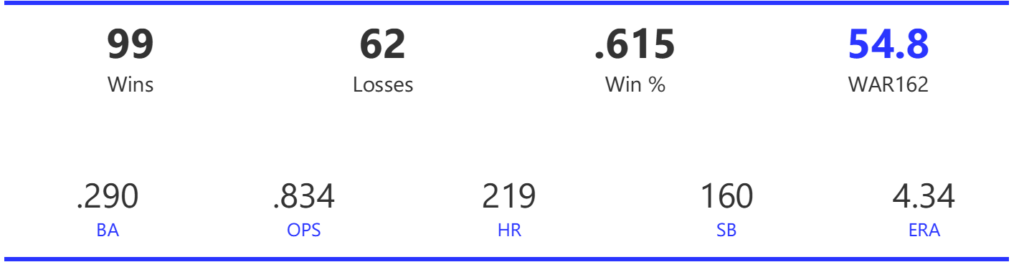
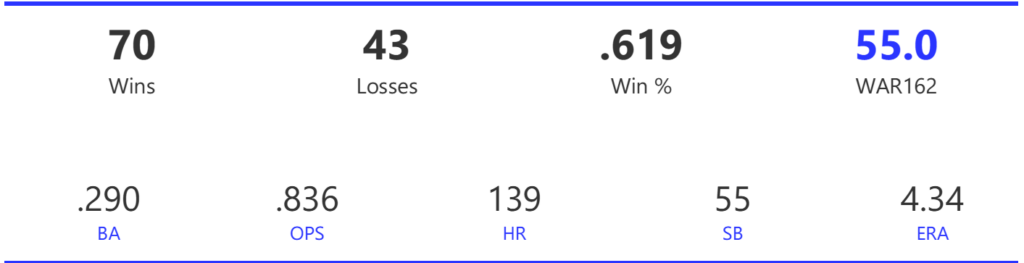
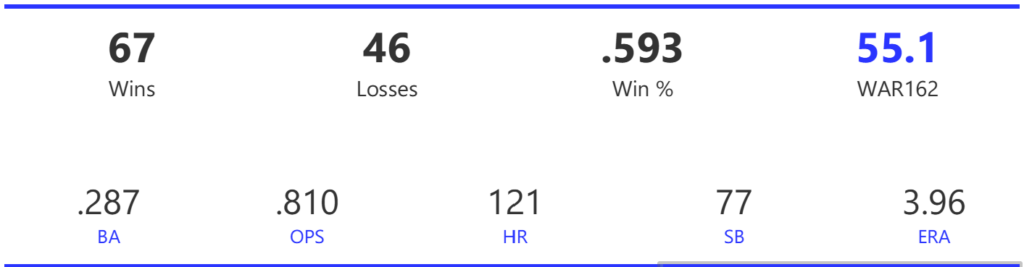
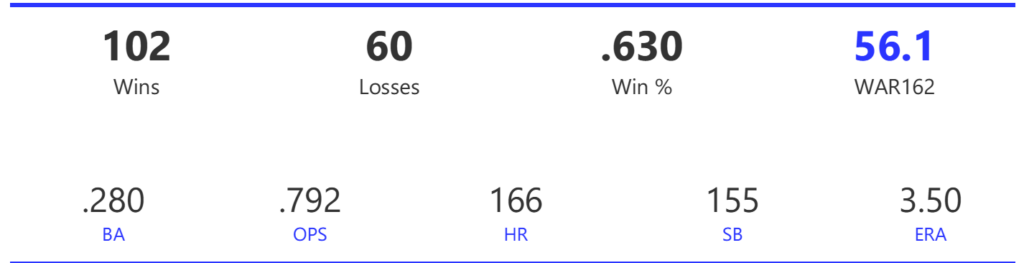
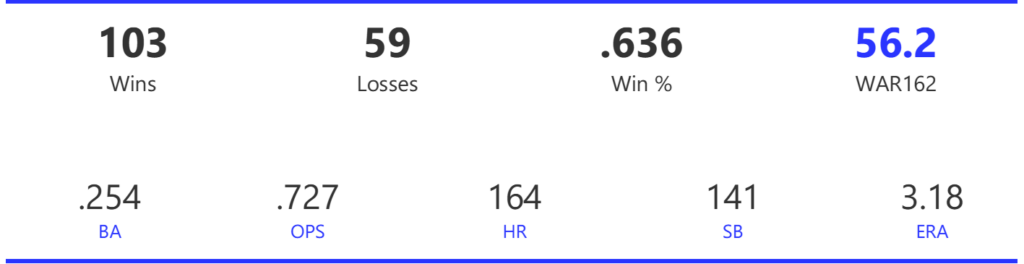
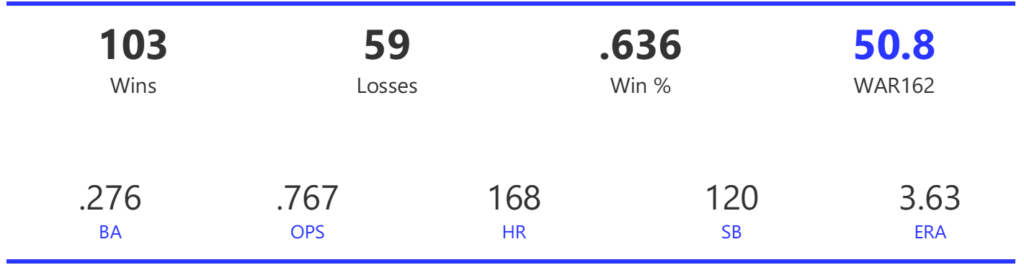
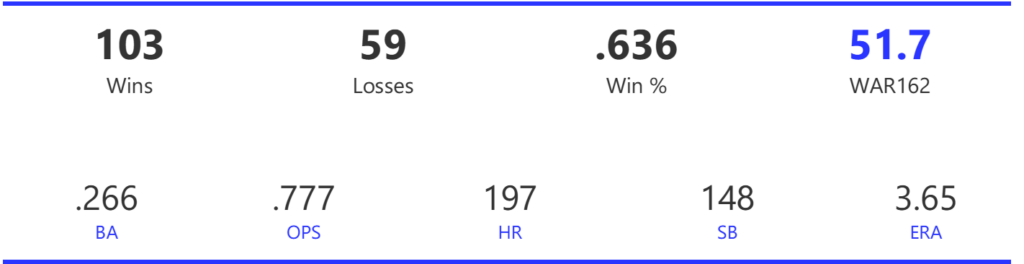
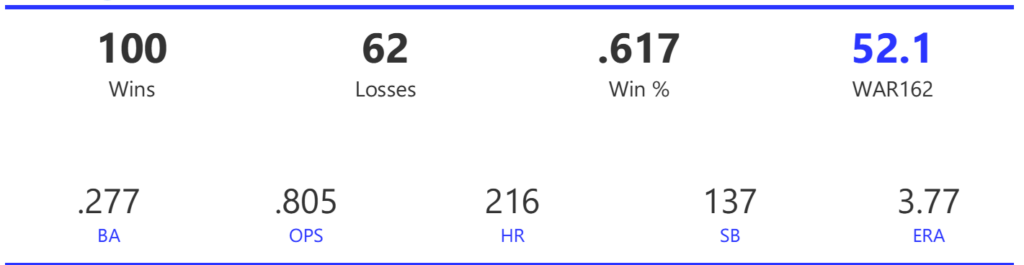
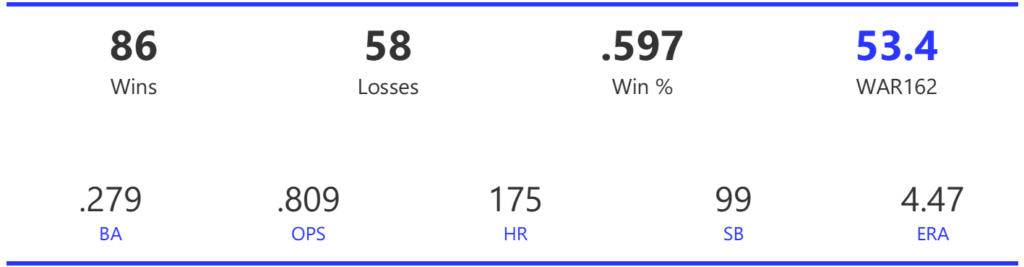
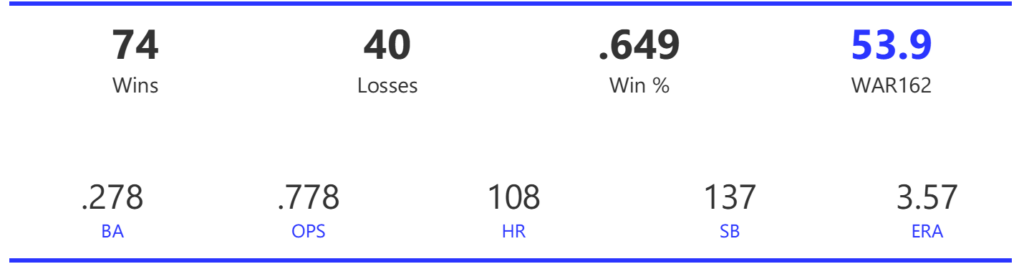
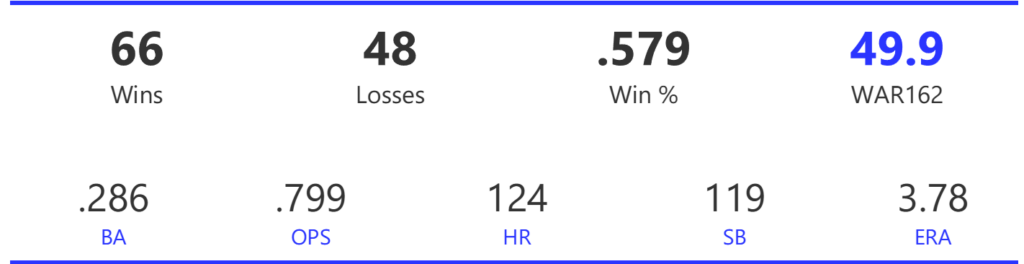
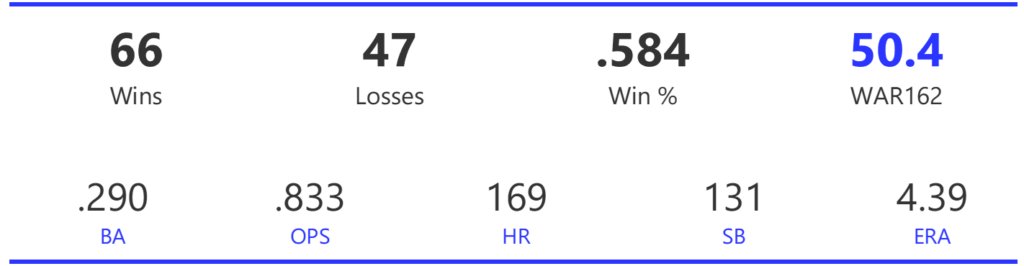
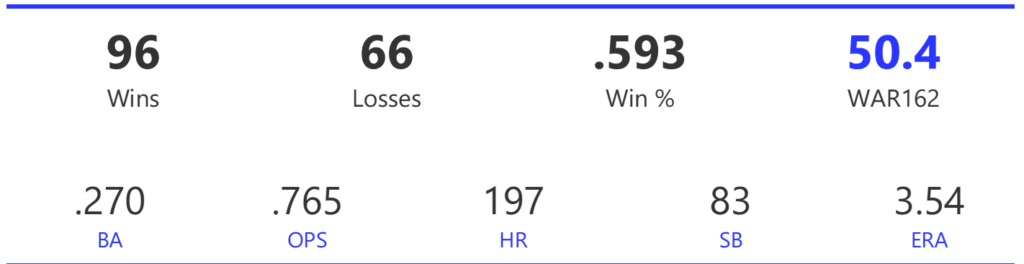
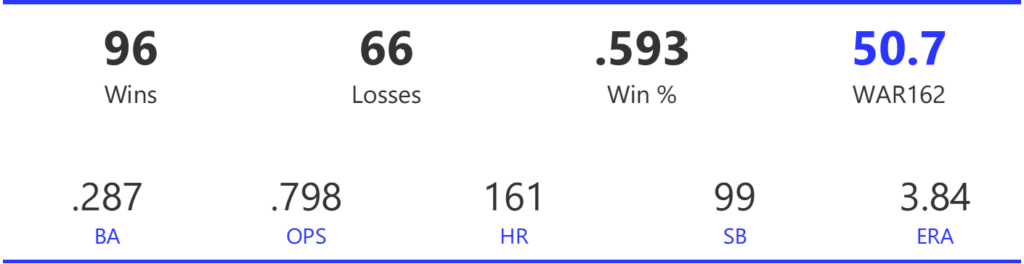
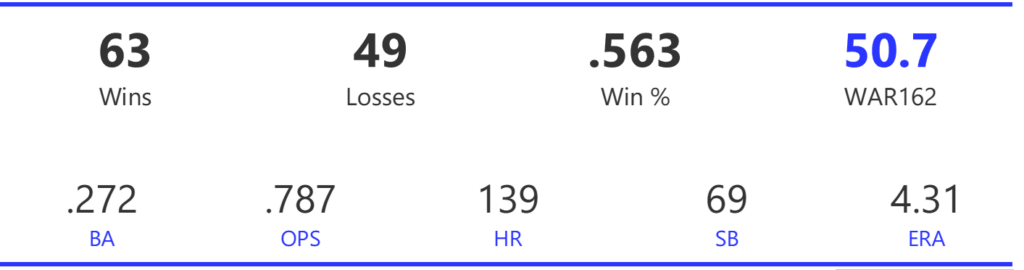
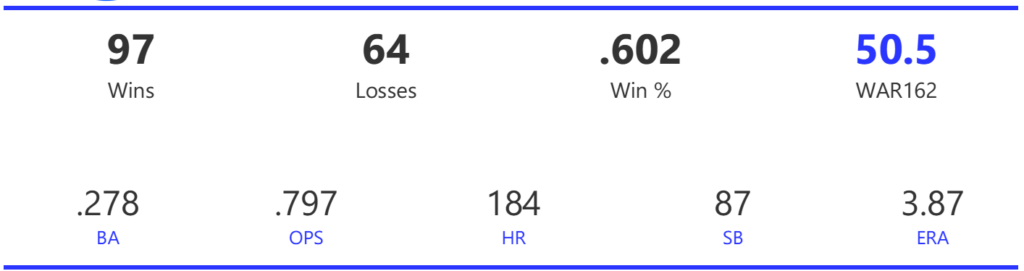
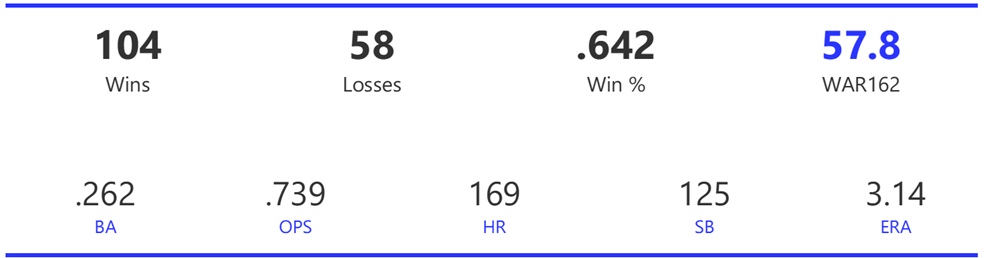
We’ll start with the top section, which includes the team rank, team name and season, a filter where users enter a rank (from 1 to 20), and some summary statistics capturing key measures such as wins and losses. The rank display and all other information automatically update based on the rank filter. What is the rank based on, you may ask? We are using WAR162, shown in blue in the top section; this measure is an aggregate value based on the sum of individual player WAR values for the season.

MLB team dashboard – Top section with summary team info

The MLB Team Dashboard – Plus/Minus and Distribution Charts

Moving down the page, we now see some interesting charts; a series of team-level plus/minus indices is shown on the left, while a dynamic distribution chart (with box plot) can display anything from runs to hits, to attendance and game time (in minutes). The metric parameter allows users to update the adjacent chart quickly and easily. Hovering over any data point in either chart provides further detail on the respective measure.

MLB team dashboard – Team indices and dynamic distribution chart

The MLB Team Dashboard – Game-by-Game Results Chart

The next chart displays game-by-game results (where available), showing the run differential for a win (above the zero axis) or loss (below the axis). Selecting a single game bar tells us the date, teams, and score for that specific game. The taller the bar, the greater the run differential; in other words, tall bars are an indication of a one-sided game, win or lose.

MLB team dashboard – Game-by-game run differentials

Batter and Pitcher Performance

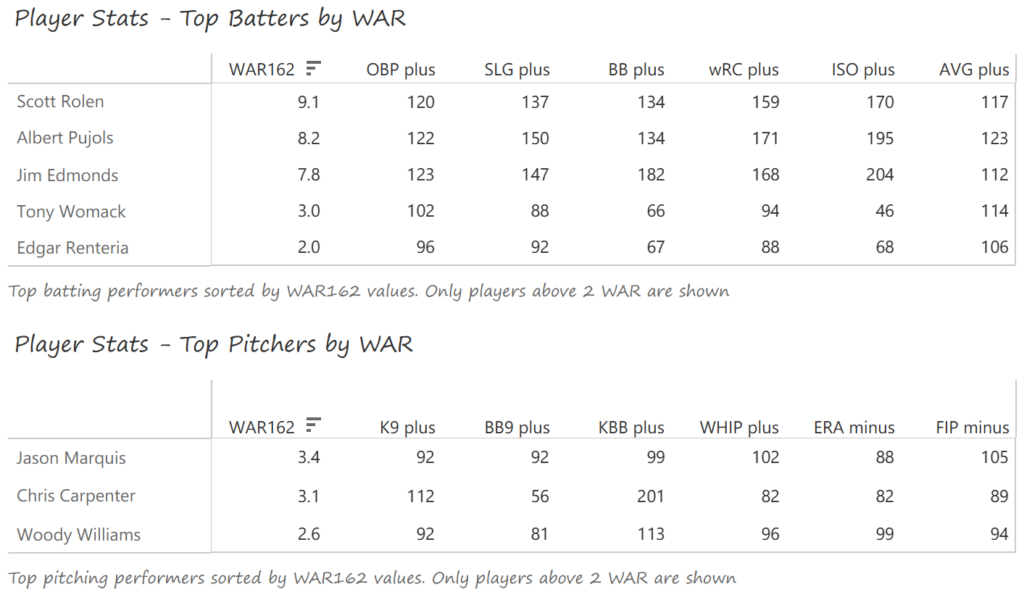
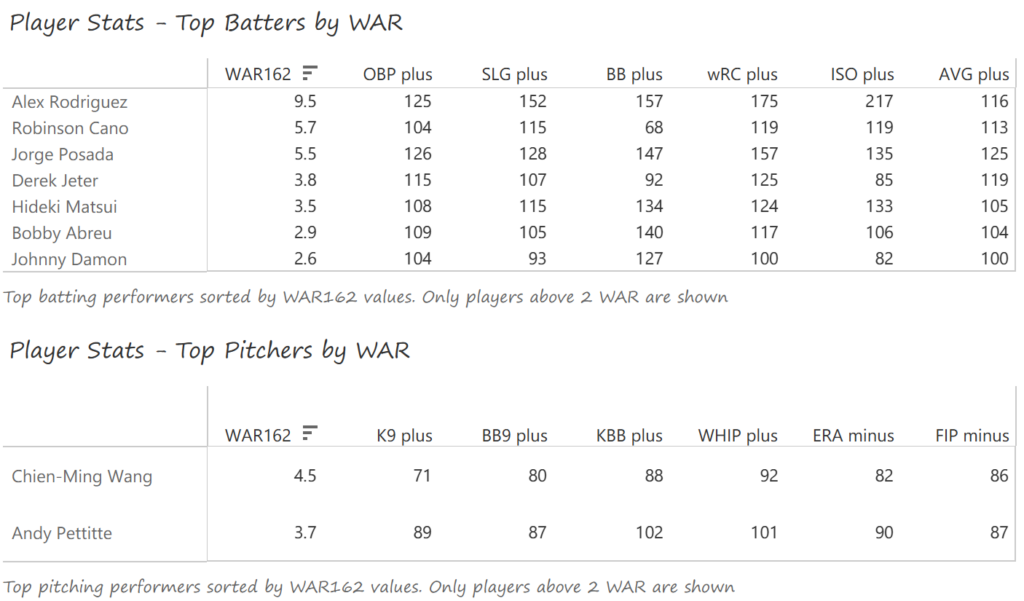
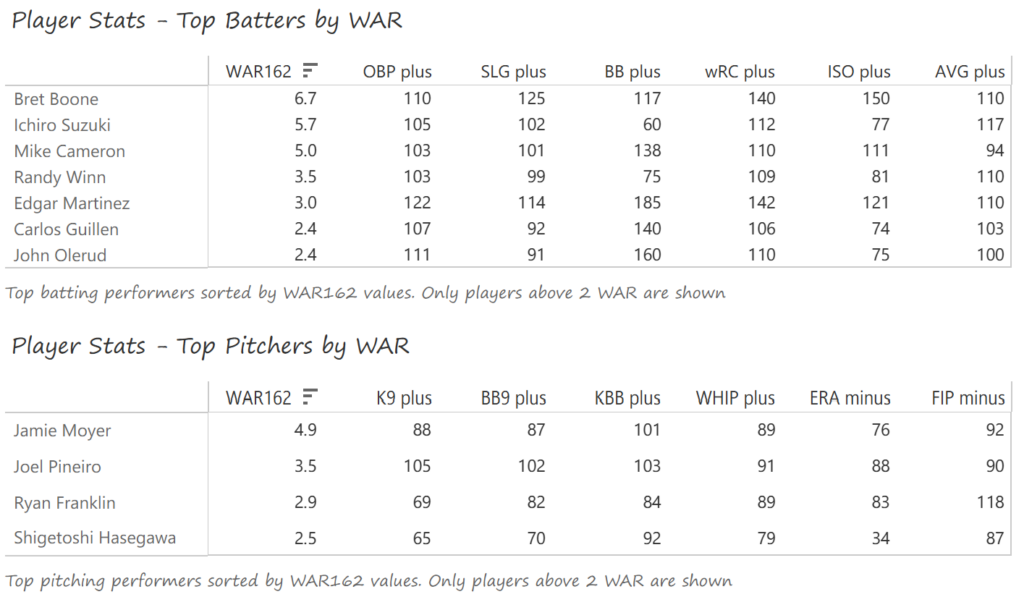
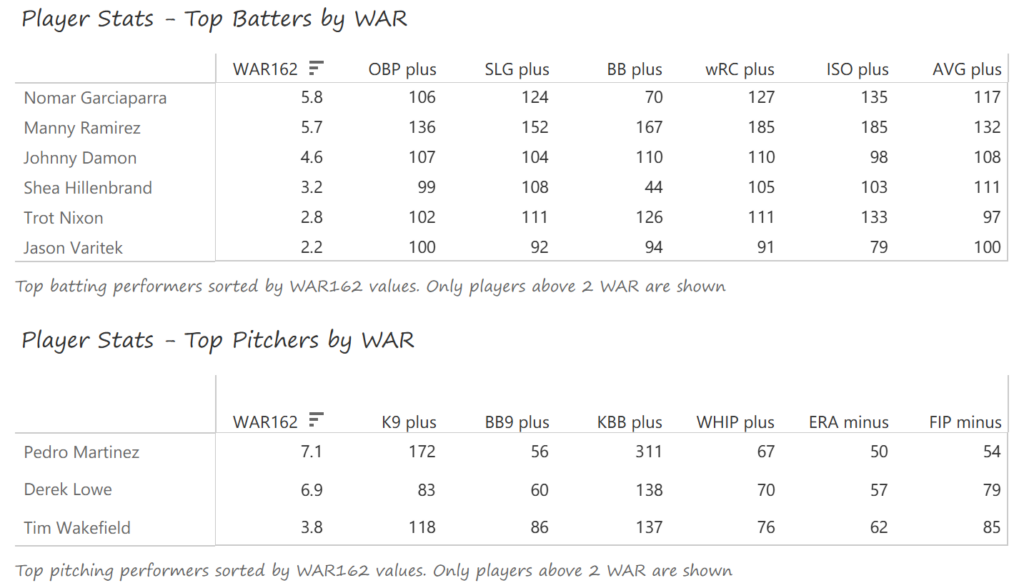
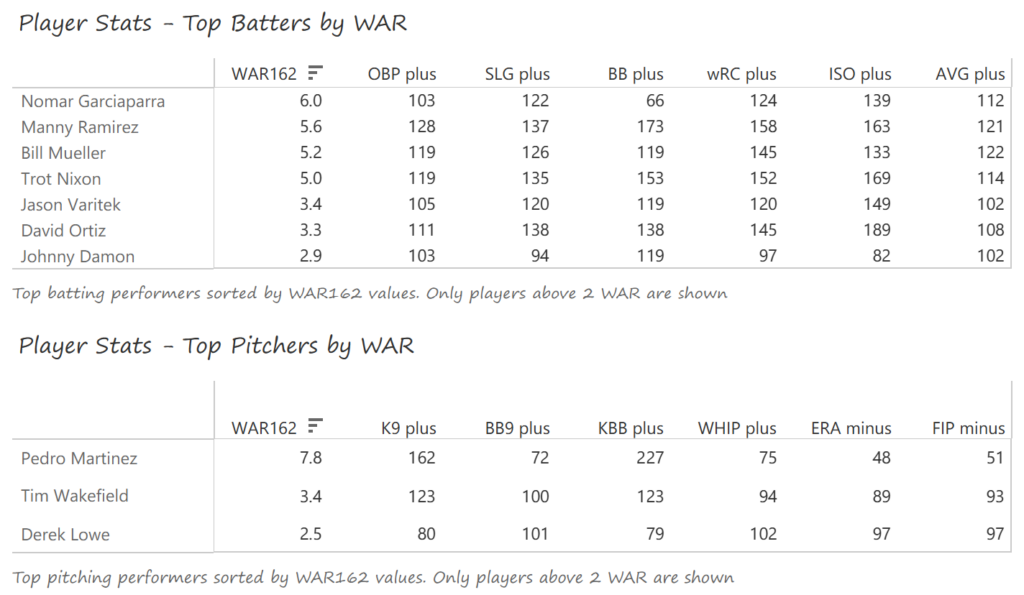
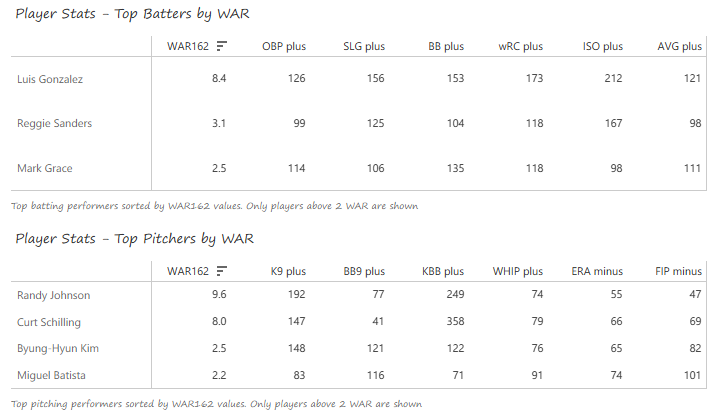
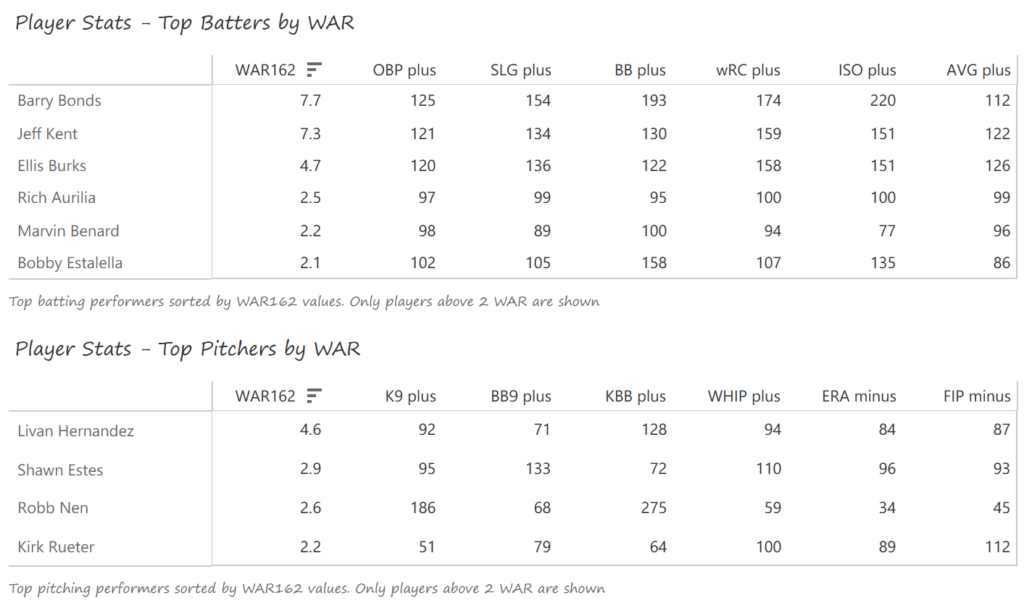
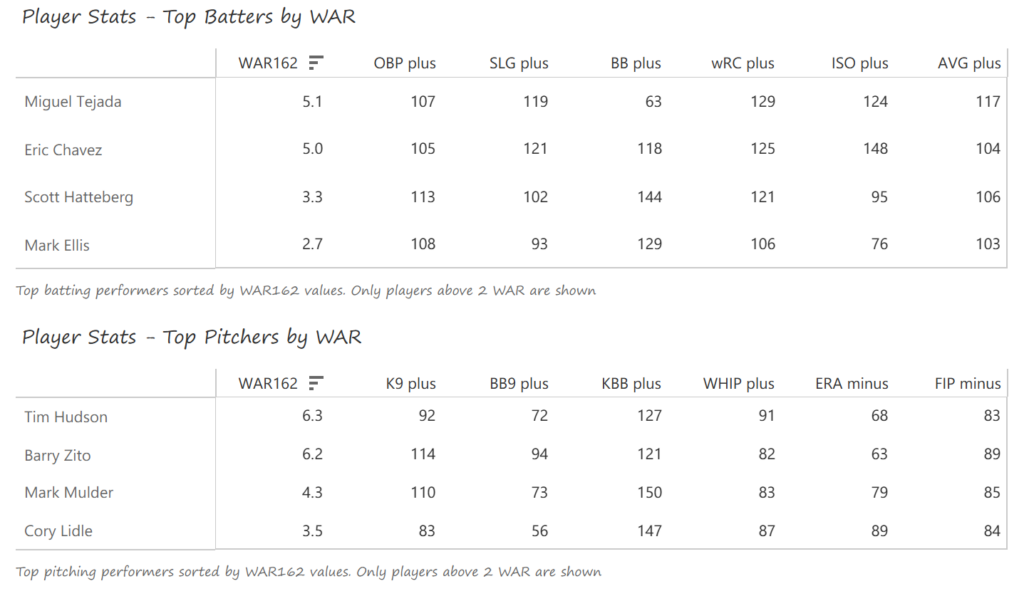
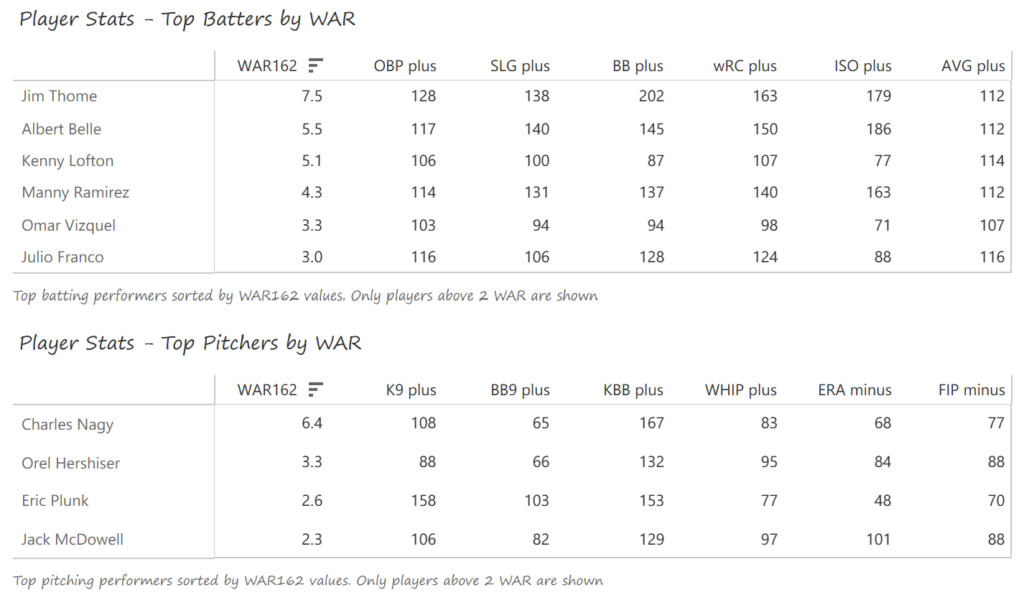
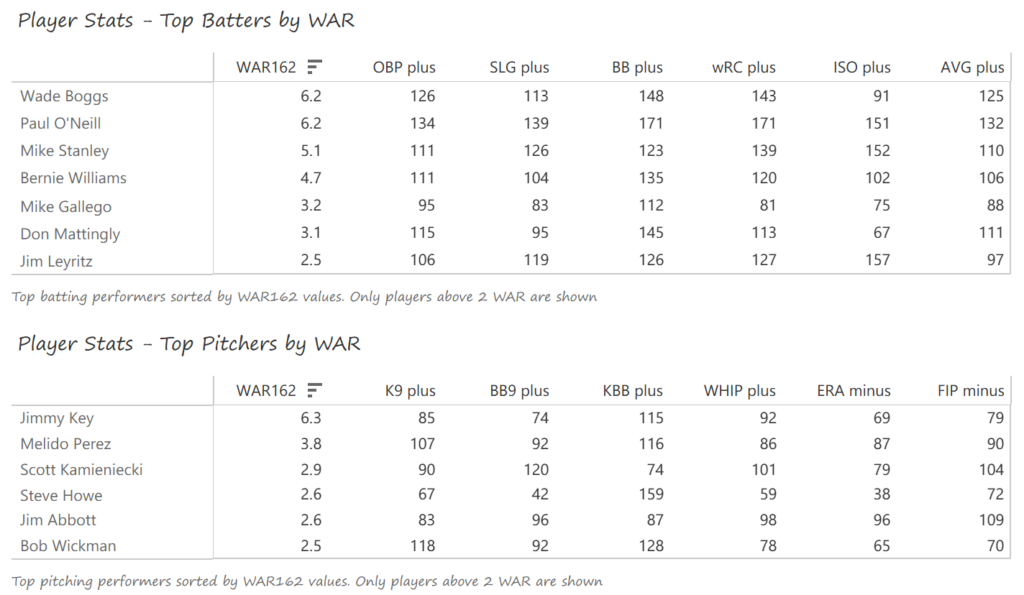
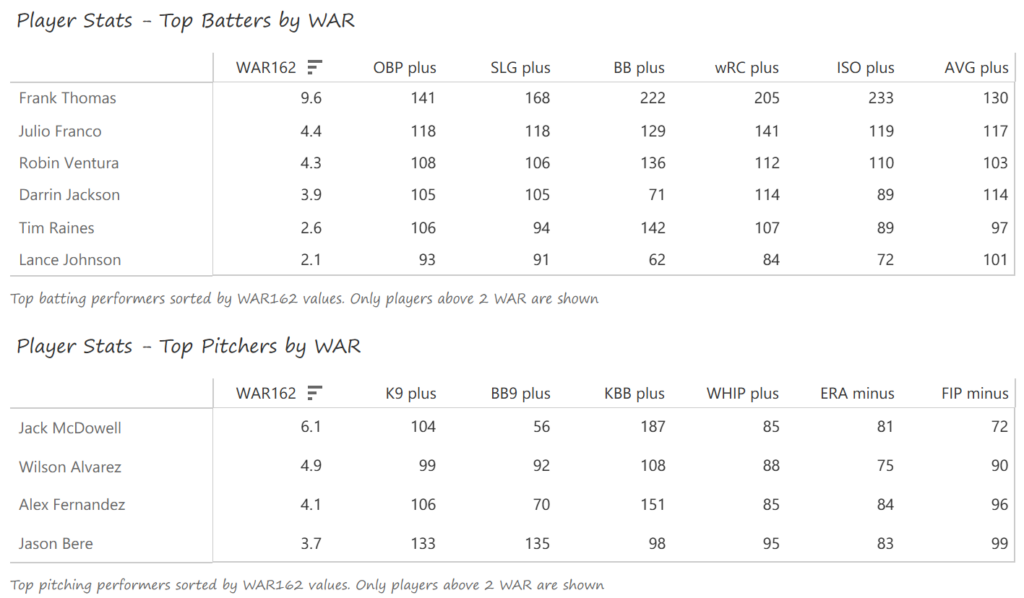
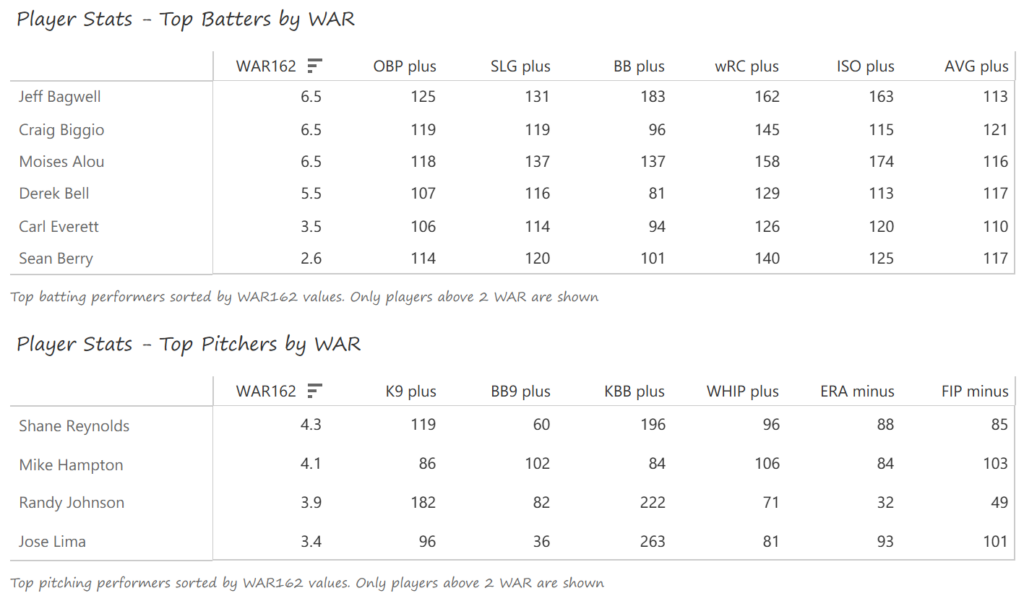
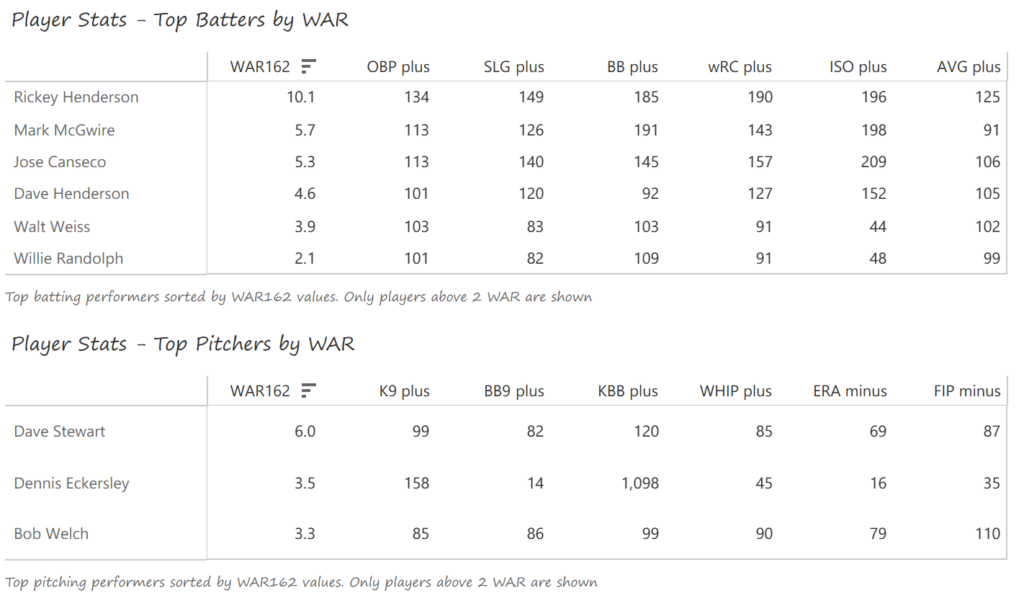
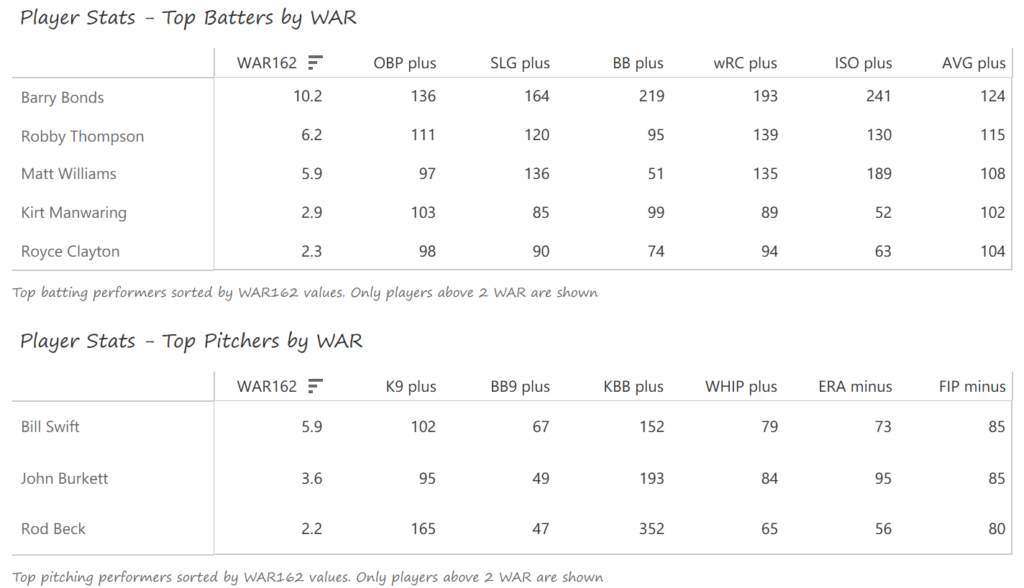
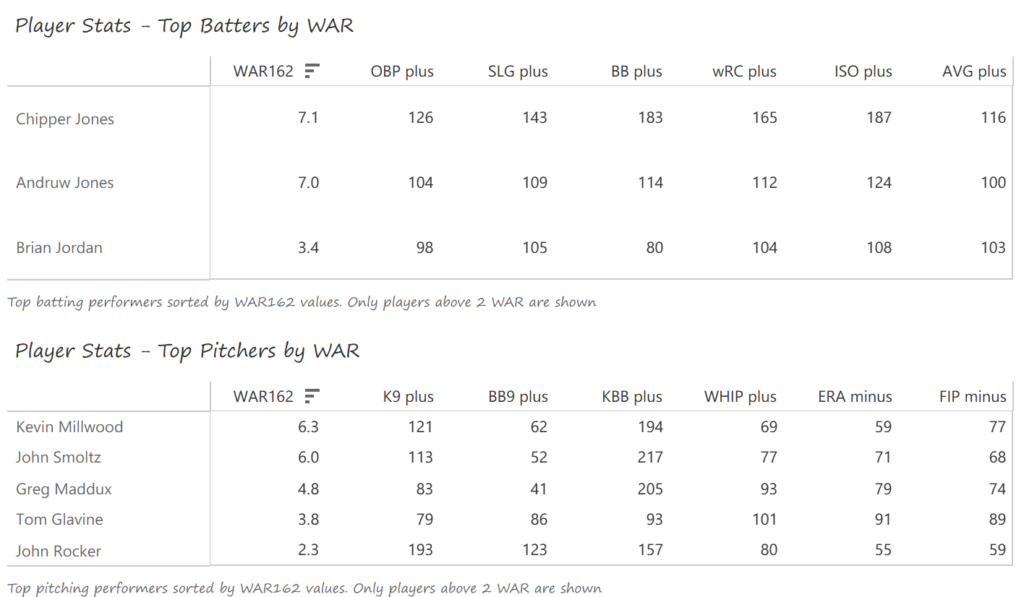
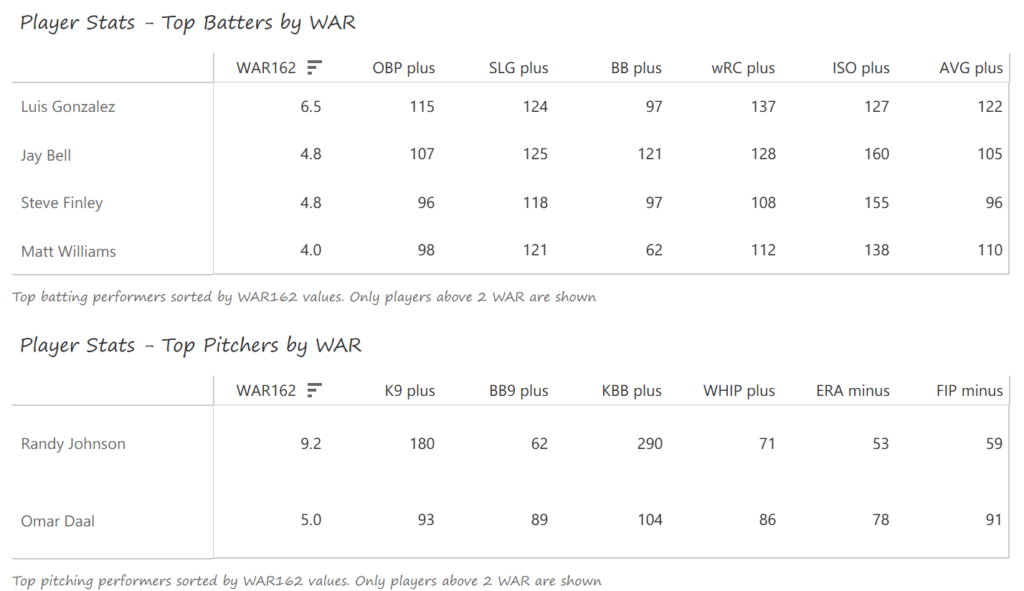
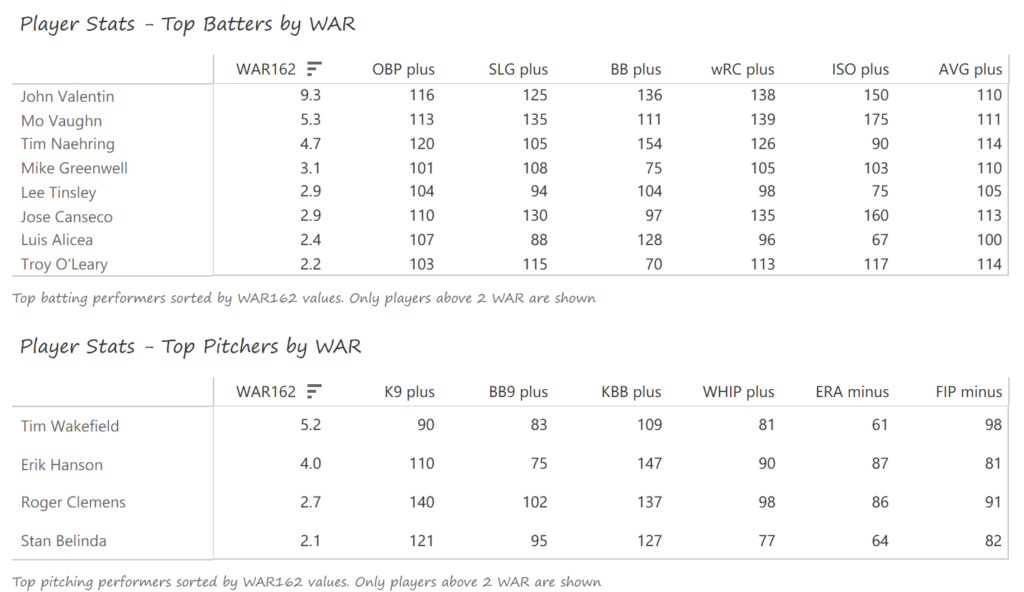
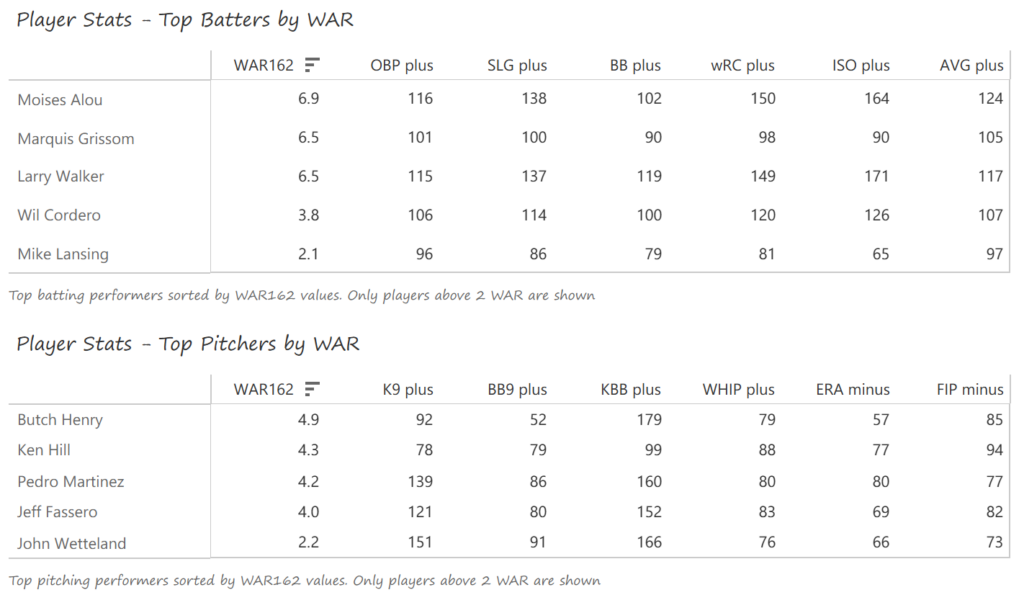
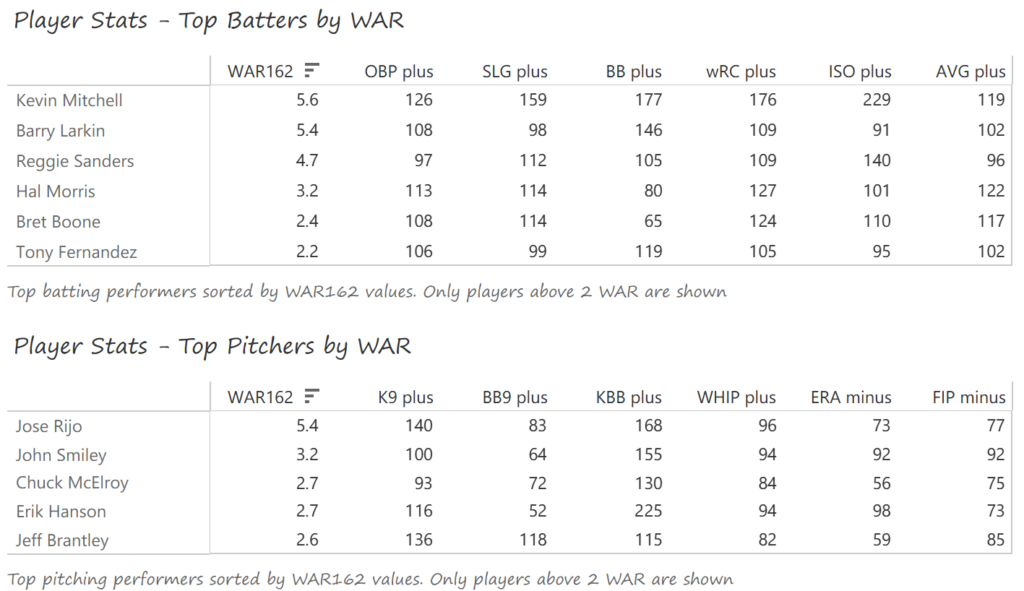
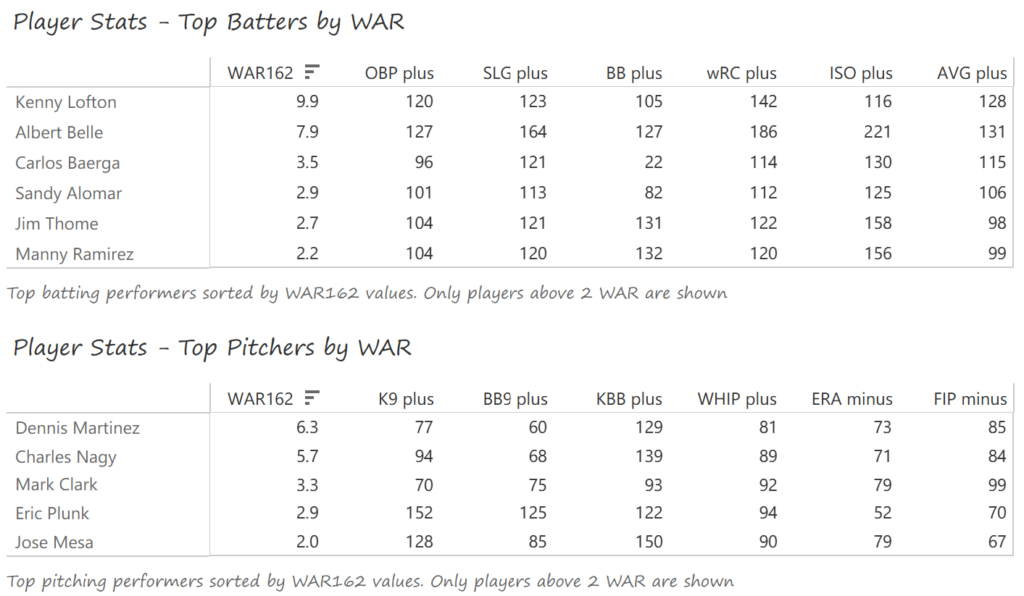
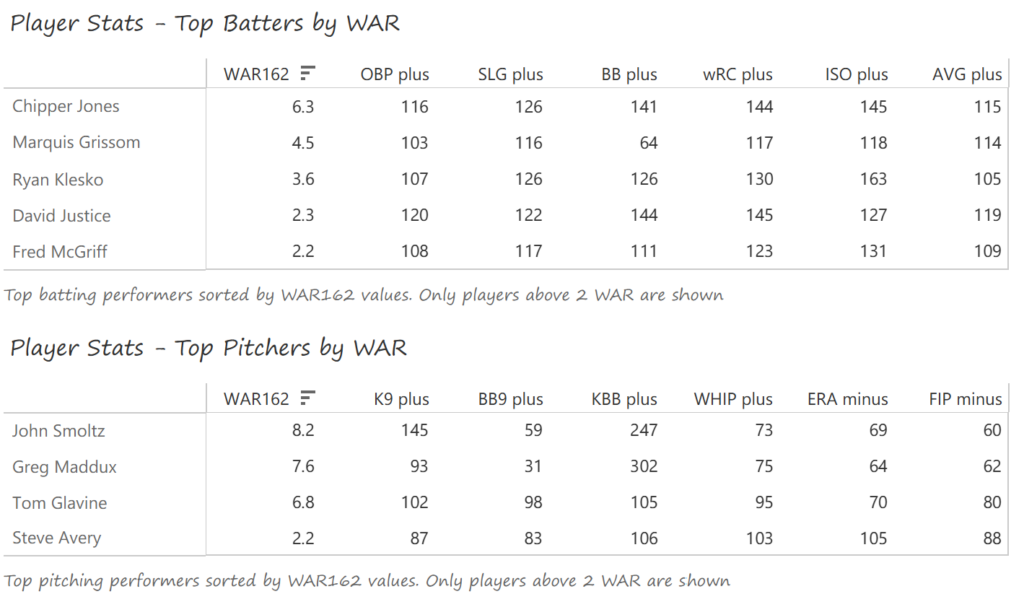
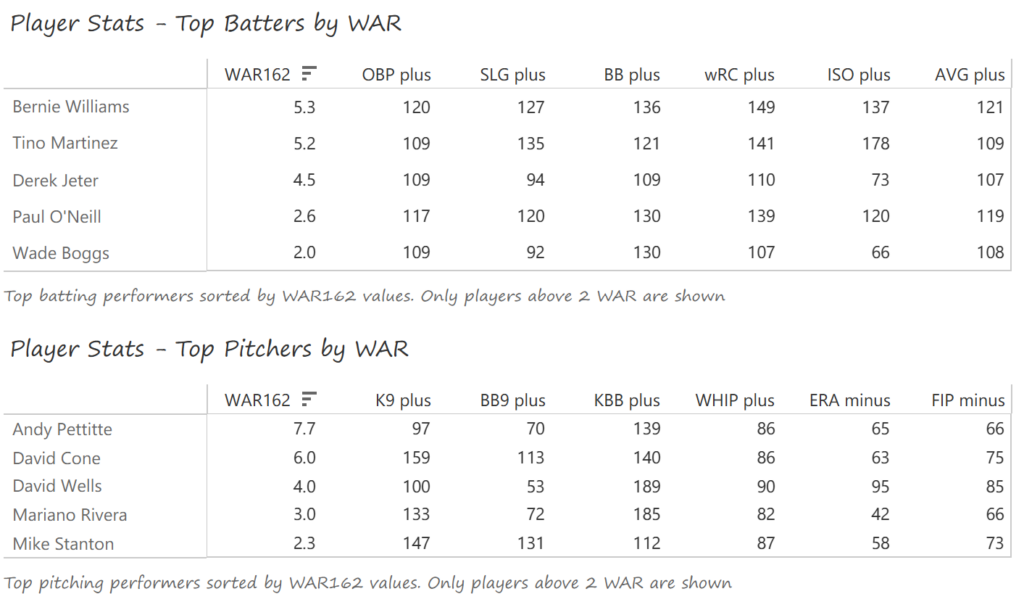
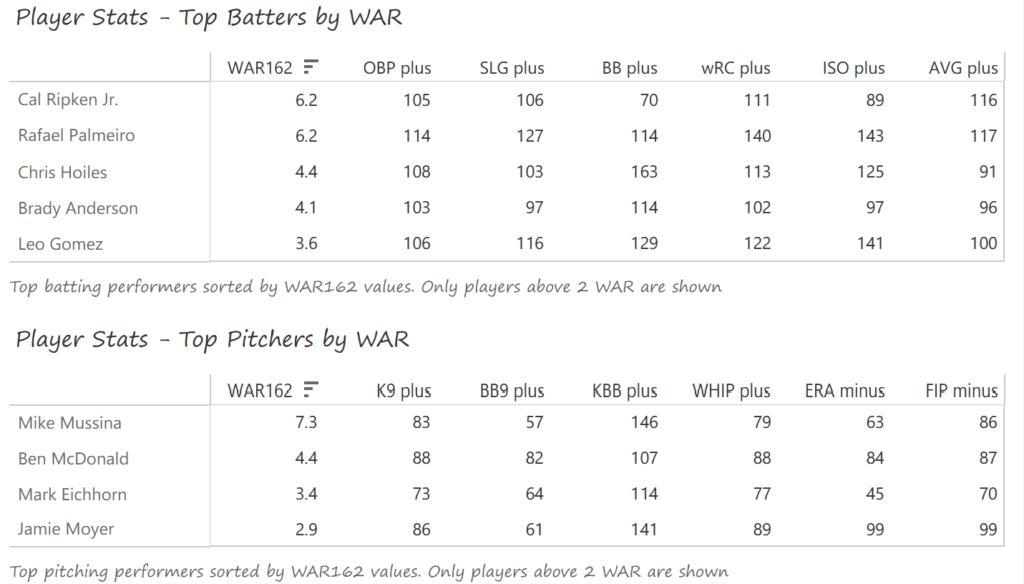
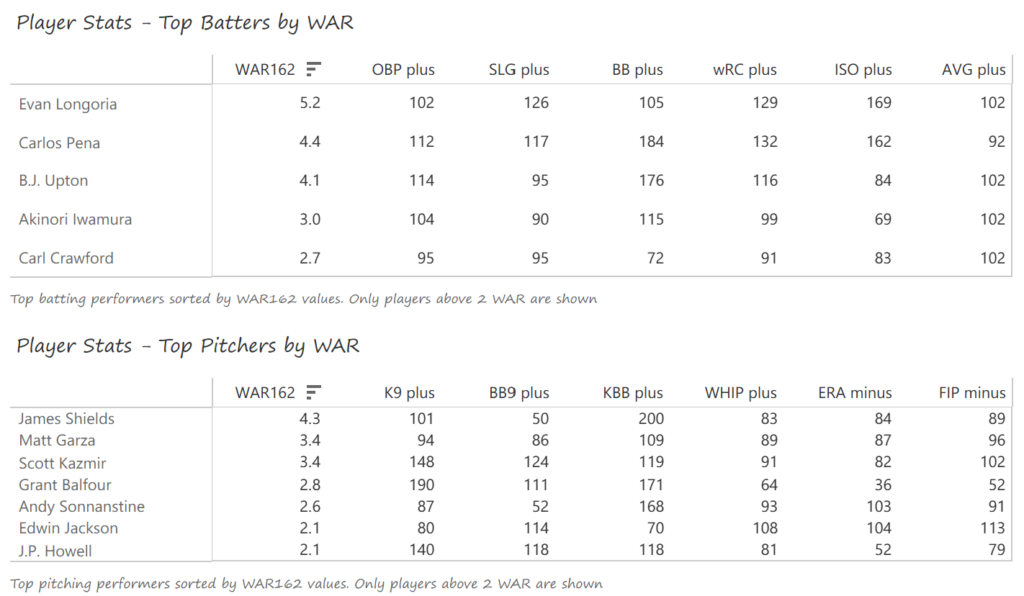
Our final section features the top-performing batters and pitchers (ranked by WAR162), along with a handful of indexed measures that provide insight into their performance relative to league averages (always set to 100). Hovering over any value provides a summary of the player and his indexed value for that metric. In this section we can see the top players for the 1905 Cubs – Frank Chance, Joe Tinker, and especially Ed Reulbach.

MLB team dashboard – Indexed measure and WAR162 for top performers

I’ll be sharing the live link to the Tableau Public dashboard shortly, as I begin the countdown posts next week. I’m excited to premiere the dashboard and start the countdowns. As always, thanks for reading!
Top 20 MLB Teams by Decade – Data Prep

Over the next few months, I’ll be doing a countdown of the top MLB teams (based on WAR162) for each decade from the 1900s through the 2010s. Each team will have a dashboard in Tableau Public, making it easy and fun to navigate through the top 20 teams from each decade. The dashboard design is about to commence, and should be ready to launch around mid-February. Until then, let’s take a tour through the data sources and processes that will ultimately feed each dashboard.

The Data (3 rich sources to work with)

One of my goals is for the dashboards to provide an array of interesting and insightful data – overall team ratings (using WAR162), team and player level stats data (runs scored, hits, batting average, etc.), and game level data that can be used to show patterns within a season. We need multiple data sources that can eventually be joined in Tableau, but each one needs to be processed individually prior to that stage. Here’s a quick overview of each source:

  • The JEFFBAGWELL data from Neil Paine was used extensively in my 2025 book release, The Visual Book of WAR. The book looked primarily at the WAR162 metric at both the individual and team levels, and the same data will be used to select and rank the top 20 teams for each decade. The dashboards will require both team-level summary data plus individual player numbers to provide further context.
  • My next source is season-level data at both the player and team levels, which will be used to provide additional context for the dashboards by displaying traditional baseball statistics such as runs, hits, batting average, OPS, ERA, and more. This data has traditionally come from the Lahman baseball database, now managed by SABR, the Society for American Baseball Research.
  • My third source is Retrosheet gamelogs data, which allows for tracking game-to-game patterns across a season. With this data, the dashboards will be able to show distribution and frequency data for each team, providing further insight into the ups and downs experienced throughout the season.

Fortunately, there are some easy ways to merge these sources (seasons are always the same), and some others that require a bit of work (team codes often differ across the sources). We now move to the next stage, where I use Exploratory to process, refine, update, and manage the data before it gets pushed to Tableau.

Processing the Data (thanks Exploratory!)

Given the differences inherent across the three sources, I have chosen to process each one separately and allow Tableau to join the respective output files. Exploratory makes this process rather straightforward; I simply import each source and then perform the necessary modifications and aggregations needed for Tableau.

Let’s view some examples, beginning with the JEFFBAGWELL (WAR162) source. I previously created a number of steps and calculations last year as I was writing the book. We’ll pick up the data from that point and create some new steps. Let’s first combine the season and team codes into a new field (this will make it easy to filter the various sources:

Creating the Team Season field

We now have a Team Season field to work with – this is immediately used to help us get to the top 20 teams for each decade:

Filtering for the Top 20 teams per decade

All the teams we want to analyze (20 per decade) are now included in our results; the others have been left behind (but not lost) in our data flow. The beauty of this approach lies in its ability to capture all decades; before sending to Tableau we can simply add one more filter that limits the data to a single decade (the 1920s, for example).

Now let’s move on to the season-level stats data from the Lahman database. Exploratory enables direct connections to multiple databases; my season-level data is stored in a MySQL database, so we’ll create some simple code to pull in the key data fields:

Home
Pulling season-level data for the Top 20 teams by decade

Notice the similar logic we just saw with the WAR data – I have created a Top_20_team field that can be used to easily merge the two data sets once we get to Tableau. This data is now in Exploratory, but we soon hit a little speed bump; team codes are not always the same across the two sources. I discovered this when I was falling short of 20 teams per decade, and used Exploratory to make some updates:

Updating team id codes

We now have updated team IDs to match the other data sources.

My third source proved a bit challenging – I created flags to identify each top 20 team, which seemed like an easy solution. Unfortunately, my solution fell apart when two Top 20 teams played one another (say the 1901 Red Sox vs. the 1901 White Sox). This caused some wonky outcomes at the game level, where one team would lose some game results based on how my code was written. Long story short (after some hair-pulling), I managed to separate the data into two files – one for home games and another for visitor games. Now, I can merge the two data files in Tableau. Problem solved!

Aside from that issue, I used Exploratory to run a lot of calculations, some of which are likely to appear in the final dashboard. For example, calculating runs scored in a game:

Creating a runs field for Top 20 teams

Here we are determining whether the Top 20 team was hosting a game (home game), and then using the home_score value. Otherwise, if it isn’t a home game, we use the vis_score value to count the runs scored by our top 20 team. We use this type of calculation for many different measures (doubles, triples, walks, etc.), with similar calculations for the opposing team values. The goal is to provide detailed game-level data for use in Tableau.

Finally, back to the home team/visiting team approach I touched on a moment ago. In order to capture every game for each team, it was necessary to split the games based on whether a team played at home (home team) or on the road (visiting team). To solve this, I first created a pair of fields to identify home games for a Top 20 team:

Identifying a Top 20 home game
Identifying a Top 20 home team

I can now capture all home games for each Top 20 team, which can be filtered and pushed to Tableau. The same process was repeated for away games, where the Top 20 team was the visiting team.

There’s a lot more I could cover here in terms of calculations and filters, but I hope you get the general idea. Everything is now ready to create files for Tableau.

The Data Output Files (simple .csv for Tableau ingestion)

Assuming we’ve done everything correctly to this point, exporting the data to .csv files is the easiest part of the process. The key is to make sure we export the data from the appropriate step in Exploratory, where all the field updates, formulas, and filters have been applied. For our team-level WAR file, we apply a decade filter, seen in the bottom right:

Team WAR summary output

To export the file to a .csv format is quite simple. Click on the export file icon and choose the appropriate output:

Exporting data from Exploratory

We follow a similar process for each of our remaining outputs, resulting in four distinct files for Tableau. With each of those files created, we’re ready to shift our focus to Tableau.

Merging the Data in Tableau (my old friend)

I spent many years in corporate America using Tableau, and became quite proficient, especially in creating highly interactive dashboards. So I am excited to use it again for this project, and pleased to see some new options in the Tableau Public version.

The first step is to start with the data sources; in this case, the four .csv files we exported from Exploratory. We can use the Data Source tab in Tableau to pull in the data and map out how the four files relate to one another. Here’s what things look like after I set up a data connection and dragged in the files:

Tableau Data Source window

I elected to use the WAR162 Team Summary file as my base table, and then join the other tables to it. Essentially, that takes us from a small base table with highly summarized information that connects to tables with much greater detail. Before we move on, note that the two Retro Gamelogs files show as a single file, as they have been combined using Tableau’s union capability (since all fields are identical, we can simply combine them). Now we can take a look at the relationships connecting each table:

WAR162 Team Summary to RetroGamelogs relationship

Our first relationship connects the base table with gamelogs data, and is based on teamID and yearID (season). Simply put, we can see every game-level record for each of the 20 teams in our 1900s decade, just by joining those two fields.

WAR162 Teams to Summary Stats relationship

Next up is our join to the Top 20 Summary Stats table, which contains player-level stats for every season among our Top 20 teams. This includes most of the basic statistics fans are familiar with – runs, hits, doubles, home runs, and so on. Joining on teamID and yearID (season) provides access to all of these numbers.

WAR 162 Team to Players Relationship

The final join is between the WAR team and WAR players data. This will allow for showing the top WAR162 performers for each of our Top 20 teams. The dashboards will now be able to reveal exactly why a team is ranked – perhaps there were two or three WAR standouts, or maybe a team has a balanced roster with many above average contributors.

We’ve Got a Lot of Data to Sort Through!

As you may have gathered through these steps, there is now a lot of available data to potentially use. Some of it won’t be impactful, and can be easily left out of the dashboard design, but there will certainly be a competition between the remaining elements. Some of these challenges can be accommodated by building dynamic options where users can filter dashboard views, but we’ll still require a base framework for the design. It won’t be easy – take a look at just a small subset of the data elements:

A handful of data fields…
Followed by more data…
And still more data…
And even more data…

You probably get the idea by now – there’s data everywhere, some of it meaningless, some of it trivial, and a good chunk of it important or essential. The job of a dashboard designer is to discard the first two categories and refine the important or essential data to create a compelling output for users to navigate. The dashboard needs to combine functionality with aesthetics (the world is full of truly ugly dashboards!) that invite users to interact and discover new insights.

What’s Next?

My next post will introduce the dashboard design and walk through how to effectively use it, followed by the rollout of my decade-level countdowns from #20 to #1. I hope you’ll join me on this journey, and thanks for reading!
New Top 20 Team Dashboards Coming

New Top 20 Team Dashboards Coming

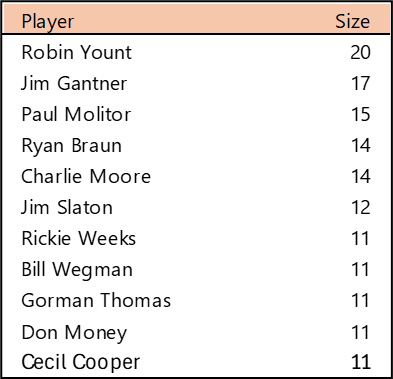
I spent the day today flagging the top 20 teams by decade (based on WAR162 calcs) in the Retrosheet game logs data, which opens the door to some fun upcoming analyses. In my Visual Book of WAR, there is a section looking at the top 10 teams per decade (1900s-2010s); we’re going to expand that to the top 20 for this next project. The aim is to produce a fun and informative dashboard for each of these teams that will highlight why they rank where they do.

While the dashboard is still in the ideation stage, expect deeper insights into each team’s patterns within their featured season – individual WAR levels, run differentials, interesting statistics, and much more. Here are some teaser charts showing a few decades worth of who the top 20 teams are:

First, the 1910s:

Top 20 Teams by WAR 1910-19

Next, the 1930s:

Top 20 Teams by WAR, 1930-39

And the 1970s:

Top 20 Teams by WAR, 1970-79

And the 2010s:

Top 20 Teams by WAR, 2010-19

For each of the above teams, plus those from the other decades, we’ll have a sweet dashboard highlighting each of their seasons that rank in the top 20 for the decade.

The plan is to roll these out, with five teams at a time from each decade. The #20 through #16 teams will come first, followed by #15 through #11, #10 through #6, and finally, numbers 5 through 1. We’ll then move on to the next decade and repeat the same cadence. This should make for a fun series of posts that allow for interesting comparisons and insights.

I’m looking forward to kicking off this series very soon, and believe you’ll find it quite interesting. More to come as I finalize the dashboard format and how to deploy it for the greatest impact. As always, thanks for reading, and see you soon!

Data, Data, and More Data

My first week of 2026 has been spent largely on updating game and event data from the massive Retrosheet data sets. Even limiting the number of data elements to a small subset of the event data yields a considerable amount of information to analyze. Here’s what’s new (for my databases) this week:

  • 2023-2025 season event data
  • 1950-1953 season event data
  • 1910-1949 season event data

What do we find in this data? For my subset, these are the bits of data I can use:

  • game id (a unique combination based on date and the home team
  • visiting team
  • inning (in which an event occurred)
  • batting team
  • the number of outs, balls, and strikes at the time of an event
  • the score at the time of the event
  • batter & pitcher information (left-handed, right-handed, etc.)
  • event type (single, double, home run, etc.)

Plus a wealth of additional information to be mined, analyzed, and visualized.

While Retrosheet is missing events for a small percentage of games between 1910 and 1970, the data is otherwise remarkably comprehensive. Now that I have it stored locally, you should start seeing some interesting analyses on this site for 2026. That’s it for now, and thanks for reading!
Closing Out 2025 – With New Data!

Over the last few years, I have been a bit inconsistent with updating my baseball databases, for a variety of reasons. To produce more content in 2026 I need to keep these sources up to date, starting with data from the great retrosheet.org site. I found (to my dismay) that not only had I not updated the 2024 game log data last year, but was missing 2023 as well! The problem is now solved, as I was able to add not only 2023 & 2024 records, but also the 2025 data, and to run the multiple code updates (in MySQL, if you’re wondering) I created years ago.

So what is Retrosheet game log data? It’s a thorough summary of every Major League Baseball (MLB) game played in a season – typically 2,430 games in the current era. The data covers everything from the game date to the umpires and players at each position. In short, it’s a very rich data set for building a variety of analyses and visualizations. Let’s take a look at some of the data attributes, starting with extensive game summary information, including dates, home and away teams, and more. Note that I have also created a handful of calculated data fields to aid in analyzing the data, but the rest is all available from Retrosheet.

Game summary attributes

Here are more attributes, as we now begin to see some game details – the number of errors, home runs, walks (BB), and double plays (GIDP), for both the home and visiting teams.

Visitor and home team game detail

Some more team details are next, followed by information on the umpires for each game:

More home team detail plus umpire data

And more…now with detail on the winning and losing pitchers, and the start of the batting order for the visiting team:

Visitor batting order attributes

Additional batting order detail…

Visitor and home batting order attributes

And finally, some fields created by me to aid in analyzing the data:

Some additional calculated fields

Obviously, there are numerous opportunities to conduct interesting and fun analyses with this robust data set, which now encompasses data from all seasons between 1921 and 2025. Next up is to pull in seasons from the other end of MLB history, specifically the 1901 through 1920 campaigns. After that comes the fun part of analyzing and visualizing the information.

See you soon, and thanks for reading!
Book Progress – Part 1

This week marked the real start of putting some effort into the structure of my upcoming Career Arcs book; the onset of cold weather and the passing of the Thanksgiving holiday have afforded me a bit of writing time, even as multiple December holiday gatherings approach. So I have started with some necessary components including an introduction, resources and tools pages, and an about the author page.

I’ve also been looking at which versions to publish; I love the idea of print books, especially for such a visually dense volume filled with color charts and graphs. However, there is a considerable production cost associated with full color books which might push the price beyond many buyers comfort level. My likely solution is to produce both e-book and softcover versions and perhaps a hardcover volume as well. This option will allow buyers to make their own choice based on their preferred format and price point. At the moment I’m leaning toward Amazon’s Kindle Direct Publishing (KDP) platform due to its ability to easily produce all three versions.

Another current exploration involves the book cover and layout. While I’m good with visual information display, I am certainly not a graphic designer, so those tasks will likely be covered by a freelancer with book design experience.

The next step will be determining the specific content of the book and the order of sections and chapters. I have some idea of the flow, but need to define it more precisely. Of course the written and visual content will follow closely behind once I’ve made the content selections. There is a lot of work to come but I’m optimistic about the process and my ability to produce the content of the book. December time may be at a premium, but January through March has proven to be a productive period for me in years past. Stay tuned as I provide updates on my progress!
My New Book – The Work Begins

I’ve had a baseball visualization book in my head for the better part of a decade but kept setting it aside. Finally, things have come together, and the work has begun. My working title is “Career Arcs: A Visual Analysis of MLB Player Performance”, as the focus will be on the value players have achieved across their playing career.

The initial stage, as is so often the case, is centered on data wrangling, the art of procuring, loading, creating (formulas), analyzing, and finally, visualizing the base data. My process starts with the source data, available under the MIT license, which gives me the ability to use the data however I choose. I will always acknowledge Neil Paine for his great dataset focused on multiple interpretations of WAR (Wins Above Replacement), a widely used metric for baseball statheads. Without this data, creating the book would prove far more challenging.

Exploratoryis one again my primary data wrangling tool; it makes the powerful capabilities of R accessible to a non-coder like myself. In Exploratory, I can load the data, create filters and formulas, and do some pretty cool visualizations. My use is twofold (at least); I can analyze the data on the back end while simultaneously building charts and dashboards for potential use within the book. Here’s an example dashboard I’ve created (in process) where I can see career WAR numbers for any MLB player through the 2024 season:

Dwight Evans WAR Scorecard

These dashboards allow for data discovery on my end while painting a nice visual picture that may wind up in an appendix section of the book. I love creating charts and dashboards that can be used for more than one purpose!

In addition to working in Exploratory, I am learning the ins and outs of Adobe InDesign, which will be used for page layout, titling, fonts, styles, colors, and any other elements used for book publishing. I have yet to decide how I’ll publish the various versions of the book, other than being fairly certain there will be both e-book and printed versions. Full color printed books can become very expensive to print, so I’m wrestling with a variety of approaches at this stage to maximize readership while also having a print version available at a potentially high price point.

I’ll provide updates as my work progresses, including potential section and chapter content, release dates, and so on. In the meantime, thanks for reading, and let me know your thoughts through my Substack site at Visual Excursions. See you soon!

Updated Pennant Race Charts

The 2020, 2021, and 2022 MLB pennant race charts using Retrosheet data have been updated on the Exploratory Server: https://exploratory.io/dashboard/kc2519/Pennant-Races-1901-current-aUu5vDT1EW. All seasons from 1901-2022 are now available using the simple parameter selection (just make sure it’s set to the interactive mode).

Here’s a screenshot:

Views of the 2022 National League pennant races by division

Meanwhile, I’m struggling with some JSON output for my traditional version, so no updates there yet.