Tag: Retrosheet

Top 20 MLB Teams by Decade – Data Prep

Over the next few months, I’ll be doing a countdown of the top MLB teams (based on WAR162) for each decade from the 1900s through the 2010s. Each team will have a dashboard in Tableau Public, making it easy and fun to navigate through the top 20 teams from each decade. The dashboard design is about to commence, and should be ready to launch around mid-February. Until then, let’s take a tour through the data sources and processes that will ultimately feed each dashboard.

The Data (3 rich sources to work with)

One of my goals is for the dashboards to provide an array of interesting and insightful data – overall team ratings (using WAR162), team and player level stats data (runs scored, hits, batting average, etc.), and game level data that can be used to show patterns within a season. We need multiple data sources that can eventually be joined in Tableau, but each one needs to be processed individually prior to that stage. Here’s a quick overview of each source:

  • The JEFFBAGWELL data from Neil Paine was used extensively in my 2025 book release, The Visual Book of WAR. The book looked primarily at the WAR162 metric at both the individual and team levels, and the same data will be used to select and rank the top 20 teams for each decade. The dashboards will require both team-level summary data plus individual player numbers to provide further context.
  • My next source is season-level data at both the player and team levels, which will be used to provide additional context for the dashboards by displaying traditional baseball statistics such as runs, hits, batting average, OPS, ERA, and more. This data has traditionally come from the Lahman baseball database, now managed by SABR, the Society for American Baseball Research.
  • My third source is Retrosheet gamelogs data, which allows for tracking game-to-game patterns across a season. With this data, the dashboards will be able to show distribution and frequency data for each team, providing further insight into the ups and downs experienced throughout the season.

Fortunately, there are some easy ways to merge these sources (seasons are always the same), and some others that require a bit of work (team codes often differ across the sources). We now move to the next stage, where I use Exploratory to process, refine, update, and manage the data before it gets pushed to Tableau.

Processing the Data (thanks Exploratory!)

Given the differences inherent across the three sources, I have chosen to process each one separately and allow Tableau to join the respective output files. Exploratory makes this process rather straightforward; I simply import each source and then perform the necessary modifications and aggregations needed for Tableau.

Let’s view some examples, beginning with the JEFFBAGWELL (WAR162) source. I previously created a number of steps and calculations last year as I was writing the book. We’ll pick up the data from that point and create some new steps. Let’s first combine the season and team codes into a new field (this will make it easy to filter the various sources:
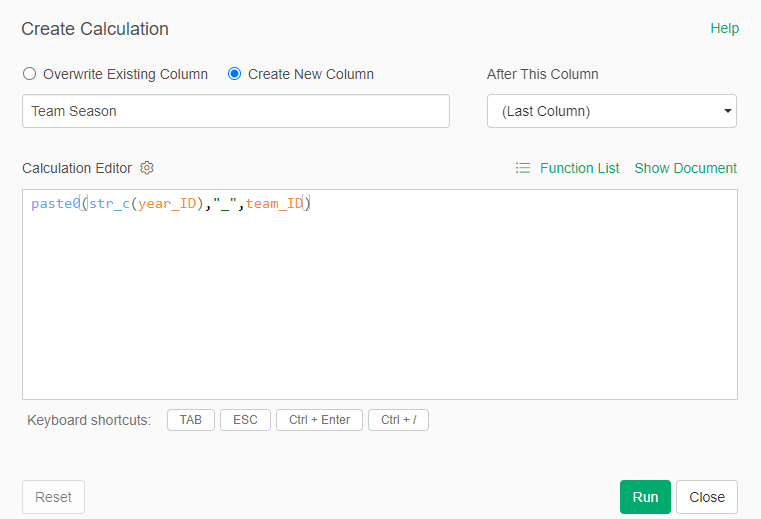
Creating the Team Season field

We now have a Team Season field to work with – this is immediately used to help us get to the top 20 teams for each decade:
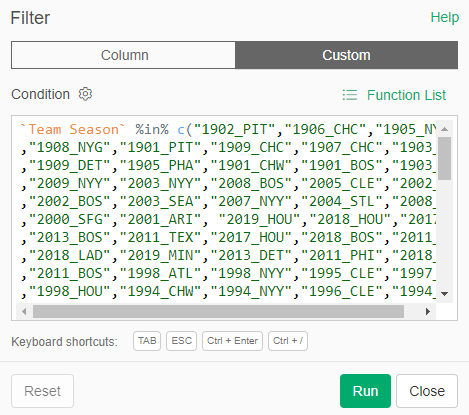
Filtering for the Top 20 teams per decade

All the teams we want to analyze (20 per decade) are now included in our results; the others have been left behind (but not lost) in our data flow. The beauty of this approach lies in its ability to capture all decades; before sending to Tableau we can simply add one more filter that limits the data to a single decade (the 1920s, for example).

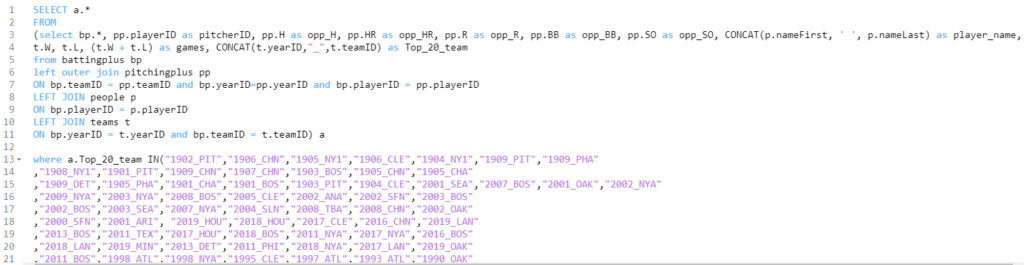
Now let’s move on to the season-level stats data from the Lahman database. Exploratory enables direct connections to multiple databases; my season-level data is stored in a MySQL database, so we’ll create some simple code to pull in the key data fields:
Home ยป Retrosheet
Pulling season-level data for the Top 20 teams by decade

Notice the similar logic we just saw with the WAR data – I have created a Top_20_team field that can be used to easily merge the two data sets once we get to Tableau. This data is now in Exploratory, but we soon hit a little speed bump; team codes are not always the same across the two sources. I discovered this when I was falling short of 20 teams per decade, and used Exploratory to make some updates:
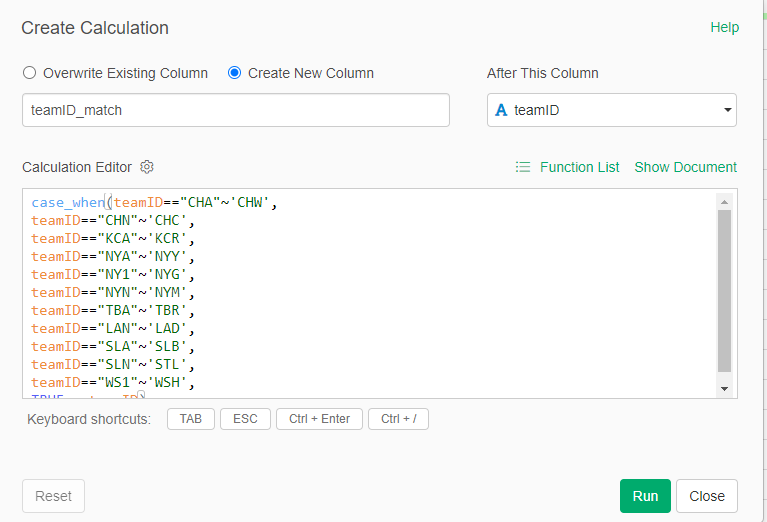
Updating team id codes

We now have updated team IDs to match the other data sources.

My third source proved a bit challenging – I created flags to identify each top 20 team, which seemed like an easy solution. Unfortunately, my solution fell apart when two Top 20 teams played one another (say the 1901 Red Sox vs. the 1901 White Sox). This caused some wonky outcomes at the game level, where one team would lose some game results based on how my code was written. Long story short (after some hair-pulling), I managed to separate the data into two files – one for home games and another for visitor games. Now, I can merge the two data files in Tableau. Problem solved!

Aside from that issue, I used Exploratory to run a lot of calculations, some of which are likely to appear in the final dashboard. For example, calculating runs scored in a game:
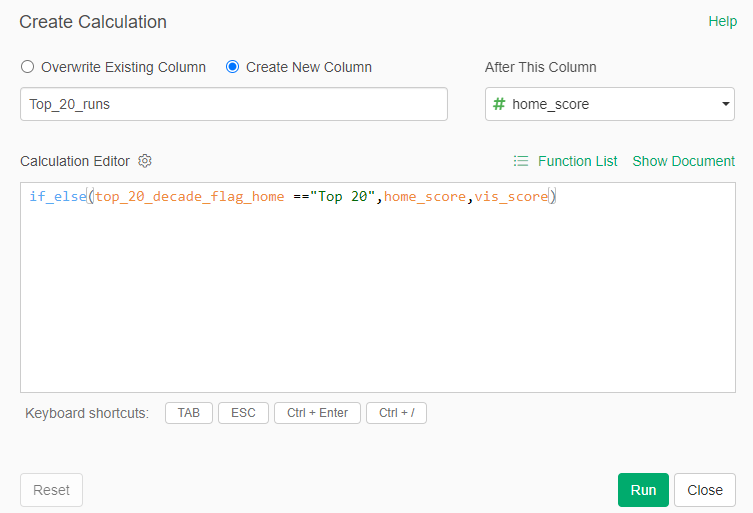
Creating a runs field for Top 20 teams

Here we are determining whether the Top 20 team was hosting a game (home game), and then using the home_score value. Otherwise, if it isn’t a home game, we use the vis_score value to count the runs scored by our top 20 team. We use this type of calculation for many different measures (doubles, triples, walks, etc.), with similar calculations for the opposing team values. The goal is to provide detailed game-level data for use in Tableau.

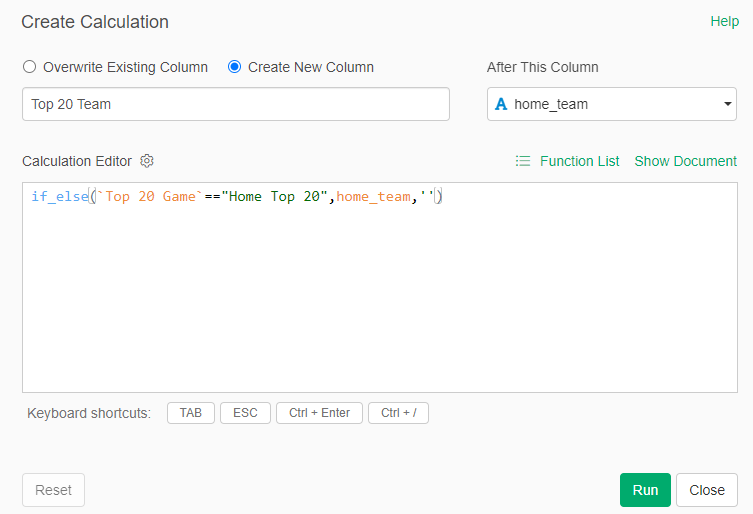
Finally, back to the home team/visiting team approach I touched on a moment ago. In order to capture every game for each team, it was necessary to split the games based on whether a team played at home (home team) or on the road (visiting team). To solve this, I first created a pair of fields to identify home games for a Top 20 team:
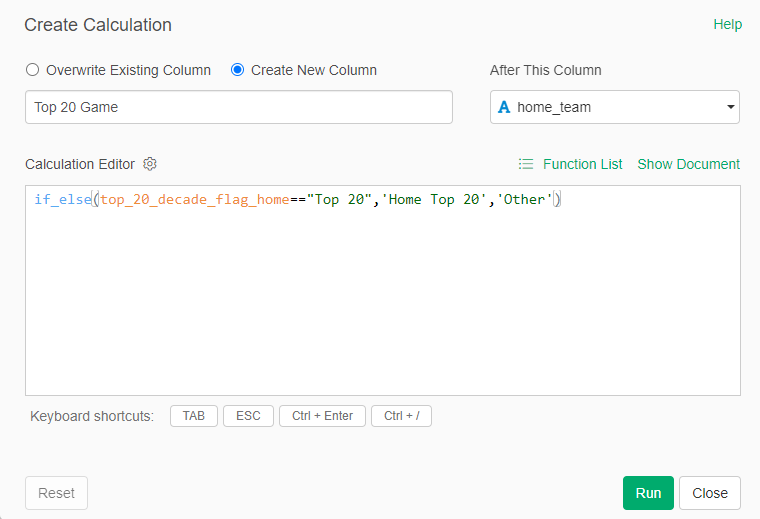
Identifying a Top 20 home game
Identifying a Top 20 home team

I can now capture all home games for each Top 20 team, which can be filtered and pushed to Tableau. The same process was repeated for away games, where the Top 20 team was the visiting team.

There’s a lot more I could cover here in terms of calculations and filters, but I hope you get the general idea. Everything is now ready to create files for Tableau.

The Data Output Files (simple .csv for Tableau ingestion)

Assuming we’ve done everything correctly to this point, exporting the data to .csv files is the easiest part of the process. The key is to make sure we export the data from the appropriate step in Exploratory, where all the field updates, formulas, and filters have been applied. For our team-level WAR file, we apply a decade filter, seen in the bottom right:
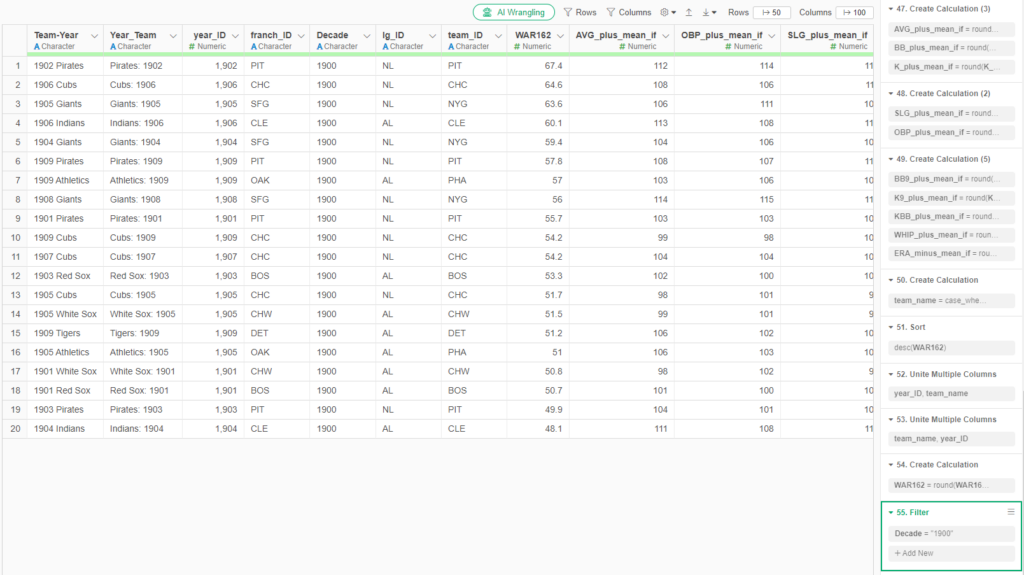
Team WAR summary output

To export the file to a .csv format is quite simple. Click on the export file icon and choose the appropriate output:
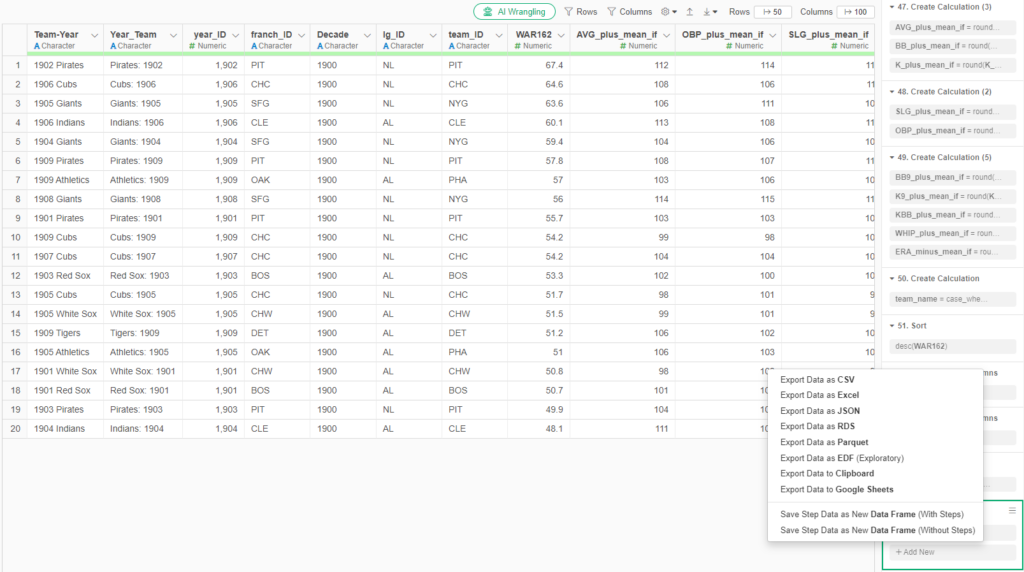
Exporting data from Exploratory

We follow a similar process for each of our remaining outputs, resulting in four distinct files for Tableau. With each of those files created, we’re ready to shift our focus to Tableau.

Merging the Data in Tableau (my old friend)

I spent many years in corporate America using Tableau, and became quite proficient, especially in creating highly interactive dashboards. So I am excited to use it again for this project, and pleased to see some new options in the Tableau Public version.

The first step is to start with the data sources; in this case, the four .csv files we exported from Exploratory. We can use the Data Source tab in Tableau to pull in the data and map out how the four files relate to one another. Here’s what things look like after I set up a data connection and dragged in the files:
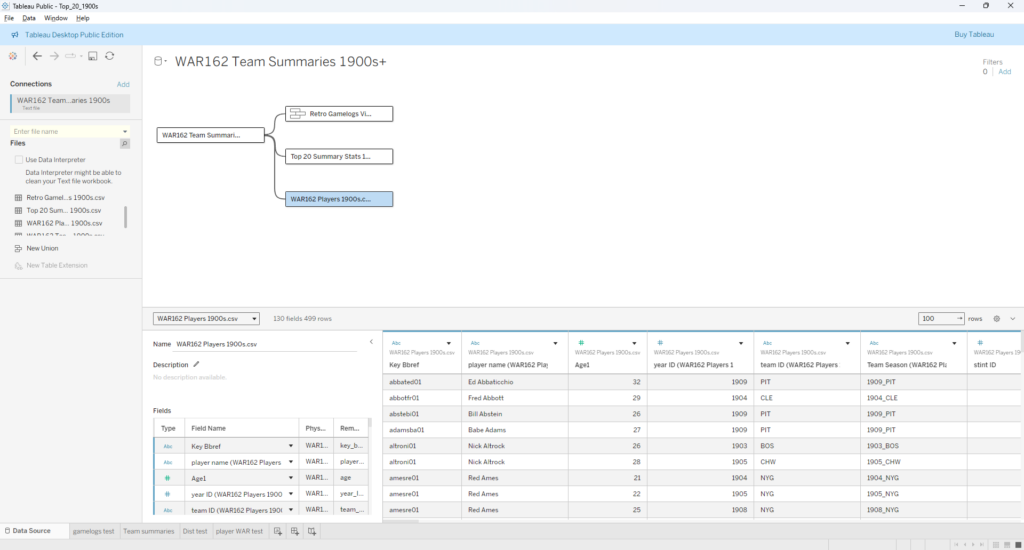
Tableau Data Source window

I elected to use the WAR162 Team Summary file as my base table, and then join the other tables to it. Essentially, that takes us from a small base table with highly summarized information that connects to tables with much greater detail. Before we move on, note that the two Retro Gamelogs files show as a single file, as they have been combined using Tableau’s union capability (since all fields are identical, we can simply combine them). Now we can take a look at the relationships connecting each table:
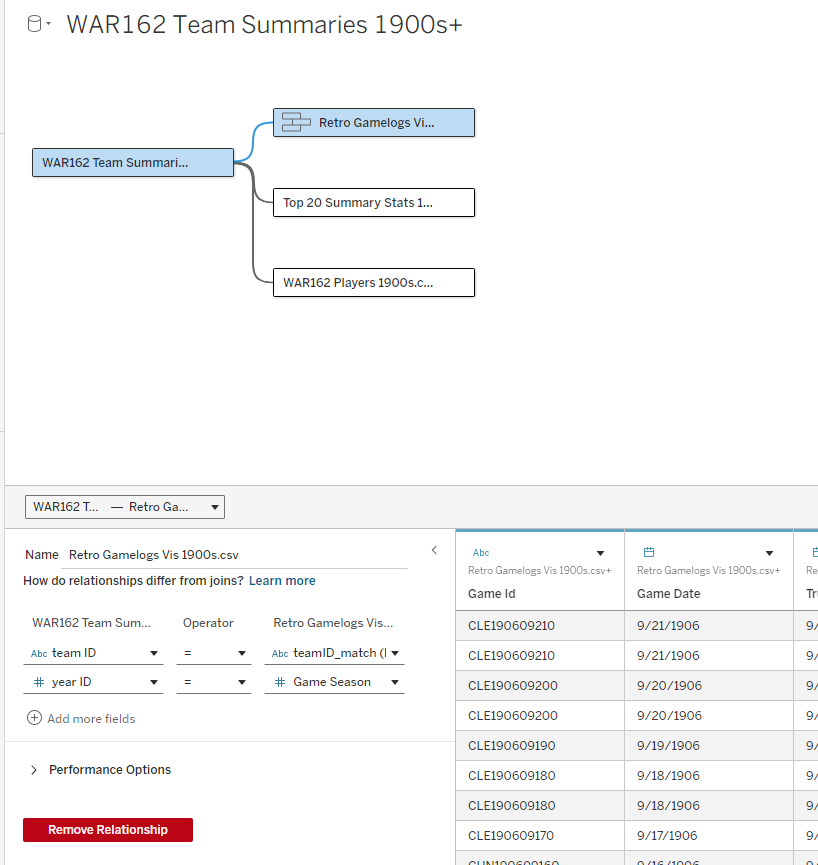
WAR162 Team Summary to RetroGamelogs relationship

Our first relationship connects the base table with gamelogs data, and is based on teamID and yearID (season). Simply put, we can see every game-level record for each of the 20 teams in our 1900s decade, just by joining those two fields.
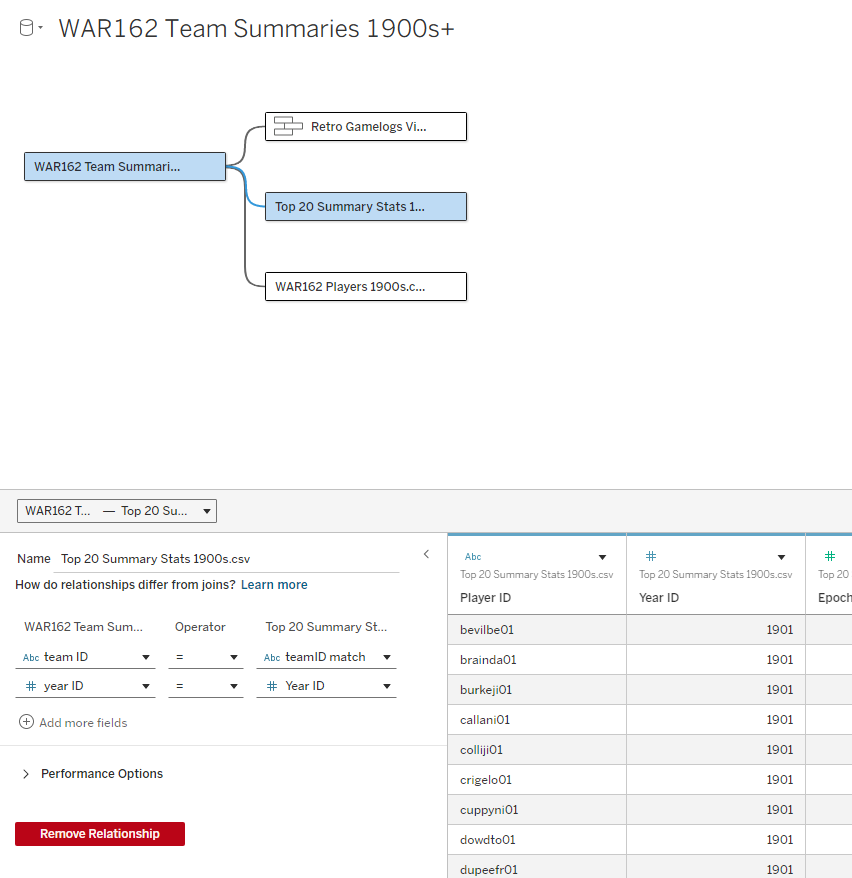
WAR162 Teams to Summary Stats relationship

Next up is our join to the Top 20 Summary Stats table, which contains player-level stats for every season among our Top 20 teams. This includes most of the basic statistics fans are familiar with – runs, hits, doubles, home runs, and so on. Joining on teamID and yearID (season) provides access to all of these numbers.
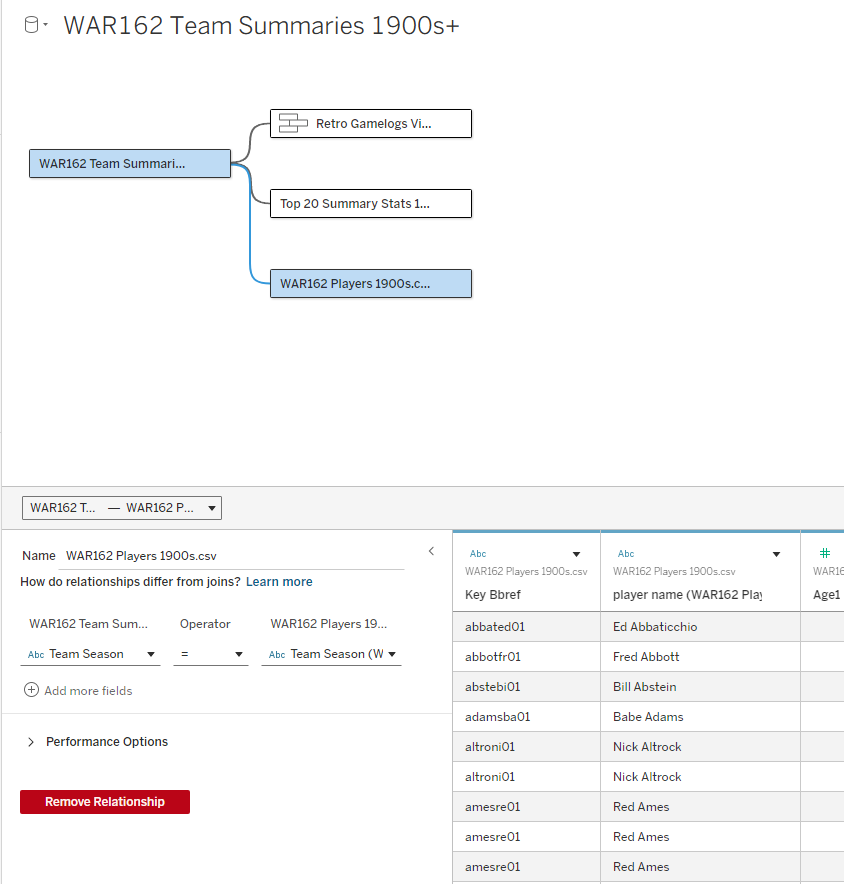
WAR 162 Team to Players Relationship

The final join is between the WAR team and WAR players data. This will allow for showing the top WAR162 performers for each of our Top 20 teams. The dashboards will now be able to reveal exactly why a team is ranked – perhaps there were two or three WAR standouts, or maybe a team has a balanced roster with many above average contributors.

We’ve Got a Lot of Data to Sort Through!

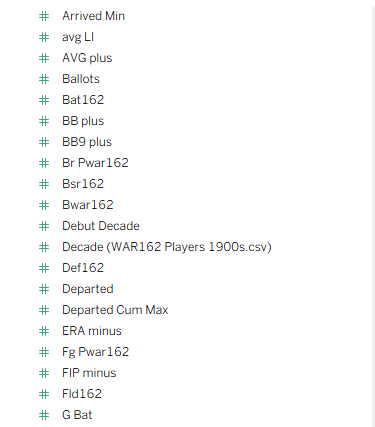
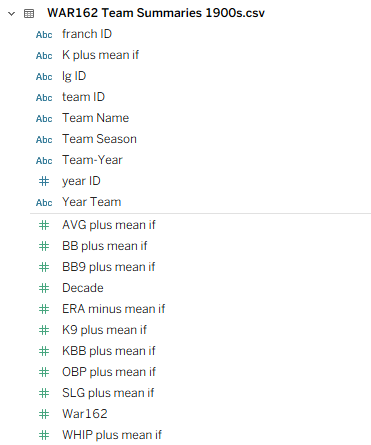
As you may have gathered through these steps, there is now a lot of available data to potentially use. Some of it won’t be impactful, and can be easily left out of the dashboard design, but there will certainly be a competition between the remaining elements. Some of these challenges can be accommodated by building dynamic options where users can filter dashboard views, but we’ll still require a base framework for the design. It won’t be easy – take a look at just a small subset of the data elements:
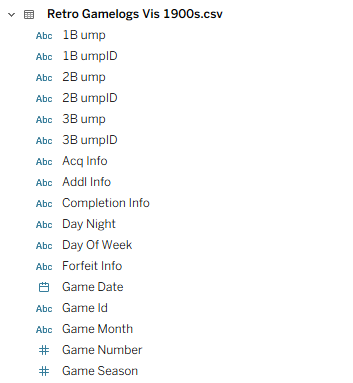
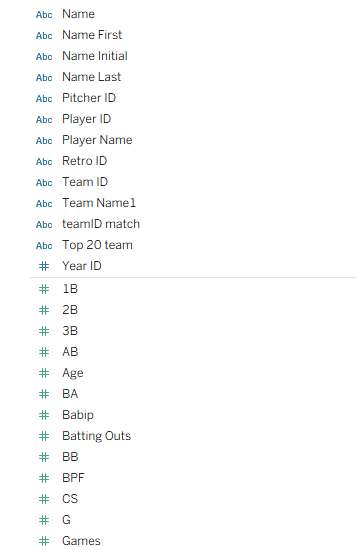
A handful of data fields…
Followed by more data…
And still more data…
And even more data…

You probably get the idea by now – there’s data everywhere, some of it meaningless, some of it trivial, and a good chunk of it important or essential. The job of a dashboard designer is to discard the first two categories and refine the important or essential data to create a compelling output for users to navigate. The dashboard needs to combine functionality with aesthetics (the world is full of truly ugly dashboards!) that invite users to interact and discover new insights.

What’s Next?

My next post will introduce the dashboard design and walk through how to effectively use it, followed by the rollout of my decade-level countdowns from #20 to #1. I hope you’ll join me on this journey, and thanks for reading!
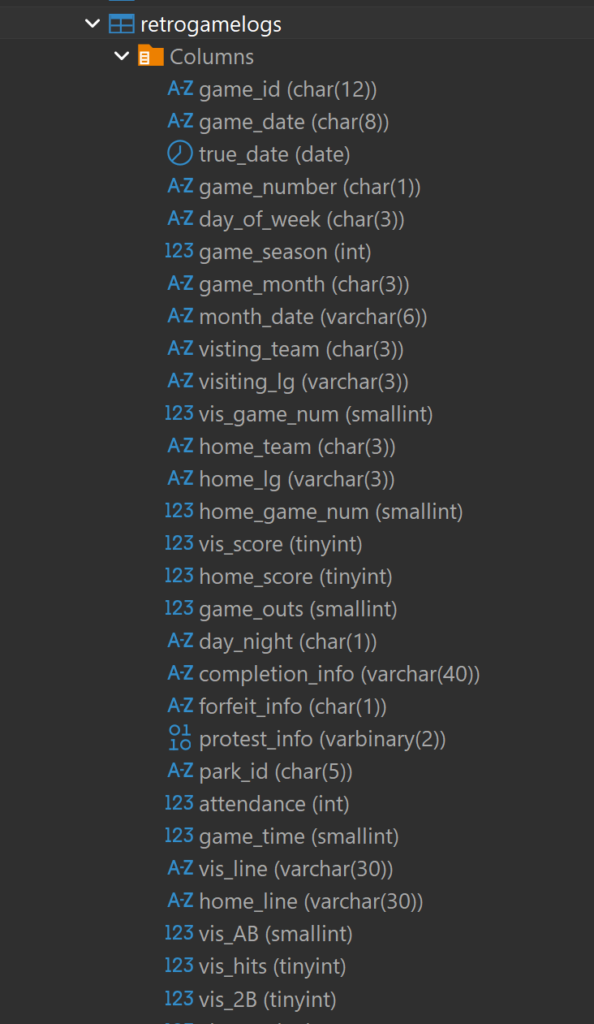
Data, Data, and More Data

My first week of 2026 has been spent largely on updating game and event data from the massive Retrosheet data sets. Even limiting the number of data elements to a small subset of the event data yields a considerable amount of information to analyze. Here’s what’s new (for my databases) this week:

  • 2023-2025 season event data
  • 1950-1953 season event data
  • 1910-1949 season event data

What do we find in this data? For my subset, these are the bits of data I can use:

  • game id (a unique combination based on date and the home team
  • visiting team
  • inning (in which an event occurred)
  • batting team
  • the number of outs, balls, and strikes at the time of an event
  • the score at the time of the event
  • batter & pitcher information (left-handed, right-handed, etc.)
  • event type (single, double, home run, etc.)

Plus a wealth of additional information to be mined, analyzed, and visualized.

While Retrosheet is missing events for a small percentage of games between 1910 and 1970, the data is otherwise remarkably comprehensive. Now that I have it stored locally, you should start seeing some interesting analyses on this site for 2026. That’s it for now, and thanks for reading!
Closing Out 2025 – With New Data!

Over the last few years, I have been a bit inconsistent with updating my baseball databases, for a variety of reasons. To produce more content in 2026 I need to keep these sources up to date, starting with data from the great retrosheet.org site. I found (to my dismay) that not only had I not updated the 2024 game log data last year, but was missing 2023 as well! The problem is now solved, as I was able to add not only 2023 & 2024 records, but also the 2025 data, and to run the multiple code updates (in MySQL, if you’re wondering) I created years ago.

So what is Retrosheet game log data? It’s a thorough summary of every Major League Baseball (MLB) game played in a season – typically 2,430 games in the current era. The data covers everything from the game date to the umpires and players at each position. In short, it’s a very rich data set for building a variety of analyses and visualizations. Let’s take a look at some of the data attributes, starting with extensive game summary information, including dates, home and away teams, and more. Note that I have also created a handful of calculated data fields to aid in analyzing the data, but the rest is all available from Retrosheet.

Game summary attributes

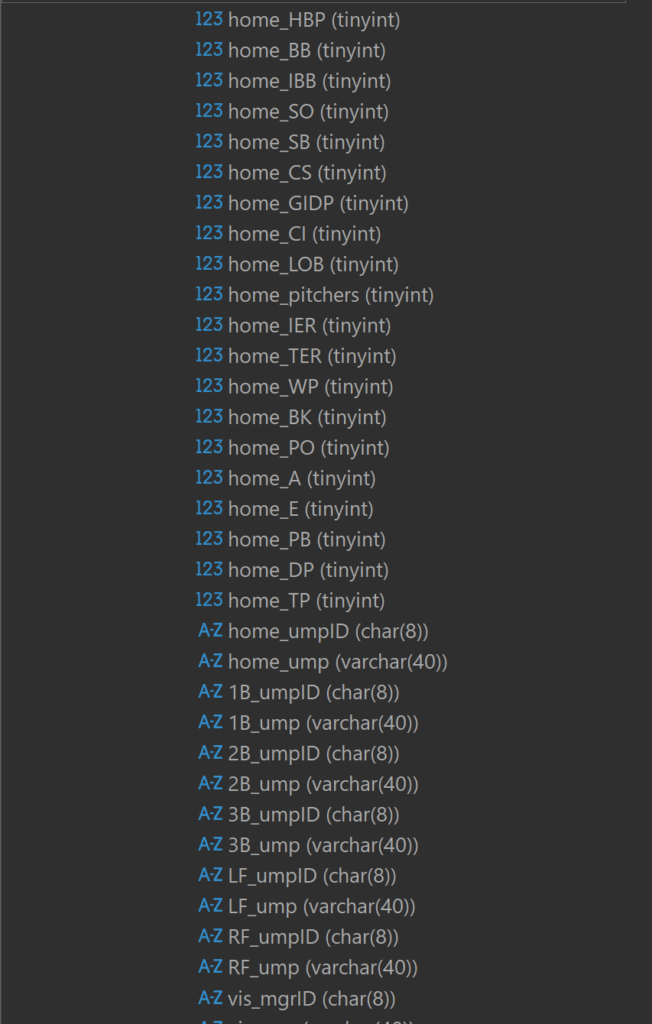
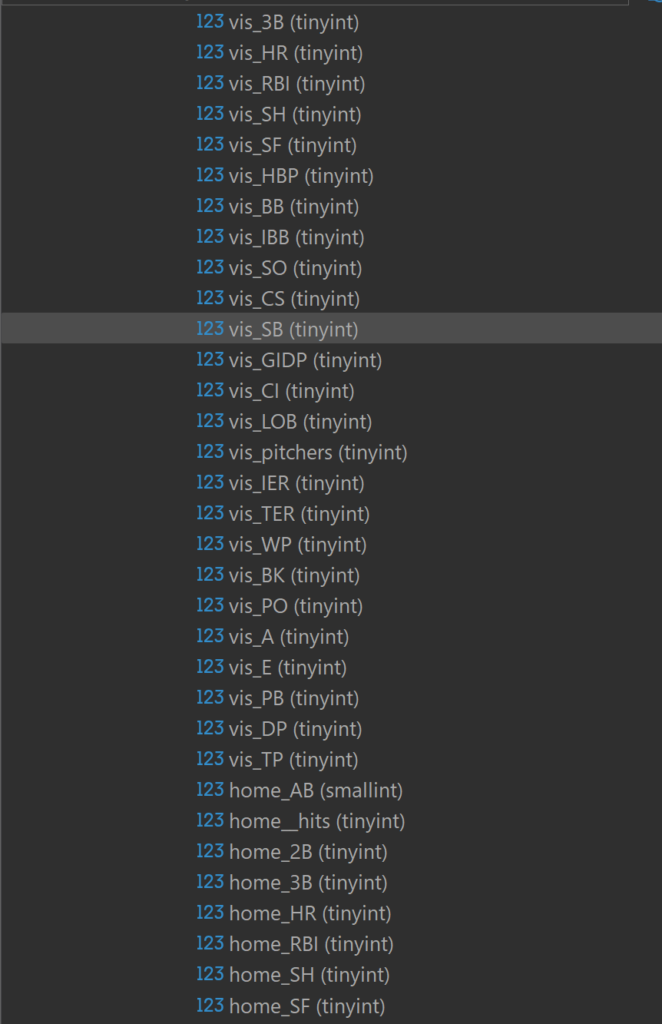
Here are more attributes, as we now begin to see some game details – the number of errors, home runs, walks (BB), and double plays (GIDP), for both the home and visiting teams.

Visitor and home team game detail

Some more team details are next, followed by information on the umpires for each game:

More home team detail plus umpire data

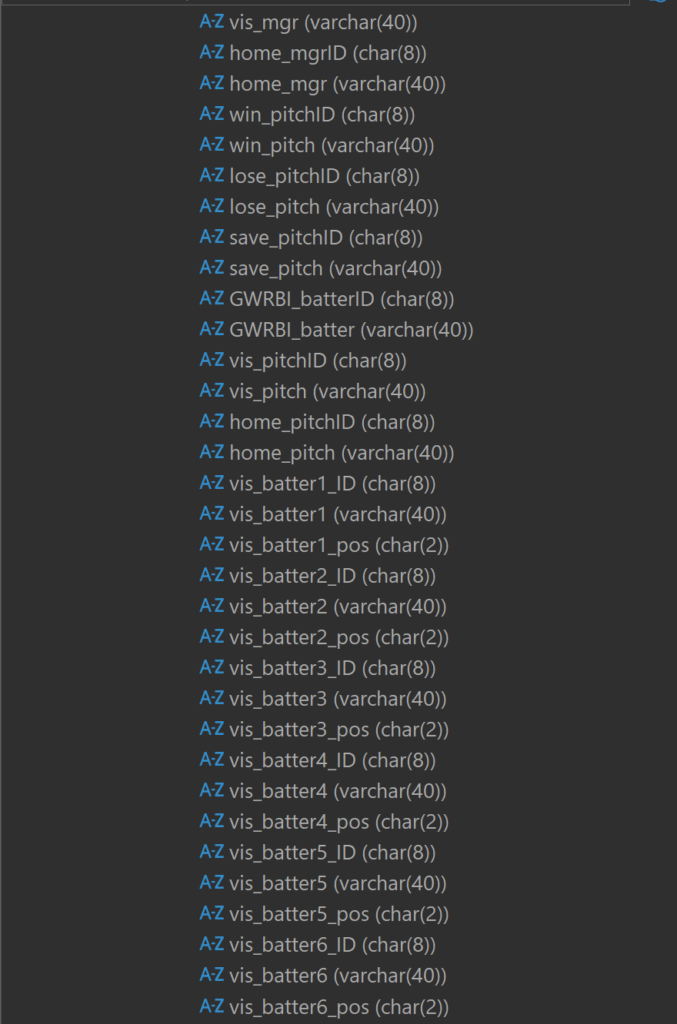
And more…now with detail on the winning and losing pitchers, and the start of the batting order for the visiting team:

Visitor batting order attributes

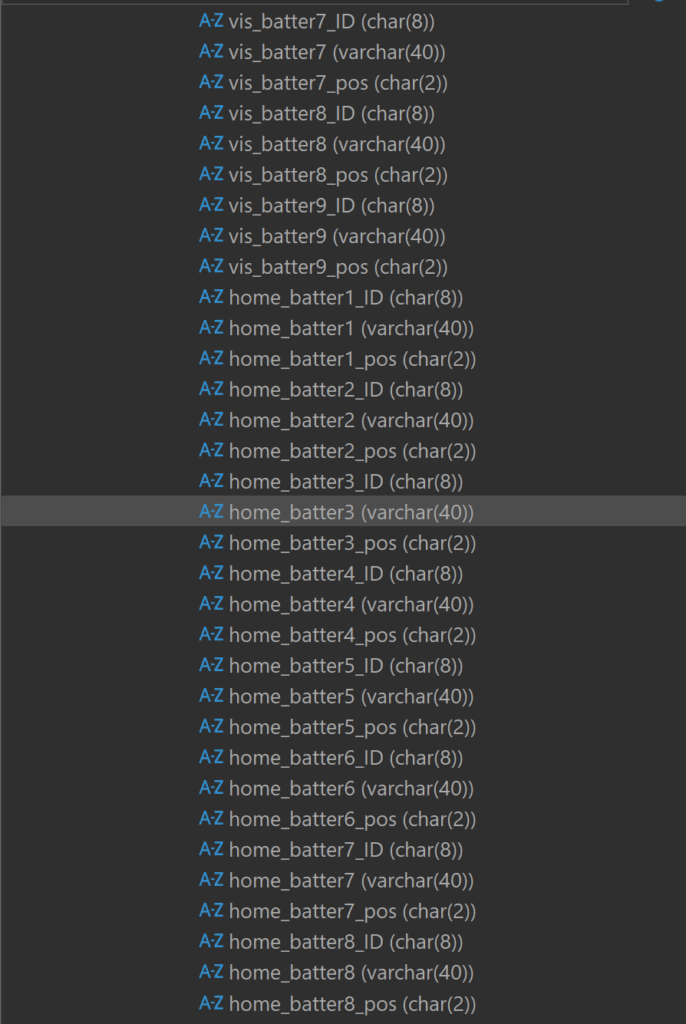
Additional batting order detail…

Visitor and home batting order attributes

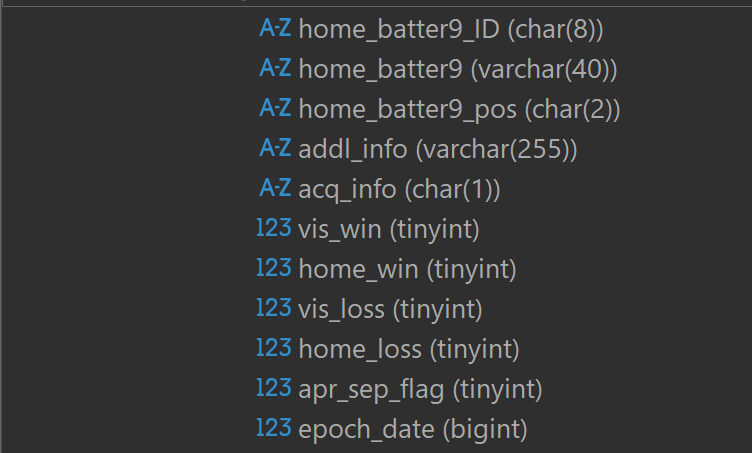
And finally, some fields created by me to aid in analyzing the data:

Some additional calculated fields

Obviously, there are numerous opportunities to conduct interesting and fun analyses with this robust data set, which now encompasses data from all seasons between 1921 and 2025. Next up is to pull in seasons from the other end of MLB history, specifically the 1901 through 1920 campaigns. After that comes the fun part of analyzing and visualizing the information.

See you soon, and thanks for reading!

Updated Pennant Race Charts

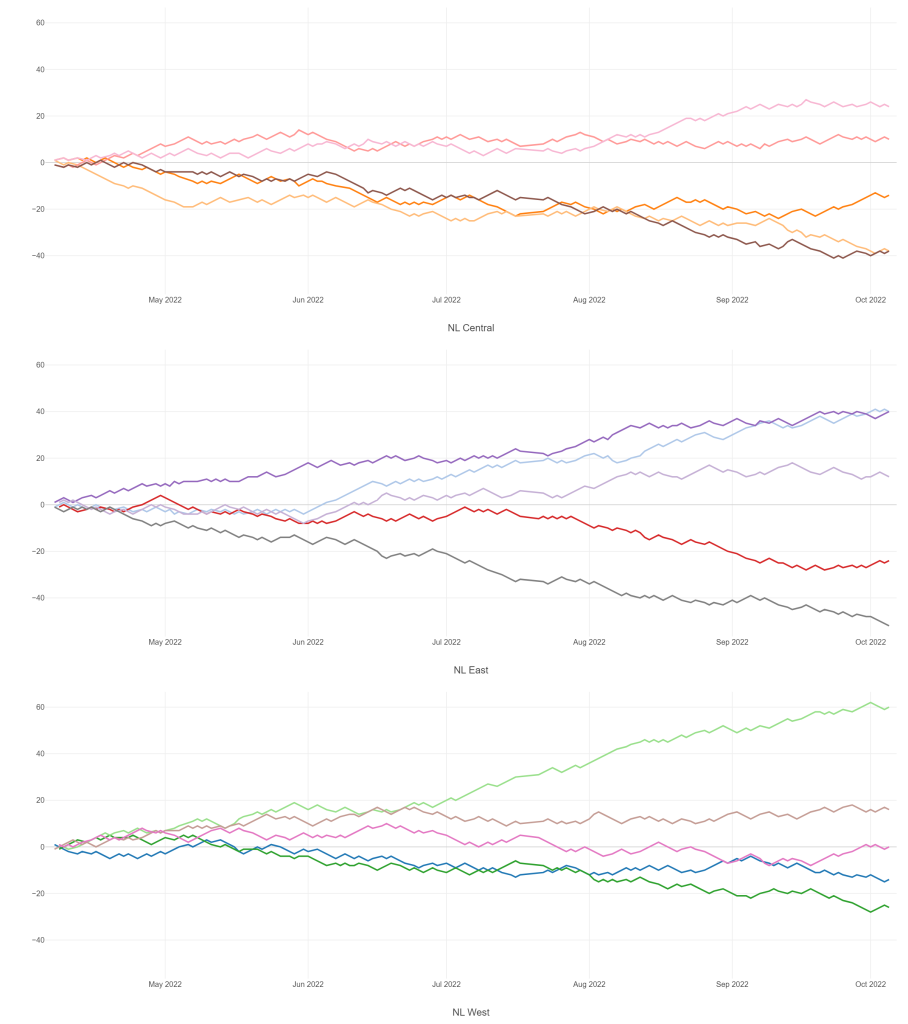
The 2020, 2021, and 2022 MLB pennant race charts using Retrosheet data have been updated on the Exploratory Server: https://exploratory.io/dashboard/kc2519/Pennant-Races-1901-current-aUu5vDT1EW. All seasons from 1901-2022 are now available using the simple parameter selection (just make sure it’s set to the interactive mode).

Here’s a screenshot:

Views of the 2022 National League pennant races by division

Meanwhile, I’m struggling with some JSON output for my traditional version, so no updates there yet.

Interactive Pennant Races in Exploratory

I’ve been creating MLB pennant race charts for years now, covering every season from 1901 through 2019, with 2020, 2021, and 2022 to come soon. These charts have been available on the site in single charts for each season at a league (American or National) and division level (since 1969). This has always worked reasonably well, but I have always yearned for something a bit more interactive, where users could go to one place and enter the season and league they want to view. Finally, courtesy of the Exploratory Server, such a solution is now available.

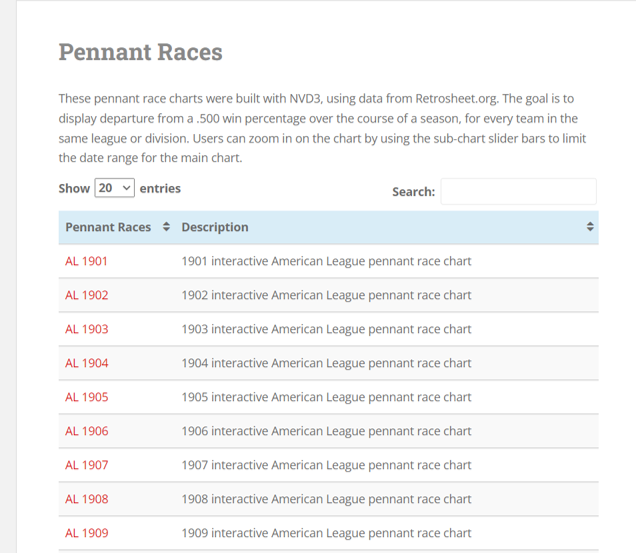
Here’s a glimpse of what I’m talking about – first, the old way of doing things, which I’ll continue to maintain. The process starts with a visit to the pennant races page on this site:

Pennant races chart selection

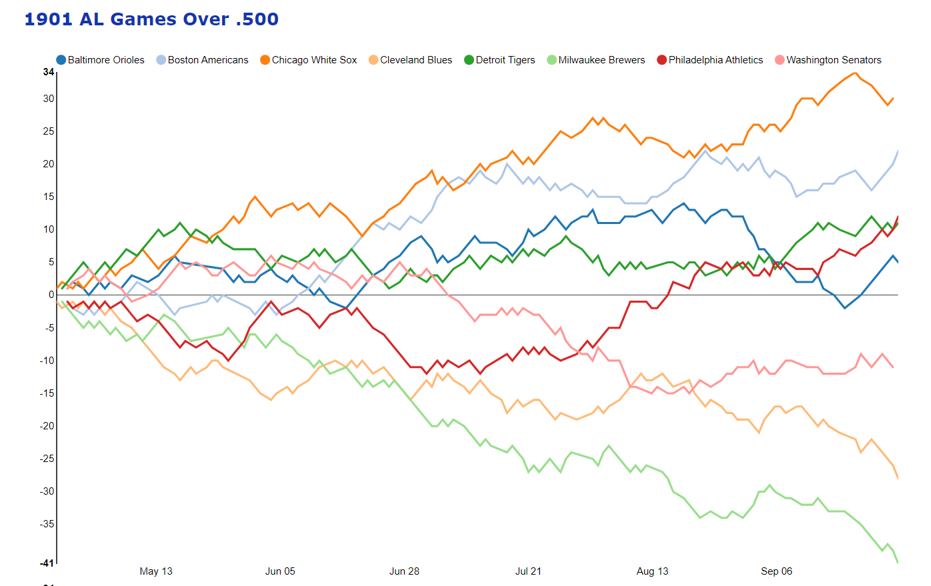
Selecting a specific menu option will display a single pennant race, such as the 1901 American League race shown here:

1901 American League pennant race

These charts work well, and provide some interactivity, but it is strictly one chart per link, so not very efficient.

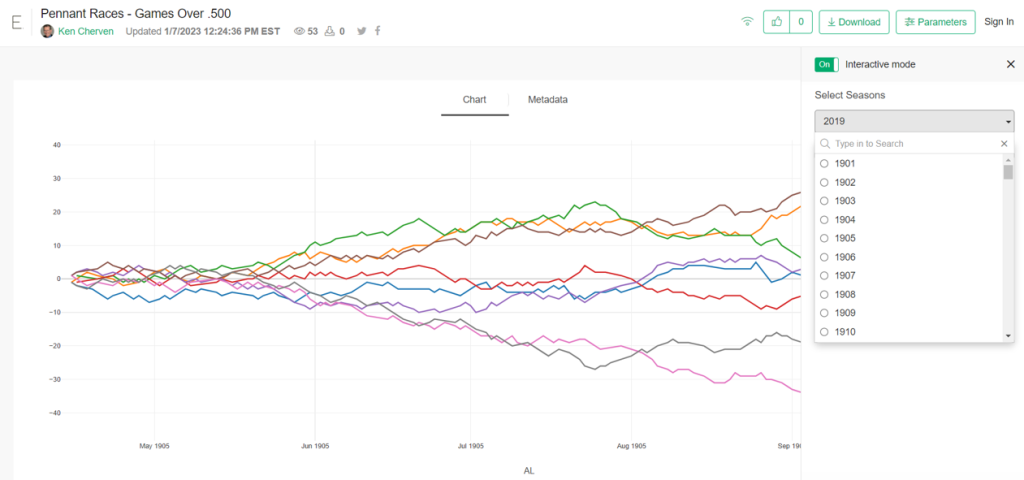
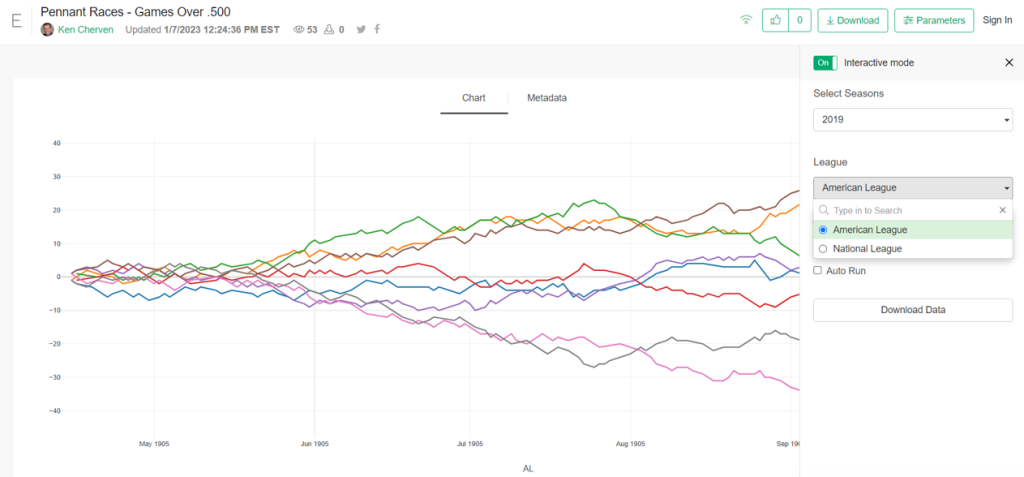
Now, here’s the alternative option using the Exploratory server. Here I can create very similar charts but with a parameter-driven menu enabling users to select a season and a league:

Exploratory pennant race seasons filter
Exploratory pennant race league filter

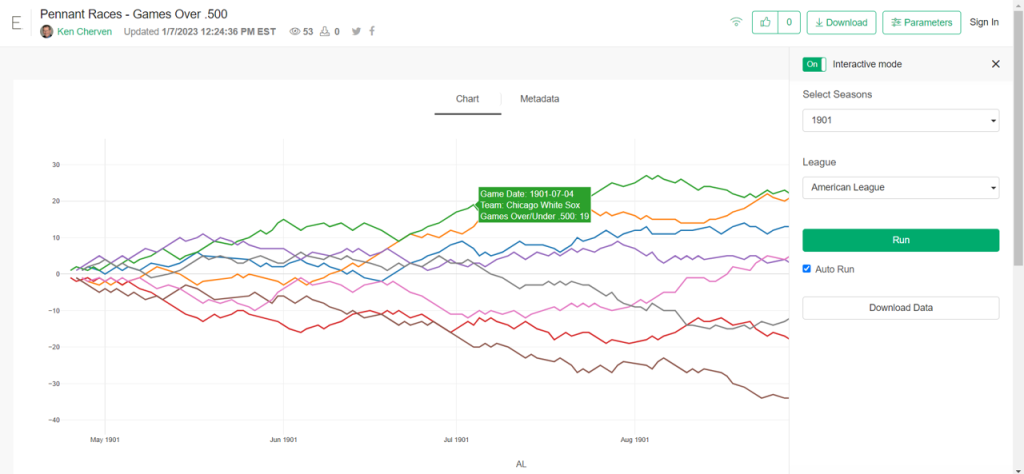
Here’s a case where we select the 1901 season and the American League filters, with the following result:

1901 AL pennant race in Exploratory

The real power in this approach comes with the seasons from 1969-2019, where each league had two and then three divisions. Selecting the 2019 season and the American League filter options will now deliver all three divisional charts on a single page!

You can try this out yourself; just make sure to set the Parameters interactive mode to “On” which will activate the filters; you can control the display as well to show one or more columns. I find that a single column works best for the pennant race charts.

https://exploratory.io/viz/kc2519/Pennant-Races-Games-Over-500-Qvx9ZEF0In

I’ll be working more on this as part of the visualization options going forward; there are other cases where I can use similar functionality. Thanks for reading, and see you soon!

Trade Network Updates, Part 1

A few years back (2016 o be specific) I created network graphs displaying the history of trades made for each MLB franchise, using transactions data from the wonderful Retrosheet project. These graphs presented more than a few challenges in how to present the data but I wound up with what I consider to be a very interesting set of results, which you can find here. I also created some posts on the process at that time, found here and here.

Here’s a snapshot within a graph:

Six seasons have elapsed since I created those graphs, so I thought it was beyond time to update them, but this time with a twist. Last fall I came across a great dataset that captures an array of advanced sabermetric statistics which I hope to use on a regular basis. These statistics can be used to assess a player’s true value relative to his peers each season. What if I could incorporate those into the trade network updates to show the post-trade value of each player to their new team? Ideally, this will help to show the value of each trade and which team wound up getting the better part of the deal.

Of course this would involve adding a degree of complexity to the MySQL code for pulling the data and shaping it for use in creating network graphs. However, the end result could be very revealing and worthwhile. Today I’m at the start of the process, tinkering with SQL code to extract the data in a proper format. Here’s an example:

SELECT h.player_name, p.playerID, tr.season, tr.TransactionID, tr.TeamFrom, tr.TeamTo, ROUND(SUM(h.WAR162),1) as WAR

FROM historical_WAR_and_more h
INNER JOIN People p
ON h.key_bbref = p.bbrefID
INNER JOIN trades2021 tr
ON p.retroID = tr.Player

WHERE tr.season >= 1901 and h.year_ID > tr.season and h.team_ID = tr.TeamTo AND tr.Type = ‘T’

GROUP BY h.player_name, p.playerID, tr.season, tr.TransactionID, tr.TeamFrom, tr.TeamTo

In this case, I’m looking at the cumulative WAR (Wins Above Replacement) for each traded player with their new team. This could be a single season total or the sum of many years in some cases. Here are some results:

We now have post-trade results (starting if the season following the trade) as measured by WAR for each traded player. We see one fairly substantial figure – the second Aaron Harang trade which netted 16.9 WAR points for his new team, the Cincinnati Reds (CIN in the results). Given that a single season WAR above 3 or 4 is considered substantial, it’s clear that his new team probably benefited from a few of those high-value seasons. What we can’t see yet is what they gave away in their half of the trade.

Fortunately, we can access this using the TransactionID field, which provides all the information for each party within the trade. But we’ll save that for another day as I figure out the next progression of the code. As always, thanks for reading!

Pennant Race Charts Updated!

The last of my big three annual updates is now complete, as all 2016 & 2017 pennant race charts have been created, and now reside in the Visual-Baseball Project portfolio. These charts are created using NVD3, which is built on top of the powerful d3.js framework developed by Mike Bostock. These tools help make the charts highly interactive, allowing you to see where each team stands at any given point in the season, and also providing the ability to zoom in using a smaller sub-chart beneath the primary display.

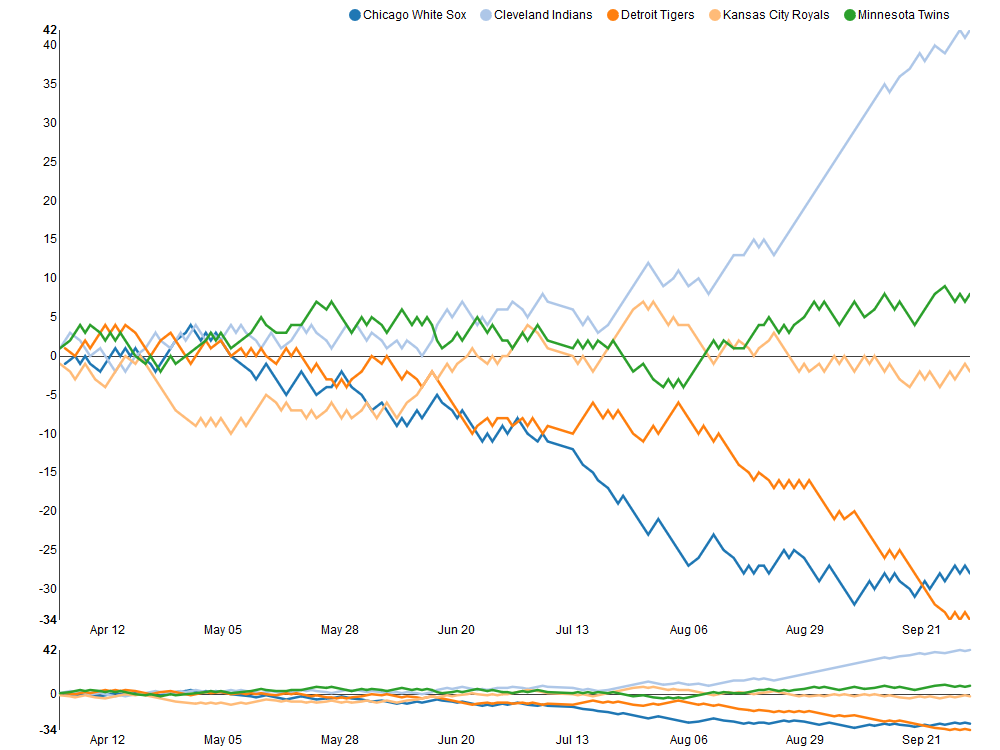
The structure of the charts is based on every team’s relationship to a .500 winning percentage – a situation where a team wins exactly as many games as it loses. This structure allows for easy interpretation of the results, as we can see which teams hover near the .500 mark (i.e.- consistent mediocrity), others that rise well above this level, and also those teams that descend far below the breakeven point. Allow me to illustrate these thoughts using the 2017 American League Central division, and my hometown Detroit Tigers, who suffered through their worst season since 2003.

2017_AL_Central

As you can see, the darker orange line representing the Tigers takes a steep dive starting in early August, culminating in a final record 34 games below the .500 percentage. Meanwhile, the rival Cleveland Indians (light blue line) present a near mirror image of the Tigers failure, with a sensational month of September that ultimately lands then 42 games over the .500 break-even level.

Similar charts have been created for the other divisions for both the 2016 & 2017 seasons. In fact, you can now view any season, league, and divisional splits dating back to the 1901 campaigns, a total of 380 pennant races to explore! Find all the pennant race charts here. Have fun exploring, and as always, thanks again for reading!

Recapping 2017

Observers of this blog will note that posts were scarce in 2017 – in fact this is the only one, and it’s being completed in 2018! This is the result of a variety of causes, including external projects, busy schedules, and focus that was shifted in other, unrelated directions. Still, 2017 was not without its moments.

For starters, I managed to create three data visualization courses for Packt:

Learning Data Visualization

Data Visualization Techniques

Advanced Data Visualization

Retrosheet data for the 2016 and 2017 seasons has also been downloaded, and is in the update process as we speak, which will enable some new visualization work (and perhaps a new book title) in 2018. Soon, annual season data from the Baseball-Databank and Sean Lahman will be available as well.

I’m also in the process of launching a new site at jazzgraphs.com, where I’ll use network visualizations to uncover the complex web of relationships between jazz musicians, labels, and recordings. Posters and a book are in the plans for 2018, so stay tuned.

Wishing all a happy and prosperous 2018, and I promise more content to come this year!