Category: Network Graphs

Athletics Radial Axis Network

Our next entry in the MLB Radial Axis Series features the Athletics in all their iterations, from Philadelphia to Kansas City to Oakland, and now Sacramento. In total, we’re talking about 125 seasons from 1901 through 2025. We’re going to walk through some highlights from the network, and then provide the link so you can explore it in detail. For some background on how the network graphs work, select this link – Anatomy of MLB radial axis graphs.

The Athletics Network

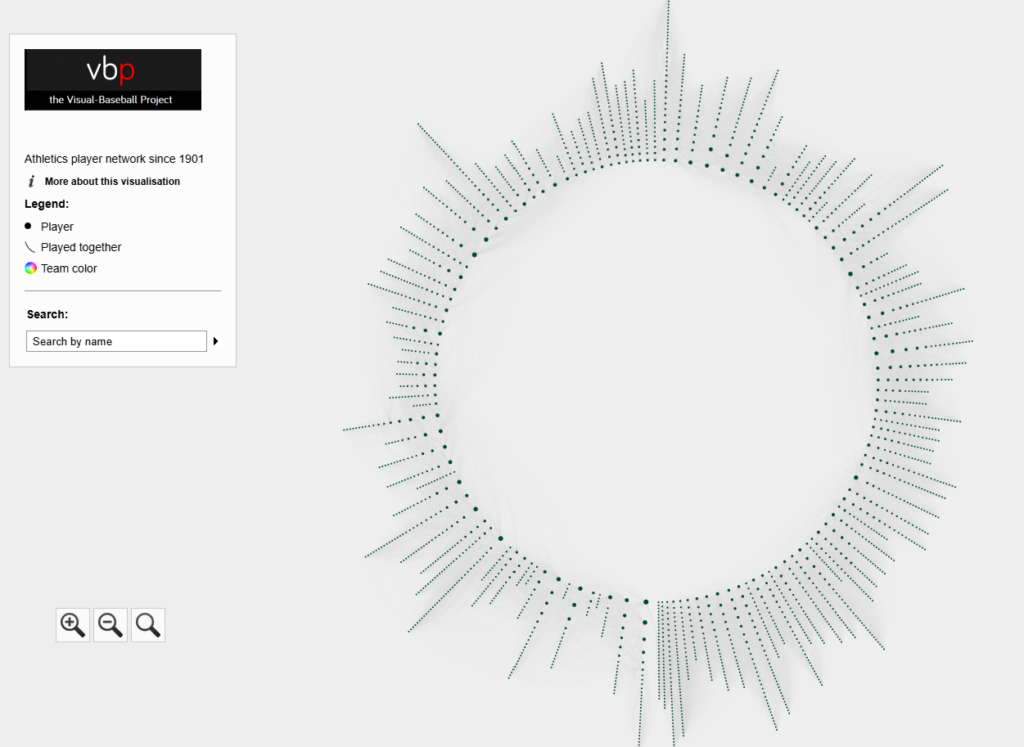
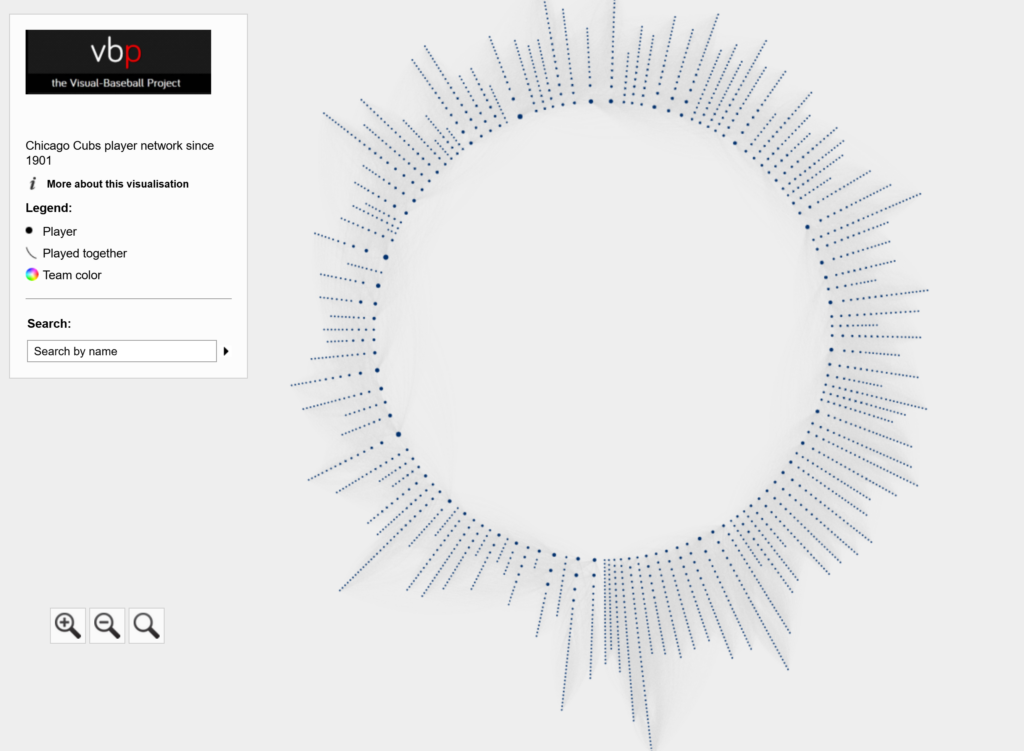
The Athletics’ radial axis network reflects the connections among all players who spent time with the franchise from 1901 to 2025. The 1901 season is found at the bottom center of the graph. Subsequent seasons are arranged clockwise, eventually returning to the bottom center with the 2025 season. Player nodes are sized by the number of seasons spent with the team, and the gray lines between nodes reflect connections to other players. The interactive version of the network is here – Athletics Network.

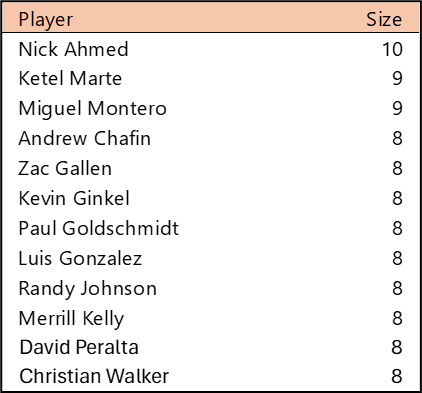
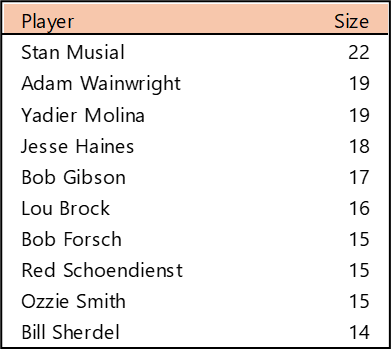
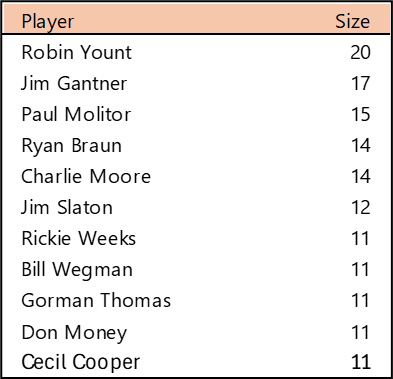
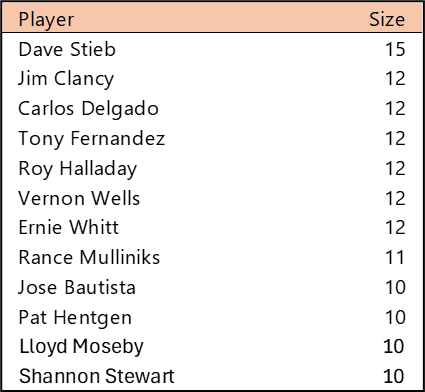
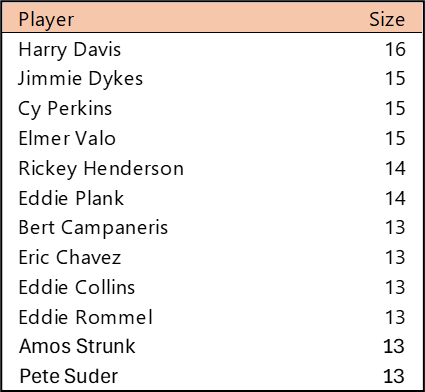
Top 10 by Seasons Played (Size)

Harry Davis played 16 seasons at the turn of the 20th century for the Philadelphia-based Athletics to claim the longevity title. Given Connie Mack’s propensity for breaking up his A’s teams when stars became too expensive (Jimmie Foxx, Lefty Grove, Eddie Collins, etc.), we don’t see many stars with an entire career spent with the A’s. The Oakland edition of the Athletics features a few names, including Rickey Henderson (1979-84, 1989-93, 1994-95, 1998), Bert Campaneris (1964-76), and Eric Chavez (1998-2010).

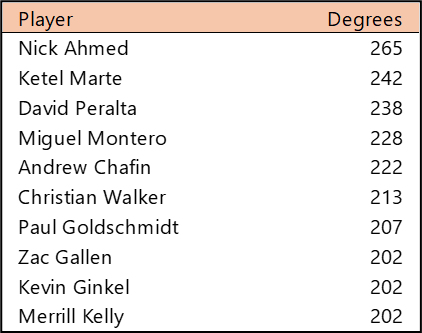
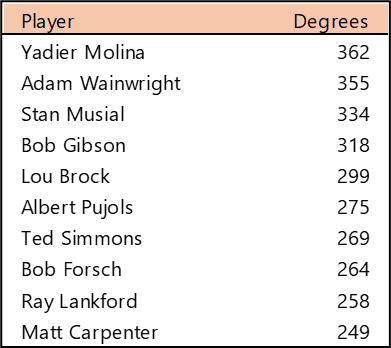
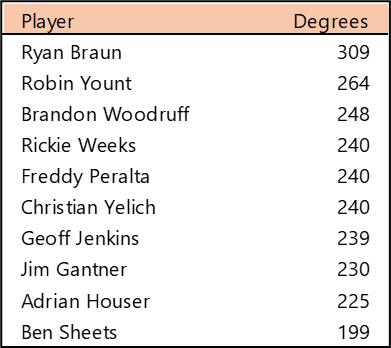
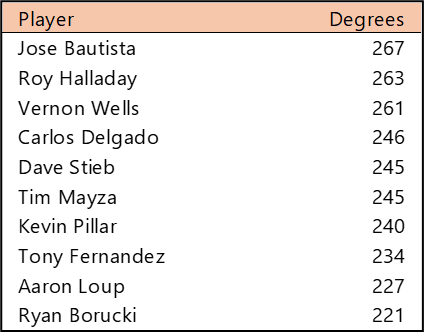
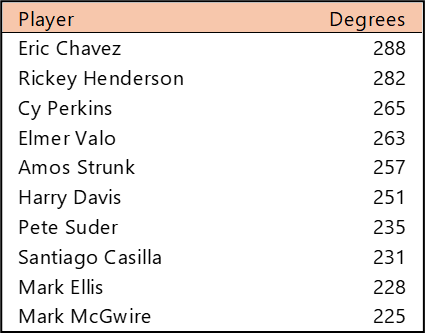
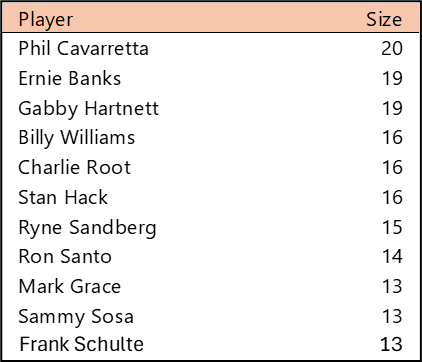
Top 10 by Degree (the number of connections)

Eric Chavez tops the list for the most teammates, followed closely by Rickey Henderson. Unlike most original franchises (dating to 1901), the Athletics typically failed to keep players for their entire career; thus, there are no players with 300 or more connections.

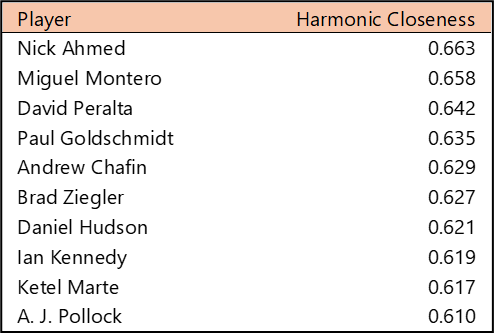
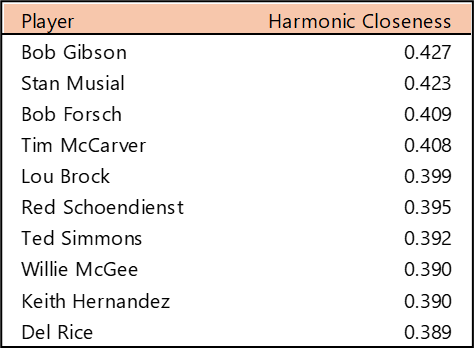
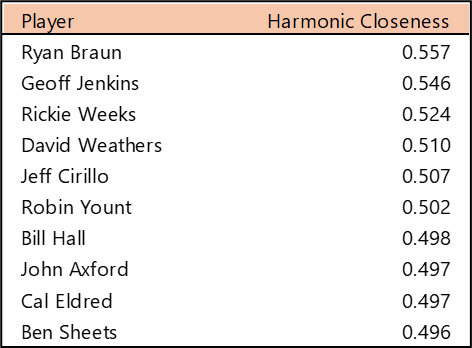
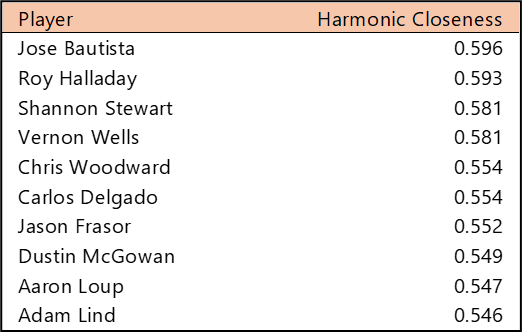
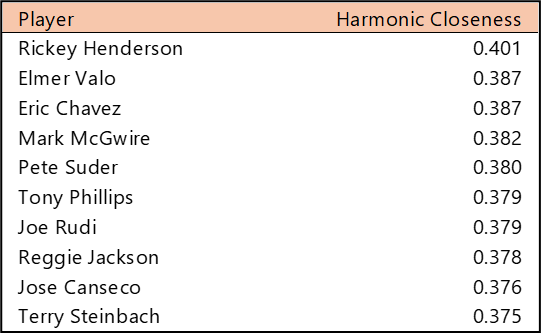
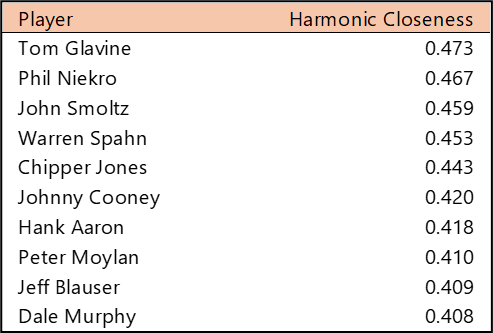
Top 10 by Harmonic Closeness Centrality

With Harmonic Closeness Centrality, we measure how closely an individual player is related to all other players in the network. Rickey Henderson tops this list, due to both his 14 years with the team and his multiple stints. Several other players are prominent due to the period when they played for the A’s. Mark McGwire, Tony Phillips, Joe Rudi, and Reggie Jackson all played during the 1970s or 1980s, placing them in close proximity to both older and more recent team members.

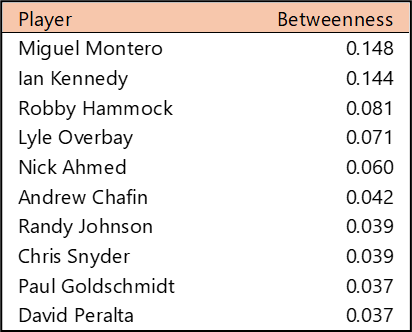
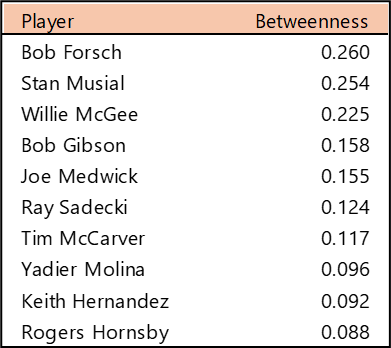
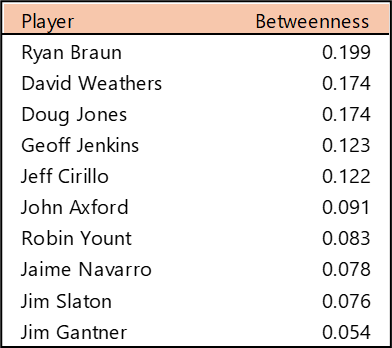
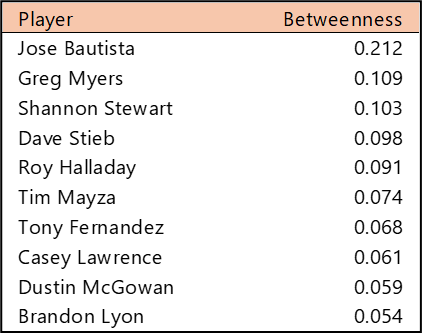
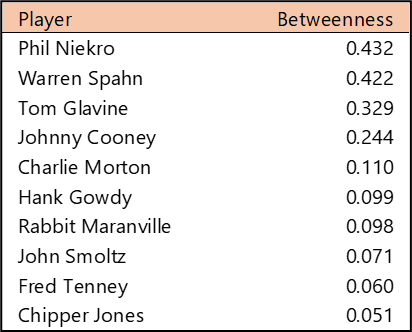
Top 10 by Betweenness Centrality

Betweenness Centrality measures which players rank highest for the ability to connect to all other players. Reggie Jackson (1967-75, 1987), Al Simmons (1924-32, 1940-41), and Art Ditmar (1954-56, 1961-62) top the rankings for this measure. Interestingly, all three had Athletics stints at the start and end of their careers. This places them in the unique position of having at least two distinct sets of teammates as direct connections.

Summary

That’s it for our overview of the Athletics network. Be sure to visit the interactive graph to discover additional insights about the Athletics players over the last 125 seasons. We’ll be back shortly with our next franchise entry. Thanks for reading!
Astros Radial Axis Network

Our next entry in the MLB Radial Axis Series features the Astros, who started out as the Colt .45s in 1962. We’re going to walk through some highlights from the network, and then provide the link so you can explore it in detail. For some background on how the network graphs work, select this link – Anatomy of MLB radial axis graphs.

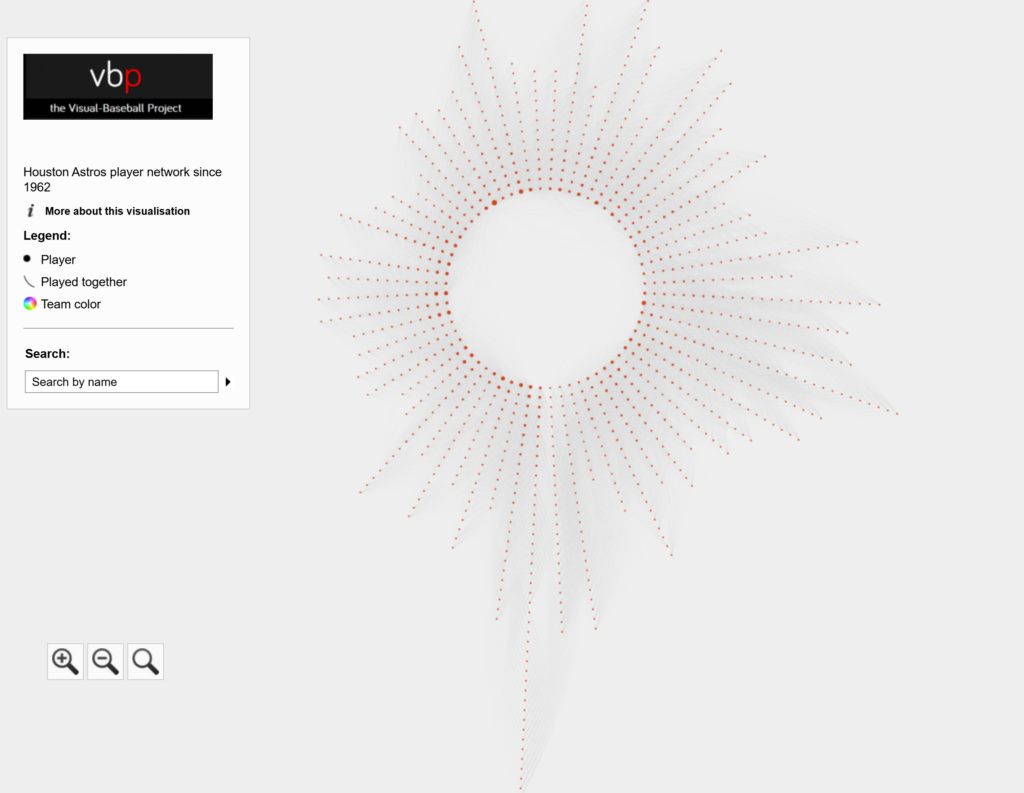
The Astros Network

The Astros’ radial axis network reflects the connections between all players who spent time with the franchise between the 1962 and 2025 seasons. The 1962 season is found at the bottom center of the graph. Subsequent seasons are arranged clockwise, eventually returning to the bottom center with the 2025 season. Player nodes are sized based on the number of seasons spent with the team, and the gray lines between nodes reflect connections to other players. The interactive version of the network is here – Astros Network.

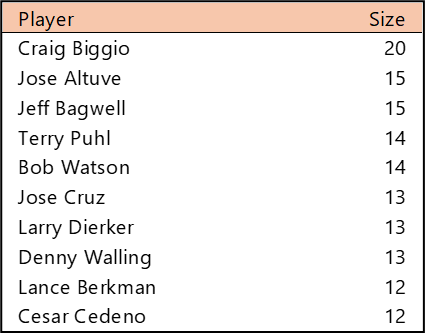
Top 10 by Seasons Played (Size)

Craig Biggio sits alone at the top of the Astros seasons played list with 20, trailed by Jose Altuve (now in season 16) and Jeff Bagwell. Other long-tenured Angels legends include Terry Puhl, Bob Watson, Jose Cruz, Larry Dierker, and Denny Walling.

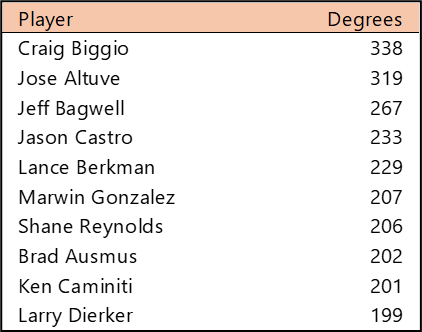
Top 10 by Degree (the number of connections)

Craig Biggio again tops the degrees ranking, having been on an Astros roster with 338 different teammates. Jose Altuve is likely to claim the top spot eventually, while Jeff Bagwell is a distant third. Jason Castro had two stints (2010-16, 2021-22) with Houston, leading to a large number of different teammates.

Top 10 by Harmonic Closeness Centrality

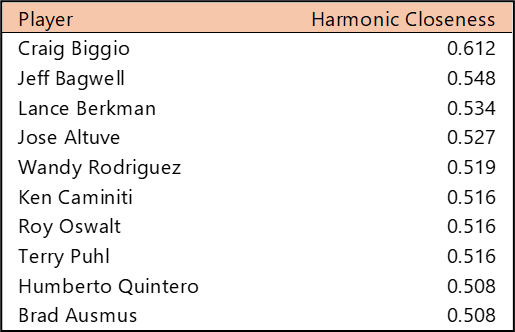
With Harmonic Closeness Centrality, we’re measuring how strongly an individual player is related to all players in the network. The Astros famed Killer B’s dominate this measure. Biggio, Bagwell, and Berkman all rank at the top of the most well-connected players in Astros history, with Biggio the clear leader. Jose Altuve and Wandy Rodriguez are also very favorably positioned within the network, along with other Astros legends like Ken Caminiti, Roy Oswalt, and Terry Puhl.

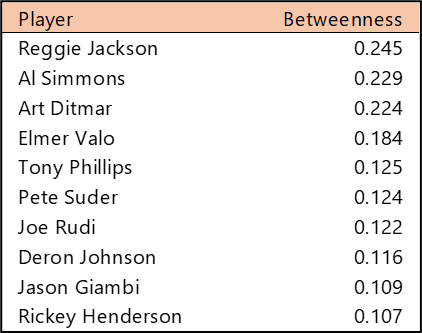
Top 10 by Betweenness Centrality

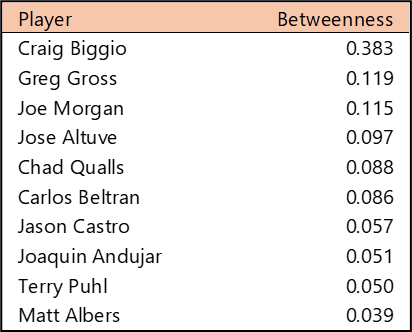
Betweenness Centrality measures which players are most central to the network. Often, this results in players who played in the middle period of a franchise’s history, or players with multiple stints with one franchise. Craig Biggio is unsurprisingly at the top of this measure, given his 20 seasons with the team between 1988 and 2007. If we wanted to connect to every Astro in the network, our most direct path is clearly through Biggio, followed by Greg Gross and Joe Morgan. Gross played just five seasons with the Astros, four to start his career and then one for his final MLB season. This split tenure gives him a unique position within the Astros network, connecting to teammates from 1973-76 and again in 1989.

Summary

That’s it for our overview of the Astros network. Be sure to visit the interactive graph to discover additional insights about the Astros players over the last 64 seasons. We’ll be back shortly with our next franchise entry. Thanks for reading!
Anatomy of MLB Radial Axis Graphs

This post will introduce you to an upcoming series of MLB radial axis graphs, where we examine the connections between all players at a franchise level. The plan is to feature two teams per week, with an overview of each graph’s structure and highlights within the graph. Each graph will have the same general appearance and functionality; only the underlying data and team color will change. Every post will provide a link to the interactive graph, allowing you to explore freely. One caveat – the graphs are best explored on tablets, laptops, or large monitors; phone screens will not work well.

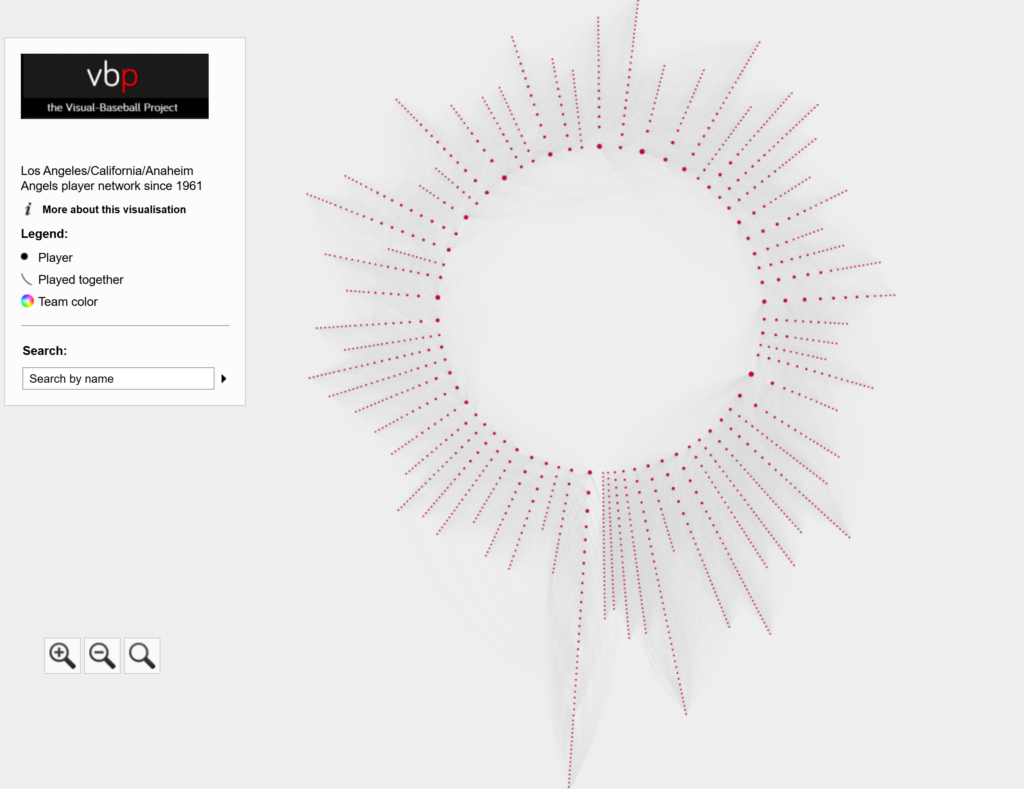
Let’s begin with the general concept behind the radial axis approach. I selected this layout (using Gephi) to provide an intuitive graph that is both easy to understand and navigate. Using a radial axis graph, we can arrange the data points (nodes) based on the first season a player was with a franchise (e.g., 1964). Players starting in the same season will be arranged in a radian originating near the center of the display. In addition, the players’ nodes are then arranged based on the number of seasons spent with a franchise. Let’s have a quick look, using the Anaheim Angels graph:

There’s a lot going on here, but we’ll explain it in the next few sections. First, you can see the structure of the graph, with each season radiating out from the center. The first season for each franchise is located near the bottom center; this will be the longest radian, as every player is new to the team that season. For the Angels, that season is 1961. The seasons are arranged clockwise from there, eventually wrapping back around to the 2025 season:

The title, legend, and search function are all contained within a static window to the left of the graph. This window provides simple information about the graph; selecting the More about this visualization option opens a new window that provides greater detail about the graph:

Specific players and their connections can be found using the Search function:

Each node in the graph represents a specific player. We can hover over any node to see who the player is, and we can click on any node to find out more information about that player, in this case Jered Weaver:

We now have detailed information about Jered Weaver in the Information Pane to the right of the graph. Later in this post, we’ll walk through the graph statistics, but for now, we can see the first and last seasons played, the size (# of seasons), and at the bottom, all of the players Weaver played with for one or more seasons. Each of these Connections can be clicked on to update the display. The size attribute is reflected in the graph; players with more seasons will have larger nodes than those with just a season or two.

The thin gray lines between graph nodes represent the connections between players. The Connections section contains this information, as we just discussed. As you might expect, these connections (edges) aid us in viewing the overall structure of the graph.

Network graph analysis uses several calculations to help summarize a graph. These measures can seem rather technical and difficult to interpret. We will simplify things in our upcoming posts for each franchise. In this section, I’ll provide a simple overview of each metric displayed in the Information Pane.

The Degree statistic measures the number of connections a selected player has. Typically, players with lengthy careers have the most connections, but players with multiple shorter stints may also have high degree numbers.

The Eccentricity statistic measures the number of steps required to connect to the most distant node in the graph. This number will be higher (on average) for original franchises dating to 1901.

The Closeness Centrality statistic measures the relative importance (from 0 to 1) of any player within the network. Higher scores indicate an individual who is close to many other players in the network. In practical terms, players who were with a franchise near the middle of all seasons will tend to have higher scores; they may connect to players from both earlier and later eras.

The Betweenness Centrality statistic measures how important an individual node is (from 0 to 1) for traversing the network. Players with many connections are most likely to score high on this statistic.

The Harmonic Closeness Centrality statistic also measures the relative importance of a player (from 0 to 1) in the network. It is a variation on the original Closeness Centrality statistic. We will use this version in our series of franchise summaries.

That’s it for our overview of MLB radial axis graphs. We’ll start with individual franchises (alphabetized by name) in a couple of days, and will include summaries and a link to the interactive graph. As always, thanks for reading!

Bad Trades, Red Sox Edition

This is the first in a series of posts where I take a look at notoriously one-sided baseball trades, using the baseball trade networks published on this site earlier in 2022. I won’t necessarily rank these deals in any sort of order; rather I will pick out a few from the network trade graphs and provide some analysis and context for some of the most notorious transactions.

If you haven’t seen the trade networks previously, here’s a link.

The networks were built using data from Retrosheet and Neil Paine, loaded into Gephi, a network analysis and visualization tool, and ultimately pushed to the web where I could finish styling the graphs. Graph nodes (the circles in the networks) are sized based on the total future WAR (Wins Above Replacement) accrued by the teams involved in the trade. All values must occur at the major league level (MLB), so players involved in the deal who don’t reach the MLB level with their new team will have a zero value. Only the cumulative WAR value while playing for the new team is included; we are not calculating WAR once a player leaves one of the teams involved in the transaction.

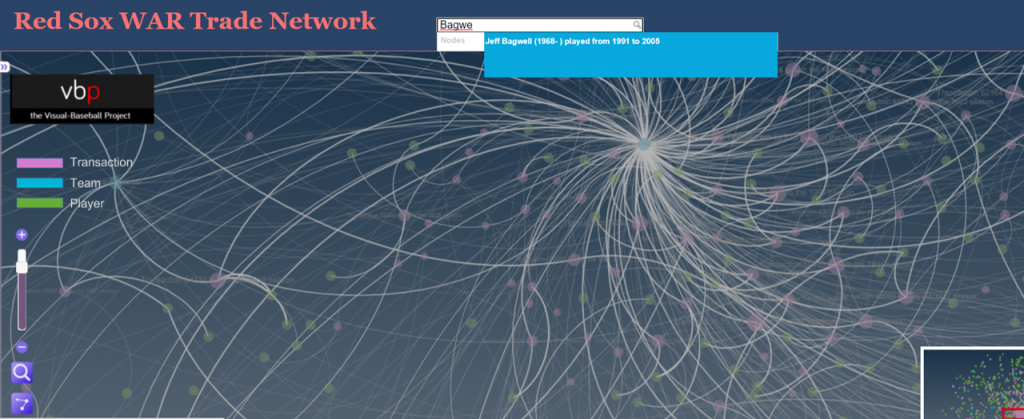
Finding a bad trade by scanning the networks is more an art than a science; the key is to look for large nodes (indicating a lot of future WAR value), and then dissecting the trade to see how much value each team received. The other alternative is if we already know the player(s) we are looking for; in these cases we can perform a simple search to find the trade. Here’s a classic example that Red Sox fans would love to forget – trading future Hall of Famer Jeff Bagwell for journeyman reliever Larry Anderson. Let’s go to the Red Sox trade network and search for Jeff Bagwell.

Red Sox trade network

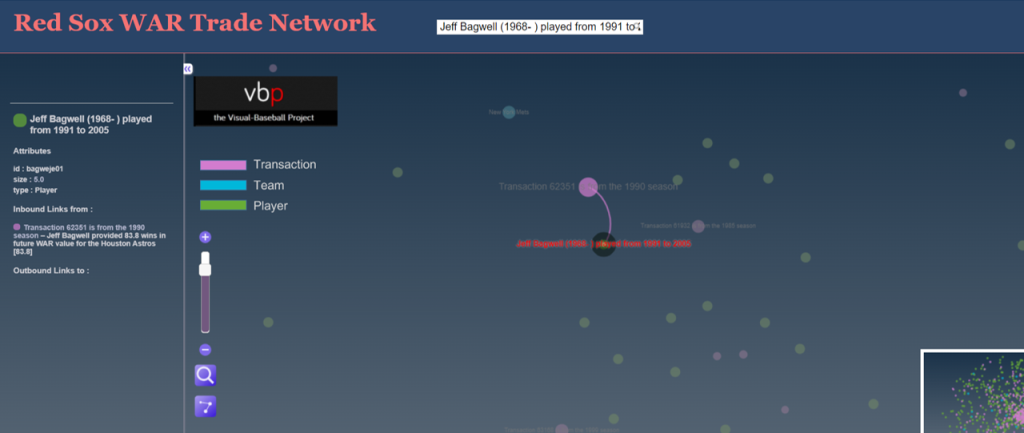
Typing in Jeff Bagwell locates him quickly within the trade network. Note that even if a player is involved in multiple trades to or from the same team (rare but possible) the search will locate each transaction. Here’s the Bagwell transaction, showing his player node and future WAR value connected to the transaction node; every player involved in that transaction will be connected to the trade node, as long as there is some future WAR value. If a player in the trade did not play in the majors for the receiving team, they will not be reflected in the graph. Here’s a view of Jeff Bagwell relative to the trade:

Jeff Bagwell transaction

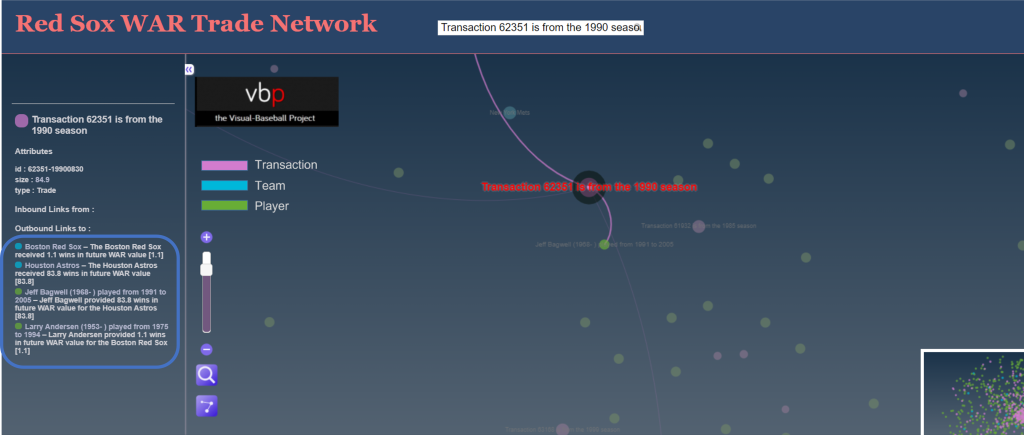
We can also click on the transaction node to see the value provided to each team by all of the players involved in the trade, again assuming they spent time with the team and were not limited to the minor leagues. Clicking on that node will display the respective WAR values in the sidebar on the left of the screen:

WAR values of the trade

Here’s where we get to the details of the trade, and specifically the direct benefits accrued to each team. The Red Sox received 1.1 future WAR from Larry Anderson; to put this in perspective, we might expect this sort of value for an average player for a single season. The Astros, on the other hand received an incredible 93.8 WAR from Jeff Bagwell, or close to 6 WAR per season for 16 years! That is a Hall of Fame level performance, and it eventually led to his selection to Cooperstown in 2017. Here’s a profile that mentions the one-sided trade.

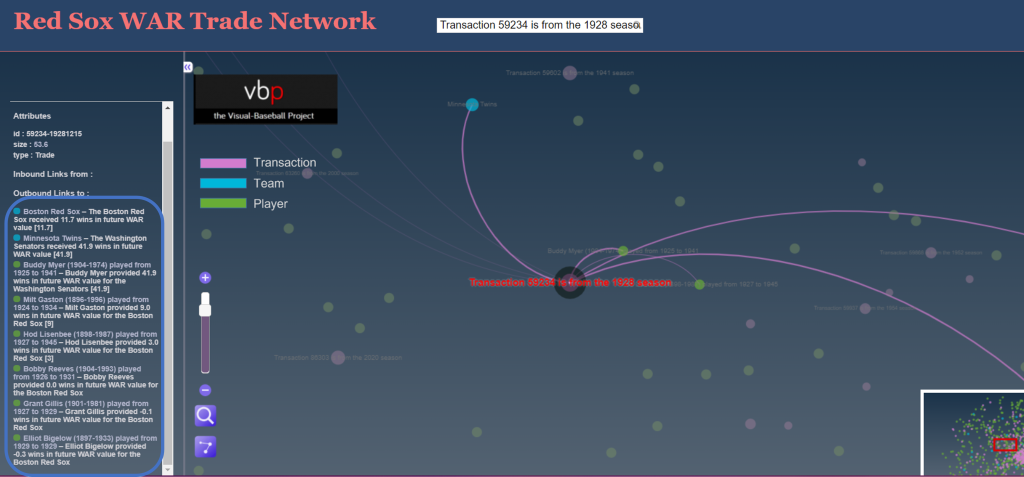
While we have the Red Sox network open, let’s see if there are any other disastrous transactions (other than the cash sale of Babe Ruth to the Yankees, technically not a trade). After scanning the network, we find this one from 1928:

Transaction 59324 – Buddy Myer

This one is clearly not a Bagwell-level disaster, but was still quite negative for the Red Sox, with a WAR differential of 30 points. The primary villain here is Buddy Myer, a solid infielder who hit .300 or better seven times for the Senators. Not a major star, but the owner of a very nice career, including leading the American League in batting average in 1935.

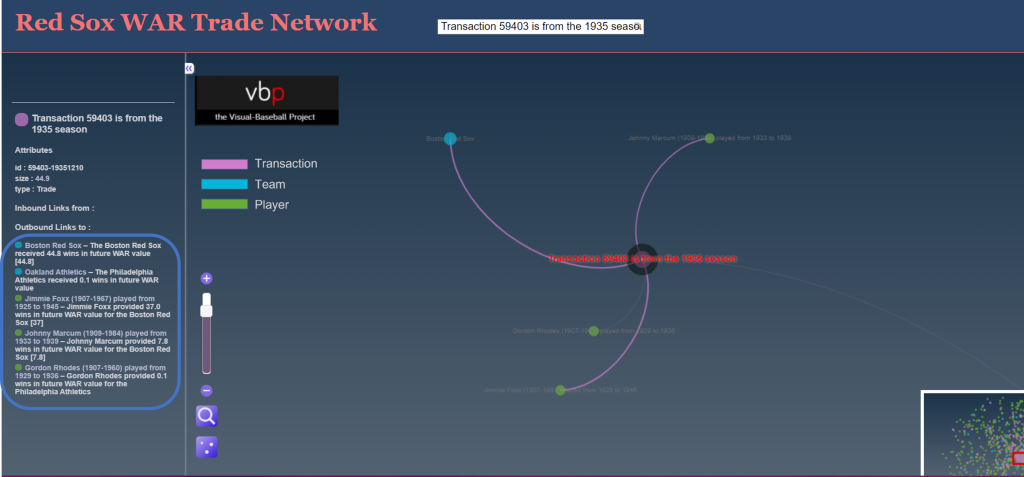
Let’s try to find one more before closing this piece, this time favoring the Red Sox. We zero in on this deal:

Transaction 59403 – Jimmie Foxx

The Red Sox netted nearly 45 future WAR value while surrendering just 0.1; most of the benefit was generated by slugging future Hall of Famer Jimmie Foxx, but they also received a nice three season contribution from pitcher Johnny Marcum. Note how we also removed nodes not involved in the trade by clicking on the edges icon on the bottom left of the display area; this makes it easier to focus on the details.

Feel free to try your hand at finding more of these one-sided deals in the Red Sox or any other trade networks. I’ll be back with some other teams before long. Thanks for reading!
Final WAR Trade Networks Published

The final 10 MLB WAR Trade Networks have now been published, bringing the total number of graphs to 31 – 30 teams and one overall network with all teams and transactions. For more information on the trade networks, click here. Here are the remaining networks:

Find your favorite teams and enjoy!

More WAR Trade Networks Published

I’ve added 11 new MLB WAR Trade Networks to the site, bringing us to 21 in all. One more round of updates should get us to the full complement of graphs. For more information on using the graphs, see here.

Here are the new adds:

All the networks can be found here. Enjoy!

First 10 WAR Trade Networks Published!

The first 10 WAR (Wins Above Replacement) Trade Networks are now available for exploring! This initial group includes nine team networks and one overall graph with all teams included. Here’s a list of the 10 graphs:

Each of these and any upcoming WAR trade networks can be found on this page.

Let’s walk through how the graphs work, using the Detroit Tigers network as an example. We’ll begin with an anatomy of the graph display:

As the image shows, the primary focus will be the main graph area in the center of the window. This is where all nodes (transactions, teams, and players) will reside, connected by edges based on common relationships. Transaction nodes will vary in size based on the total value of a trade with the largest nodes indicating a trade that created significant future WAR for one or both teams. Team and player nodes are set to constant sizes so that the initial visual focus will be on the transaction nodes. The size differences become more noticeable when we zoom in to the network. More on that shortly.

Edges are also sized based on WAR value; this is where we see the value provided to a team and by specific players. Edge sizes (weights) will be more easily seen when we zoom in to the network.

On the left are some graph controls to assist in navigating the graph. We can zoom in using the slider control or the plus/minus buttons adjacent to the slider. Zooming can also be done with a mouse scroll if you prefer that option. The fisheye lens can be toggled on or off and can be used to highlight certain areas of the graph by hovering over a selected region. Finally, the edges button will enable showing or hiding edges and connected nodes. This is useful when you wish to reduce surrounding nodes and focus on specific transactions. We can also pan the graph by dragging it using a mouse – this is helpful in centering a network or viewing specific regions of the graph.

At the upper left of the window is a color legend for each node type, and hidden on the left (not shown in our image) is an information pane that will show specifics about the network. More on that in a bit.

Now let’s examine the information window – this is what makes the network truly powerful. When the network is first displayed or the browser window is refreshed the information pane displays information about the graph (open it by clicking on the arrows icon at the top left):

You can see the simple overview of the graph, the source data, and what it aims to accomplish. Here’s an enlarged version for easier reading:

If we zoom in and select a specific transaction the pane displays the relevant details for that selection:

Now we have the details for the transaction – the season, teams, and players involved. Here’s the enlarged view:

You can do this for any transaction in a graph, or you could choose to select a team or player to see how they fit into the network. The possibilities are nearly endless and it’s a fun way to understand the relationships between teams, players, and trades.

We’ll do more exploring of the networks in upcoming posts; I’ll also be adding more teams until we have a complete set of trade networks. In the meantime, feel free to explore the graphs to learn more about the best (and worst) trades your favorite team has made over the last 120 years. Enjoy, and thanks for reading!

MLB Trade Networks Part 3: Edges Code

In our previous post I shared the SQL code I created to pull data for our upcoming set of trade networks based on WAR (Wins Above Replacement) numbers from the Neil Paine 538 MLB data set. The prior post dealt with creating nodes for a network graph; this post will share code for edge creation. In simple terms, a graph needs edges that connect related nodes; for our case we need to connect transaction (trade) nodes to the teams and players involved in each transaction.

Part of what makes this case interesting is my desire to show edge weights based on the future WAR value each team received. Showing edges with varying weights will quickly help users to identify the relative importance of a trade. Wider edges will indicate a trade that involved high future value for one or both teams. In seeing the individual players involved in a common trade we can pinpoint where the future value (or lack thereof) comes from. This will become much clearer when the graphs are posted; I’ll do one or more posts on how to use and interpret each graph.

For now let’s examine the code. Gephi requires users to identify Source nodes and Target nodes whether the edges are Undirected (i.e.- it doesn’t matter which node leads to the other) or Directed. Our initial code is for transactions to teams:

SELECT CONCAT(tr.TransactionID, ‘-‘, tr.PrimaryDate) AS Source, t.franchID AS Target, CONCAT(‘The ‘, t.name, ‘ received ‘, ROUND(SUM(h.WAR162),1),
‘ wins in future WAR value’) AS Label,
IF(ROUND(SUM(h.WAR162),1) = tr.season and tr.Type = ‘T’ AND tr.Season >= 1901 and LENGTH(tr.TeamTo) = 3 AND LENGTH(tr.TeamFrom) = 3
AND tr.Season = t.yearID
GROUP BY tr.TransactionID, tr.PrimaryDate, t.franchID, t.name;

With this code we are linking every transaction to the teams receiving one or more players in a trade. Note that we are summing the WAR value to create an edge weight based on the total value received by each team. If four players were involved (two to each team) these edge weights will reflect the combined values of these players. Note that we are setting edge weight = 1.0 if the future WAR is less than 1 (some will actually be negative so we need a minimal edge to show). Here’s a sample of results:

In contrast, the edges linking a transaction to individual players are based solely on that one player’s value. In the case cited above we will wind up with four lines of varying weights. Otherwise the code is quite similar:

SELECT CONCAT(tr.TransactionID, ‘-‘, tr.PrimaryDate) AS Source, p.playerID AS Target, CONCAT(p.nameFirst,’ ‘, p.nameLast, ‘ provided ‘, ROUND(SUM(h.WAR162),1),
‘ wins in future WAR value for the ‘, t.name) AS Label,
IF(ROUND(SUM(h.WAR162),1) = tr.season and tr.Type = ‘T’ AND tr.Season >= 1901 and LENGTH(tr.TeamTo) = 3 AND LENGTH(tr.TeamFrom) = 3
AND tr.Season = t.yearID AND t.franchID = h.franch_ID
GROUP BY tr.TransactionID, tr.PrimaryDate, p.nameFirst, p.nameLast, p.playerID, t.name;

The same logic on edge weights applies but now at the player level. Here are a few results:

I hope this makes sense – it will all become much more clear when the network graphs are produced. The good news is that I already have three graphs created and many more to come shortly. I’ll have some of them available on the site later this week. As always, thanks for reading.

Trade Network Updates, Part 2 (node code)

Over the last 10 days I’ve been playing around with code that will enable some new versions of the MLB trade networks I premiered way back in 2015. The goal this time around is to factor in the future value of a trade to each of the participating teams. There are multiple measures that could be used for this assessment but I’m going with the WAR162 value from Neil Paine’s 538 github data source. Here’s how the site describes the War162 measure: JEFFBAGWELL WAR per 162 team games. Now you may ask why Jeff Bagwell? While he was a talented hitter for many years, his name is used as an acronym for this:

“The file “jeffbagwell_war_historical.csv” contains wins above replacement (WAR) data — according to JEFFBAGWELL (the Joint Estimate Featuring FanGraphs and B-R Aggregated to Generate WAR, Equally Leveling Lists), which averages together WAR from Baseball-Reference.com and FanGraphs — plus various other metrics for MLB since 1901.” Fun stuff, right?

The bottom line from my perspective is that this measure provides a robust way of assessing the value of a trade based on performance after the trade date. Did one team benefit while another team received a player who added no future value? Or did both teams make out equally well? Or was the trade of minimal value for both sides? These are the questions I’m attempting to visually address using network analysis and visualization.

Now comes the technical aspect for all you database and code lovers. First step is to create the network nodes; in this case we need to display the individual trade transactions, teams, and players. Let’s look first at the transactions using the Visual-Baseball MySQL source data:

SELECT CONCAT(a.Id, ‘-‘, a.PrimaryDate) as Id, CONCAT(‘Transaction ‘,a.Id,’ is from the ‘, a.Season, ‘ season’) AS Label,
‘Trade’ AS Type, SUM(a.Size) AS Size
FROM
(SELECT tr.TransactionID AS Id, tr.Season, tr.PrimaryDate, ROUND(SUM(h.WAR162),1) as Size
FROM historical_WAR_and_more h
INNER JOIN People p
ON h.key_bbref = p.bbrefID
INNER JOIN trades2021 tr
ON p.retroID = tr.Player
INNER JOIN Teams t
ON tr.TeamTo = t.teamID

WHERE tr.Season >= 1901 and h.year_ID >= tr.season and tr.Type = ‘T’ and tr.TeamTo = t.teamID and LENGTH(tr.TeamFrom) = 3
AND tr.Season = t.yearID and t.franchID = h.franch_ID

GROUP BY tr.TransactionID, tr.season, tr.TeamFrom, tr.TeamTo, tr.PrimaryDate) a

GROUP BY a.Id, a.PrimaryDate, a.Season;

Here we are simply creating a node for each trade transaction, a label showing the teams involved and the trade date, and summing up the previously mentioned WAR162 to size the nodes. This will be an important part of the graph – trades that created large future values (for one or both teams) will be more prominent in the graph. Small value trades will be represented by very small nodes indicating their relative lack of importance. This one was a challenge, but finally got the code to deliver the expected results.

The next step is to create team nodes; in this case we’ll provide a constant size:

SELECT t.franchID AS Id, tf.franchName AS Label, 15 AS Size

FROM historical_WAR_and_more h
INNER JOIN People p
ON h.key_bbref = p.bbrefID
INNER JOIN trades2021 tr
ON p.retroID = tr.Player
INNER JOIN Teams t
ON tr.TeamFrom = t.teamID
INNER JOIN TeamsFranchises tf
ON t.franchID = tf.franchID

WHERE tr.season >= 1901 and h.year_ID >= tr.season and tr.Type = ‘T’ and h.team_ID = tr.TeamTo and LENGTH(tr.TeamFrom) = 3

GROUP BY t.franchID, tf.franchName;

By applying a constant node size of 15, each team will have a similar appearance in the graph which will not distract us from the trade values (some will be much larger than 15).

Our third and final node step is to provide information on all players involved in one or more trades:

SELECT Id, Label, ‘Player’ AS Type, 5 AS Size
FROM
(SELECT p.playerID AS Id,
CONCAT(h.player_name, ‘ (‘, p.birthYear,’-‘,p.deathYear,’)’,’ played from ‘,LEFT(p.debut,4),’ to ‘,LEFT(p.finalGame,4)) AS Label

FROM historical_WAR_and_more h
INNER JOIN People p
ON h.key_bbref = p.bbrefID
INNER JOIN trades2021 tr
ON p.retroID = tr.Player

WHERE tr.season >= 1901 and h.year_ID >= tr.season and tr.Type = ‘T’ and LENGTH(tr.TeamFrom) = 3
and LENGTH(tr.TeamTo) = 3
AND p.deathYear > 1900

GROUP BY h.player_name, p.playerID, p.birthYear, p.deathYear, p.debut, p.finalGame

UNION ALL

SELECT p.playerID AS Id,
CONCAT(h.player_name, ‘ (‘, p.birthYear,’-‘,’ )’,’ played from ‘,LEFT(p.debut,4),’ to ‘,LEFT(p.finalGame,4)) AS Label

FROM historical_WAR_and_more h
INNER JOIN People p
ON h.key_bbref = p.bbrefID
INNER JOIN trades2021 tr
ON p.retroID = tr.Player

WHERE tr.season >= 1901 and h.year_ID >= tr.season and tr.Type = ‘T’ and LENGTH(tr.TeamFrom) = 3
and LENGTH(tr.TeamTo) = 3
AND ISNULL(p.deathYear)

GROUP BY h.player_name, p.playerID, p.birthYear, p.deathYear, p.debut, p.finalGame) a
GROUP BY Id, Label;

Here we are running a UNION query so we can gather information about the players moving in each direction of a trade (from one team to another). We then combine that information and apply a fixed size of 5 since there are far more players than teams. We’ll have the ability in the finished networks to zoom in and see more about each player.

Each of these 3 outputs (trades, teams, and players) is combined into a single input file that will feed Gephi. We should wind up with between 10k and 20k nodes which we’ll be able to filter
and zoom on in the network graph. I have high hopes for this set of networks (there may be one for each team as well as a comprehensive one) as it should really help display the most important trades in MLB history.

That’s it for our node creation process; the next post will share how we create the edges that will connect trades to teams and teams to players. Thanks for reading!
Trade Network Updates, Part 1

A few years back (2016 o be specific) I created network graphs displaying the history of trades made for each MLB franchise, using transactions data from the wonderful Retrosheet project. These graphs presented more than a few challenges in how to present the data but I wound up with what I consider to be a very interesting set of results, which you can find here. I also created some posts on the process at that time, found here and here.

Here’s a snapshot within a graph:

Six seasons have elapsed since I created those graphs, so I thought it was beyond time to update them, but this time with a twist. Last fall I came across a great dataset that captures an array of advanced sabermetric statistics which I hope to use on a regular basis. These statistics can be used to assess a player’s true value relative to his peers each season. What if I could incorporate those into the trade network updates to show the post-trade value of each player to their new team? Ideally, this will help to show the value of each trade and which team wound up getting the better part of the deal.

Of course this would involve adding a degree of complexity to the MySQL code for pulling the data and shaping it for use in creating network graphs. However, the end result could be very revealing and worthwhile. Today I’m at the start of the process, tinkering with SQL code to extract the data in a proper format. Here’s an example:

SELECT h.player_name, p.playerID, tr.season, tr.TransactionID, tr.TeamFrom, tr.TeamTo, ROUND(SUM(h.WAR162),1) as WAR

FROM historical_WAR_and_more h
INNER JOIN People p
ON h.key_bbref = p.bbrefID
INNER JOIN trades2021 tr
ON p.retroID = tr.Player

WHERE tr.season >= 1901 and h.year_ID > tr.season and h.team_ID = tr.TeamTo AND tr.Type = ‘T’

GROUP BY h.player_name, p.playerID, tr.season, tr.TransactionID, tr.TeamFrom, tr.TeamTo

In this case, I’m looking at the cumulative WAR (Wins Above Replacement) for each traded player with their new team. This could be a single season total or the sum of many years in some cases. Here are some results:

We now have post-trade results (starting if the season following the trade) as measured by WAR for each traded player. We see one fairly substantial figure – the second Aaron Harang trade which netted 16.9 WAR points for his new team, the Cincinnati Reds (CIN in the results). Given that a single season WAR above 3 or 4 is considered substantial, it’s clear that his new team probably benefited from a few of those high-value seasons. What we can’t see yet is what they gave away in their half of the trade.

Fortunately, we can access this using the TransactionID field, which provides all the information for each party within the trade. But we’ll save that for another day as I figure out the next progression of the code. As always, thanks for reading!